
SmoothScroll Prompter
Script Reader for Creators
iPhone, iPad için tasarlandı
Ücretsiz · Uygulama içi satın alma
- Yaş sınırı4+
- KategoriFotoğraf ve Video
- GeliştiriciAlexandr Fadeev
- Dillerİngilizce
- Boyut14,1 MB
Resmi App Store sayfasına bağlanır
Download.org, SmoothScroll Prompter için hiçbir dosya barındırmaz. Düğme, uygulamanın App Store üzerindeki sayfasını açar; uygulamayı orada Alexandr Fadeev yayınlar. Sayfanın son kontrolü: 20.11.2026.
Ekran görüntüleri
Hakkında
Geliştirici bu metni dilinizde sunmamış.
Create professional videos with confidence using SmoothScroll Prompter — the ultimate script reader for content creators, YouTubers, and presenters.
SMOOTH SCROLLING
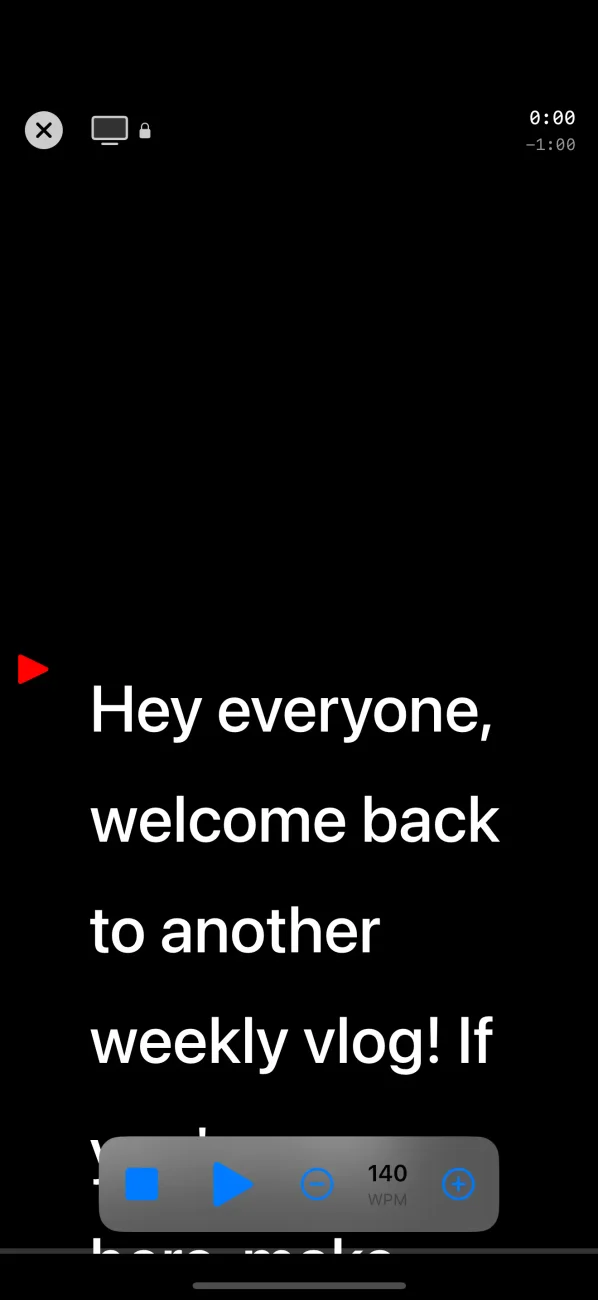
Read your scripts naturally with buttery-smooth 60fps scrolling. Adjust speed on the fly to match your speaking pace perfectly.
MIRROR MODE
Flip your text horizontally or vertically for professional teleprompter setups. Perfect for camera-mounted prompters and studio configurations.
ICLOUD SYNC — FREE
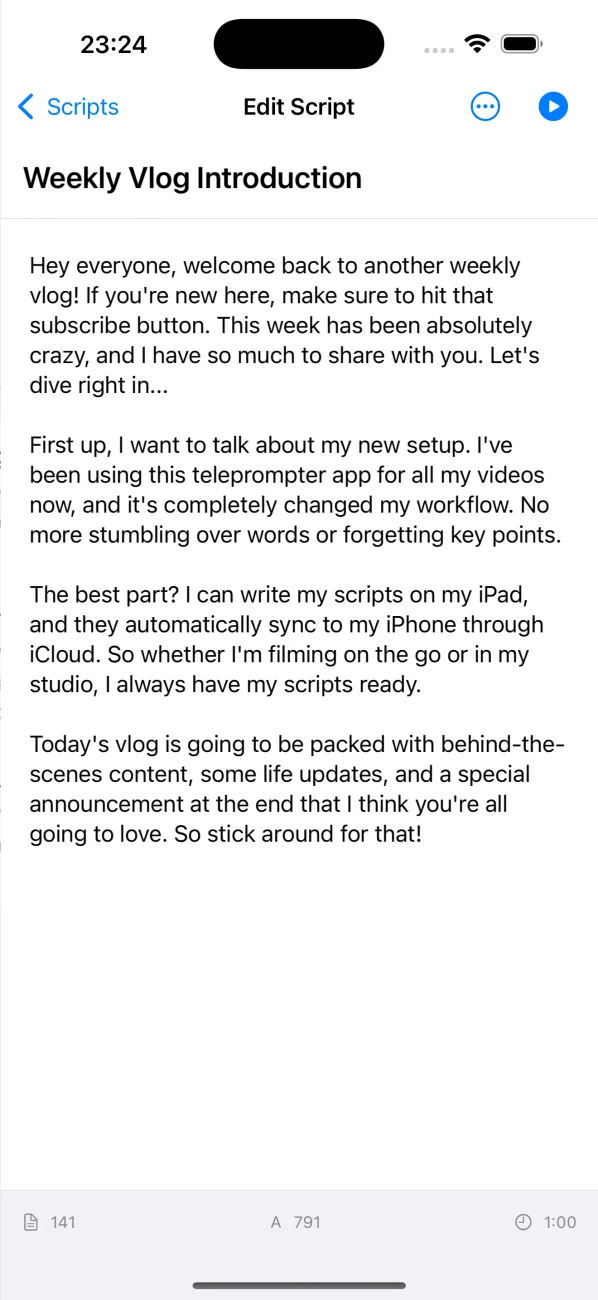
Access your scripts on all your Apple devices. Changes sync automatically so you're always ready to create. Unlike other teleprompters, we don't charge extra for sync.
BLUETOOTH KEYBOARD
Control playback remotely with any Bluetooth keyboard. Start, stop, and adjust speed without touching your device.
IMPORT YOUR SCRIPTS
Bring in scripts from TXT files instantly. Your existing content works seamlessly.
KEY FEATURES (ALL FREE):
• Variable speed control (WPM-based)
• Mirror mode (horizontal & vertical)
• Countdown timer before recording
• Cue indicator for marking your position
• Auto-save to never lose your work
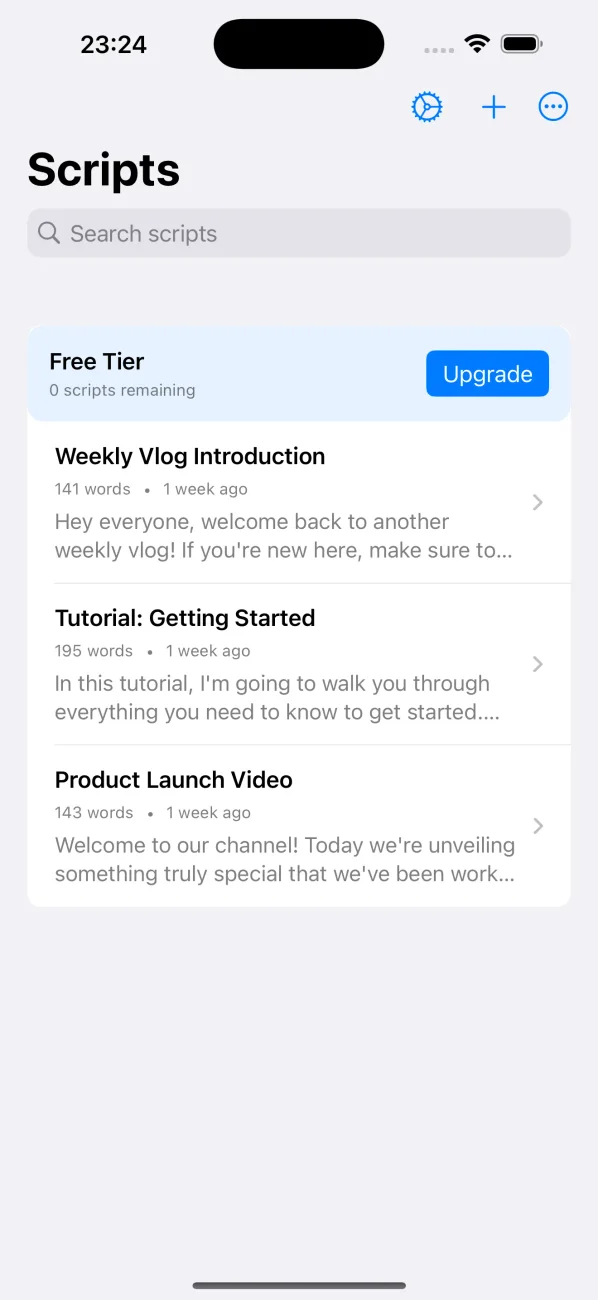
• Script library with up to 3 scripts
• Customizable fonts and colors
• Full screen presentation mode
• iCloud sync across all devices
UPGRADE TO PRO:
• Unlimited scripts
• Import Word documents (DOCX)
• Import PDF files
• Export scripts to PDF
PERFECT FOR:
• YouTube creators
• TikTok and Instagram content
• Podcasters and streamers
• Public speakers and presenters
• Video professionals
SmoothScroll Prompter helps you deliver your message with confidence. No more memorizing scripts or awkward glances away from the camera.
Download now and start creating professional content!
SUBSCRIPTION INFORMATION:
- Teleprompter Pro Monthly: a monthly subscription
- Teleprompter Pro Yearly: a yearly subscription
- Teleprompter Pro Lifetime: one payment, forever
Prices are shown in your own currency on the App Store and in the app before you buy.
Payment will be charged to your Apple ID account at confirmation of purchase. Subscriptions automatically renew unless canceled at least 24 hours before the end of the current period. Your account will be charged for renewal within 24 hours prior to the end of the current period. You can manage and cancel your subscriptions in your App Store account settings.
Privacy Policy: https://mazzilaaaa.github.io/smoothscroll-prompter-site/privacy
Terms of Use: https://mazzilaaaa.github.io/smoothscroll-prompter-site/terms
Yenilikler
Sürüm 1.5 · 14.09.2026
IF YOU PAY FOR PRO, PLEASE UPDATE
On a cold start, if your device could not reach the App Store, the app could quietly show you the free tier even though you were paying. Now your Pro status is checked on its own, never behind the price list, and the app remembers it from the last time you were online — so a lost connection no longer drops you to the free tier. If the store still cannot be reached, Settings says so and gives you a Retry button instead of saying nothing.
YOUR SCRIPTS ARE NOW CENTRED IN THE PROMPTER
Text runs down the middle of the screen, the way broadcast prompters do. This changes every script, including the ones you already have, and there is no setting to switch it back. Only the layout changes — not a word of your text.
THE READING LINE
A bright band marks the line you are speaking, with the text above and below it dimmed, so your eyes stop hunting for the place. Scripts you create from now on use it straight away. To turn it on for a script you already have: open the script, tap the pencil button in the prompter to edit it, then tap the menu at the top right and tap Script Settings. Make sure "Show Cue Indicator" is on — the Style list only appears when it is — and choose "Reading Line". The other cue styles are all still there.
MIRROR MODE IS REAL NOW, AND IT IS FREE
Mirror mode had no control anywhere in the app. It does now: open a script in the prompter and use the mirror button in the top bar to flip the text left-right, up-down, or both, for a camera-mounted prompter or a glass rig. It costs nothing.
ALSO FIXED
• "Export as PDF" in the editor is a Pro feature, but showed no lock, so you only found out after tapping. It now carries a lock.
• "Manage Subscription" now always opens something — your subscription sheet, or Apple's own subscriptions page if the sheet cannot open.
Uygulama gizliliği
Bu uygulamanın verileri nasıl işlediği hakkında Alexandr Fadeev tarafından App Store üzerinde yapılan beyan.
-
Sizinle ilişkilendirilmeyen veriler
Toplanabilir ancak kimliğinizle ilişkilendirilmez.
- Satın alımlar
- Kullanım verileri
- Tanılama
Gizlilik uygulamaları, örneğin kullandığınız özelliklere veya yaşınıza göre değişiklik gösterebilir.
Bilgiler
- Satıcı
- Alexandr Fadeev
- Kategori
- Fotoğraf ve Video
- Sürüm
- 1.5
- Güncellendi
- 14.09.2026
- Yayın tarihi
- 15.01.2026
- Boyut
- 14,1 MB
- Gereksinim
- iOS 17.0 veya sonrası
- Yaş sınırı
- 4+
- Fiyat
- Ücretsiz
- Uygulama içi satın alma
- Evet
- Diller
- İngilizce
- Telif hakkı
- © 2026 Aleksandr Fadeev
Bunları da beğenebilirsiniz
-
 Teleprompter Pro for CreatorsFotoğraf ve Video
-
 Teleprompter 4 CreatorsFotoğraf ve Video
-
 Teleprompter - Videos PrompterFotoğraf ve Video
-
 CueUp - Video TeleprompterFotoğraf ve Video
-
 Prompter - Teleprompter KameraVideo için Metin Okuyucu
-
 Telemo: Video TeleprompterFotoğraf ve Video
-
 Chroma GridFotoğraf ve Video
-
 Ever Face - see how you changeFotoğraf ve Video
-
 Cue: Teleprompter for CreatorsFotoğraf ve Video
-
 Teleprompter Çevrimdışı&GizliSesli kaydırma & AI metin