
SmoothScroll Prompter
Script Reader for Creators
Được thiết kế cho iPhone, iPad
Miễn phí · Mua hàng trong ứng dụng
- Độ tuổi4+
- Danh mụcẢnh & Video
- Nhà phát triểnAlexandr Fadeev
- Ngôn ngữTiếng Anh
- Kích thước14,1 MB
Liên kết đến trang App Store chính thức
Download.org không lưu trữ tệp nào của SmoothScroll Prompter. Nút này mở trang ứng dụng trên App Store, nơi Alexandr Fadeev phát hành ứng dụng. Trang được kiểm tra lần cuối: 20/11/2026.
Ảnh chụp màn hình
Giới thiệu
Nhà phát triển chưa cung cấp nội dung này bằng ngôn ngữ của bạn.
Create professional videos with confidence using SmoothScroll Prompter — the ultimate script reader for content creators, YouTubers, and presenters.
SMOOTH SCROLLING
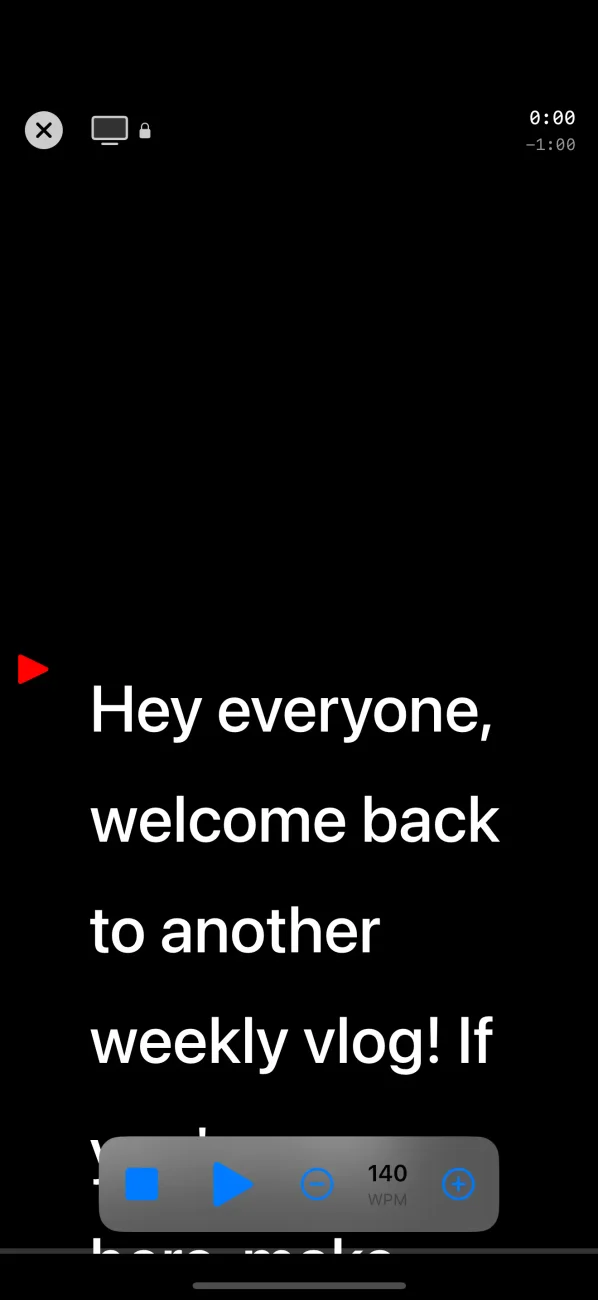
Read your scripts naturally with buttery-smooth 60fps scrolling. Adjust speed on the fly to match your speaking pace perfectly.
MIRROR MODE
Flip your text horizontally or vertically for professional teleprompter setups. Perfect for camera-mounted prompters and studio configurations.
ICLOUD SYNC — FREE
Access your scripts on all your Apple devices. Changes sync automatically so you're always ready to create. Unlike other teleprompters, we don't charge extra for sync.
BLUETOOTH KEYBOARD
Control playback remotely with any Bluetooth keyboard. Start, stop, and adjust speed without touching your device.
IMPORT YOUR SCRIPTS
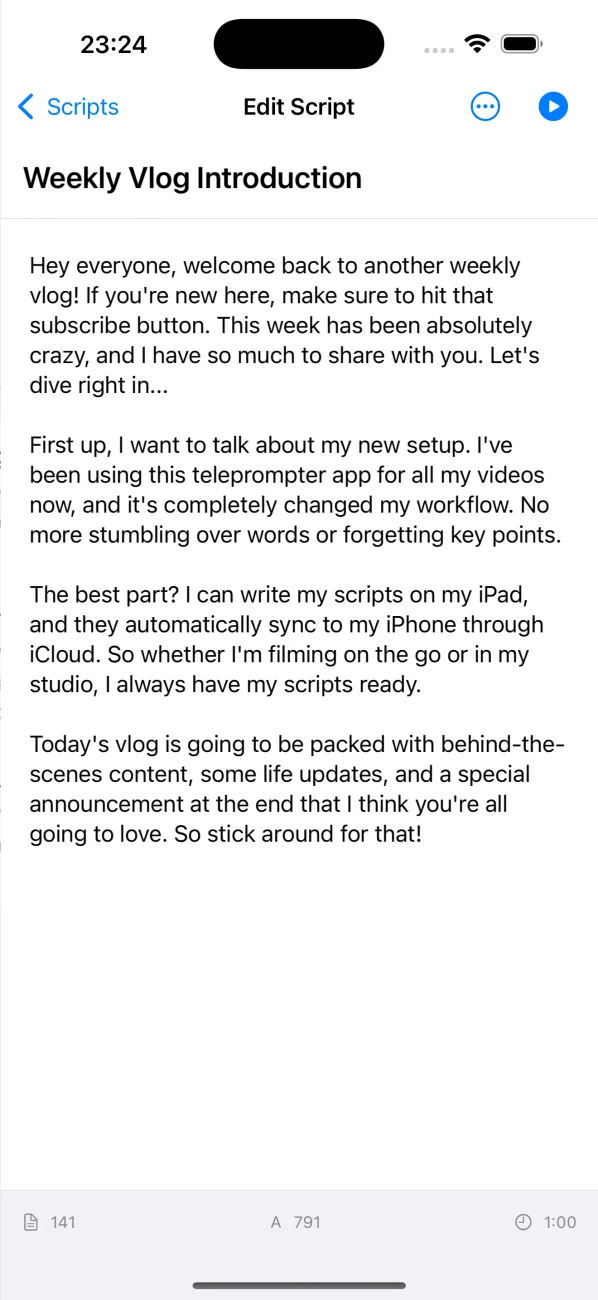
Bring in scripts from TXT files instantly. Your existing content works seamlessly.
KEY FEATURES (ALL FREE):
• Variable speed control (WPM-based)
• Mirror mode (horizontal & vertical)
• Countdown timer before recording
• Cue indicator for marking your position
• Auto-save to never lose your work
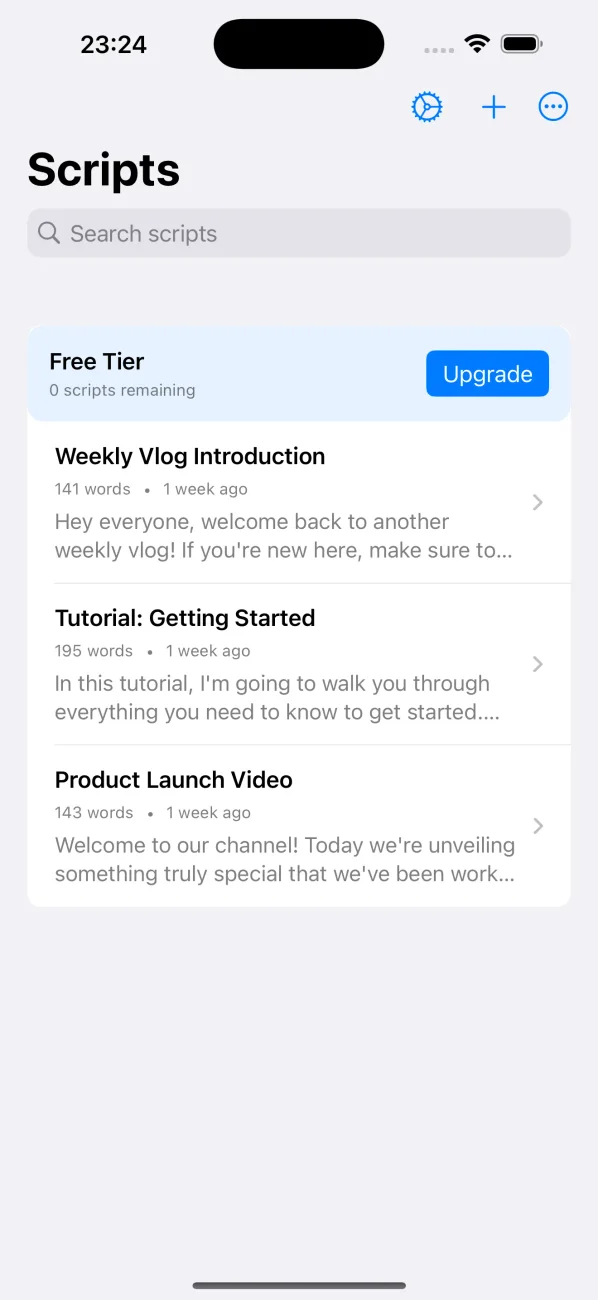
• Script library with up to 3 scripts
• Customizable fonts and colors
• Full screen presentation mode
• iCloud sync across all devices
UPGRADE TO PRO:
• Unlimited scripts
• Import Word documents (DOCX)
• Import PDF files
• Export scripts to PDF
PERFECT FOR:
• YouTube creators
• TikTok and Instagram content
• Podcasters and streamers
• Public speakers and presenters
• Video professionals
SmoothScroll Prompter helps you deliver your message with confidence. No more memorizing scripts or awkward glances away from the camera.
Download now and start creating professional content!
SUBSCRIPTION INFORMATION:
- Teleprompter Pro Monthly: a monthly subscription
- Teleprompter Pro Yearly: a yearly subscription
- Teleprompter Pro Lifetime: one payment, forever
Prices are shown in your own currency on the App Store and in the app before you buy.
Payment will be charged to your Apple ID account at confirmation of purchase. Subscriptions automatically renew unless canceled at least 24 hours before the end of the current period. Your account will be charged for renewal within 24 hours prior to the end of the current period. You can manage and cancel your subscriptions in your App Store account settings.
Privacy Policy: https://mazzilaaaa.github.io/smoothscroll-prompter-site/privacy
Terms of Use: https://mazzilaaaa.github.io/smoothscroll-prompter-site/terms
Có gì mới
Phiên bản 1.5 · 14/09/2026
IF YOU PAY FOR PRO, PLEASE UPDATE
On a cold start, if your device could not reach the App Store, the app could quietly show you the free tier even though you were paying. Now your Pro status is checked on its own, never behind the price list, and the app remembers it from the last time you were online — so a lost connection no longer drops you to the free tier. If the store still cannot be reached, Settings says so and gives you a Retry button instead of saying nothing.
YOUR SCRIPTS ARE NOW CENTRED IN THE PROMPTER
Text runs down the middle of the screen, the way broadcast prompters do. This changes every script, including the ones you already have, and there is no setting to switch it back. Only the layout changes — not a word of your text.
THE READING LINE
A bright band marks the line you are speaking, with the text above and below it dimmed, so your eyes stop hunting for the place. Scripts you create from now on use it straight away. To turn it on for a script you already have: open the script, tap the pencil button in the prompter to edit it, then tap the menu at the top right and tap Script Settings. Make sure "Show Cue Indicator" is on — the Style list only appears when it is — and choose "Reading Line". The other cue styles are all still there.
MIRROR MODE IS REAL NOW, AND IT IS FREE
Mirror mode had no control anywhere in the app. It does now: open a script in the prompter and use the mirror button in the top bar to flip the text left-right, up-down, or both, for a camera-mounted prompter or a glass rig. It costs nothing.
ALSO FIXED
• "Export as PDF" in the editor is a Pro feature, but showed no lock, so you only found out after tapping. It now carries a lock.
• "Manage Subscription" now always opens something — your subscription sheet, or Apple's own subscriptions page if the sheet cannot open.
Quyền riêng tư của ứng dụng
Những gì Alexandr Fadeev khai báo trên App Store về cách ứng dụng này xử lý dữ liệu.
-
Dữ liệu không liên kết với bạn
Có thể được thu thập nhưng không liên kết với danh tính của bạn.
- Mục mua
- Dữ liệu sử dụng
- Chẩn đoán
Phương thức đảm bảo quyền riêng tư có thể khác nhau, chẳng hạn như tuỳ theo các tính năng bạn sử dụng hoặc độ tuổi của bạn.
Thông tin
- Người bán
- Alexandr Fadeev
- Danh mục
- Ảnh & Video
- Phiên bản
- 1.5
- Cập nhật
- 14/09/2026
- Phát hành
- 15/01/2026
- Kích thước
- 14,1 MB
- Yêu cầu
- iOS 17.0 trở lên
- Độ tuổi
- 4+
- Giá
- Miễn phí
- Mua hàng trong ứng dụng
- Có
- Ngôn ngữ
- Tiếng Anh
- Bản quyền
- © 2026 Aleksandr Fadeev
Có thể bạn cũng thích
-
 Teleprompter Pro for CreatorsẢnh & Video
-
 Teleprompter 4 CreatorsẢnh & Video
-
 Teleprompter - Videos PrompterẢnh & Video
-
 CueUp - Video TeleprompterẢnh & Video
-
 Prompter - Teleprompter VideoTrình đọc kịch bản cho video
-
 Telemo: Video TeleprompterẢnh & Video
-
 Chroma GridẢnh & Video
-
 Ever Face - see how you changeẢnh & Video
-
 Cue: Teleprompter for CreatorsẢnh & Video
-
 Teleprompter Offline&Riêng tưCuộn bằng giọng nói & AI