Visual Finder|Object Detector
Real-Time & On-Device
iPhone, iPad için tasarlandı
Ücretsiz · Uygulama içi satın alma
- Yaş sınırı4+
- KategoriYardımcılar
- Geliştiricikentaro hirahara
- Dillerİngilizce+ 12 dil daha
- Boyut49,8 MB
Resmi App Store sayfasına bağlanır
Download.org, Visual Finder|Object Detector için hiçbir dosya barındırmaz. Düğme, uygulamanın App Store üzerindeki sayfasını açar; uygulamayı orada kentaro hirahara yayınlar. Sayfanın son kontrolü: 16.11.2026.
Ekran görüntüleri
Hakkında
Geliştirici bu metni dilinizde sunmamış.
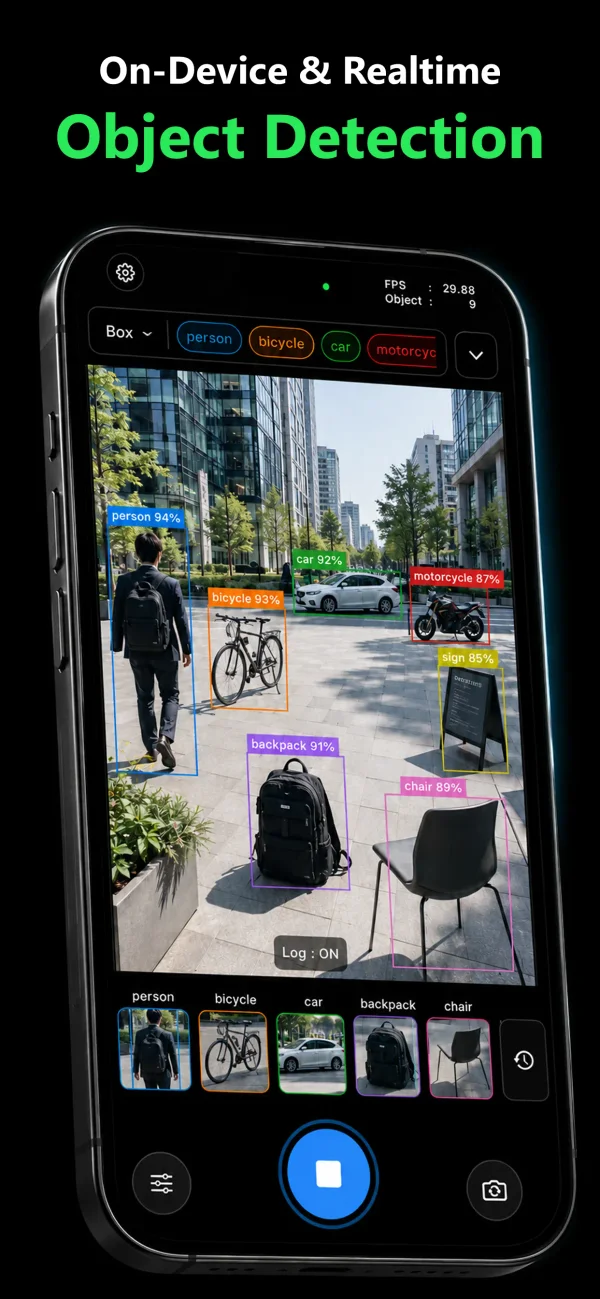
Visual Finder detects people and objects in your iPhone or iPad camera feed in real time, letting you review, track, and record results as they happen.
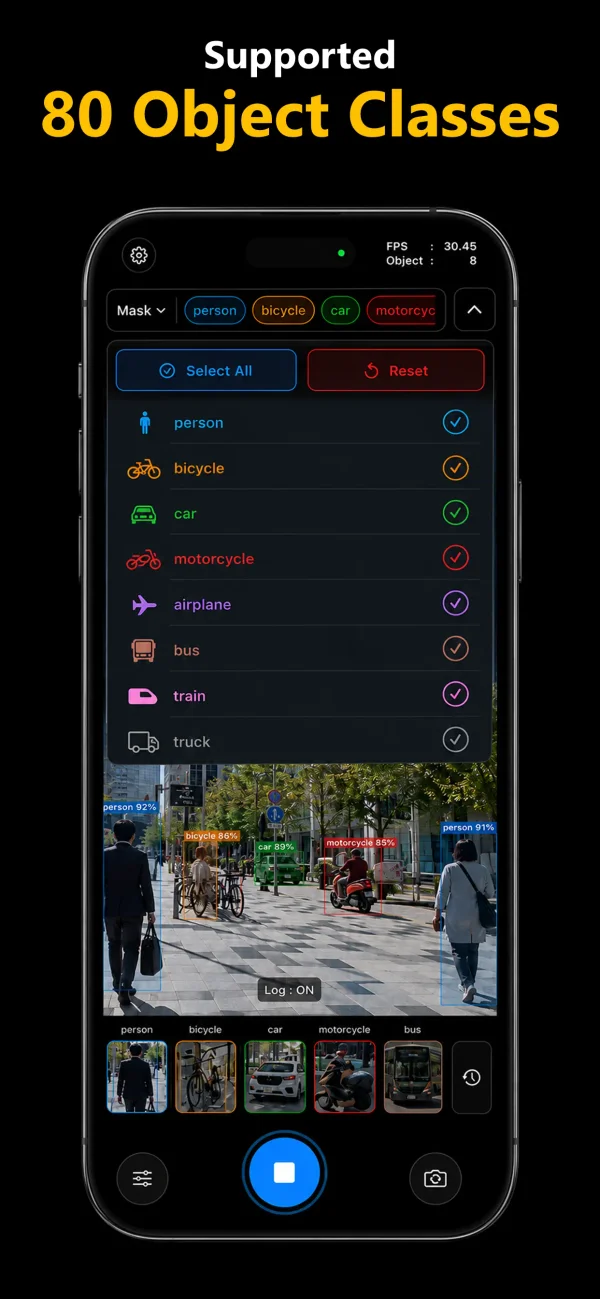
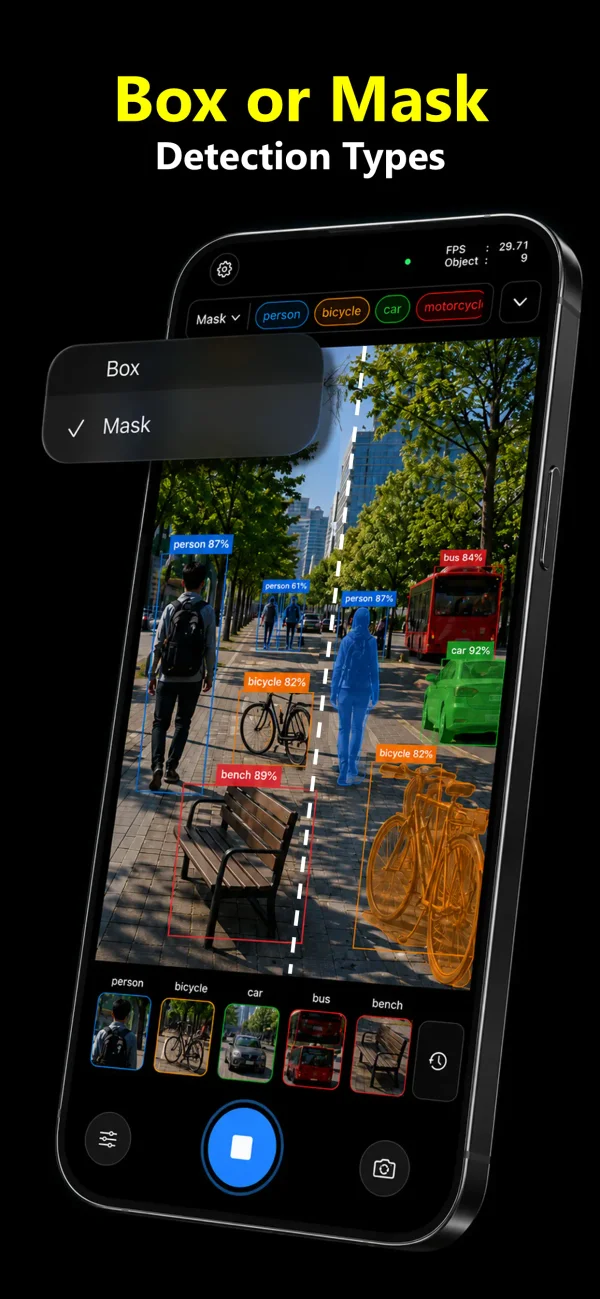
It supports 80 COCO-based categories, including people, vehicles, animals, and everyday items. Switch between Box, which marks objects with bounding boxes, and Mask, which highlights each object’s shape.
Track detected objects, revisit them as cropped images, review each session through statistics and charts, and export results as CSV. Detection runs with Core ML directly on your device.
——————————
■ Real-time object detection
Detect objects live through your camera. Choose only the categories you need or select all available categories.
Each result shows its location, category, and confidence. The screen also displays the current detection count and inference FPS.
——————————
■ Box and Mask display modes
Box surrounds each object with a bounding box for a clear view of its location and size.
Mask uses instance segmentation to show the region along the object’s shape, revealing contours and occupied areas that a rectangle alone cannot capture. Use both modes to compare the same scene from different perspectives.
——————————
■ Object tracking
Follow moving objects across camera frames. Each tracked object receives an ID, making it easy to distinguish multiple objects in the same category.
——————————
■ Cropped detection images
Recent detections appear as object crops at the bottom of the screen. Tap a crop for a larger view and save selected images to your photo library.
In Mask mode, crops follow the segmented shape. They can be saved as PNG files with everything outside the object made transparent. You can also adjust the history limit and haptic feedback for new crops.
——————————
■ Session summaries
Results from start to stop are grouped into one session. Logs include:
• Detection duration
• Processed frames and total detections
• Detected categories and counts by category
• Detected frames and appearance rate
• Average confidence and detection area
• Maximum detections per frame
• Average FPS
Charts show changes over time and each category’s share. Review not only what appeared, but how frequently it was detected.
——————————
■ CSV export
Export session logs in two formats: Summary, with overall and category statistics, and Data, with results for each frame.
Share files through the iOS or iPadOS share sheet for use with spreadsheets and analysis tools.
——————————
■ Adjustable detection settings
Fine-tune the maximum detection rate, confidence threshold, IoU threshold, minimum detection size, and Object Tracking.
Choose 1, 5, 10, 20 FPS, or Max. Actual inference speed depends on the device, model, scene, and device conditions.
——————————
■ Camera selection
Use available Wide, Ultra Wide, Telephoto, and Front cameras. Compatible external cameras exposed through AVCapture can also be selected.
Camera availability and behavior vary by device, OS, and connected camera.
——————————
■ On-device processing
Visual Finder uses Core ML. Camera frames are processed on your device and do not need to be sent to an external AI server for object detection.
——————————
■ Ideal for
Explore AI, object detection, instance segmentation, and tracking with a live camera. Compare Box and Mask results, save object crops, analyze sessions or CSV data, and use the app for research, development, learning, demos, or external-camera tests.
Some detection categories, Object Tracking, and ad removal require an in-app purchase.
Results vary with device performance, lighting, object size and orientation, motion, occlusion, and other conditions. This app is not intended for medical, safety management, identity verification, or other uses where false or missed detections could have serious consequences.
Terms of Use (Apple Standard EULA):
https://www.apple.com/legal/internet-services/itunes/dev/stdeula/
Yenilikler
Sürüm 1.2.1 · 11.11.2026
• Minor usability and stability fixes and improvements.
Uygulama gizliliği
Bu uygulamanın verileri nasıl işlediği hakkında kentaro hirahara tarafından App Store üzerinde yapılan beyan.
-
Sizi izlemek için kullanılan veriler
Başka şirketlere ait uygulamalarda ve web sitelerinde sizi izlemek için kullanılabilir.
- Konum
- Tanımlayıcılar
- Kullanım verileri
-
Sizinle ilişkilendirilen veriler
Toplanabilir ve kimliğinizle ilişkilendirilebilir.
- Konum
- Tanımlayıcılar
- Kullanım verileri
-
Sizinle ilişkilendirilmeyen veriler
Toplanabilir ancak kimliğinizle ilişkilendirilmez.
- Satın alımlar
- Tanılama
Gizlilik uygulamaları, örneğin kullandığınız özelliklere veya yaşınıza göre değişiklik gösterebilir.
Bilgiler
- Satıcı
- kentaro hirahara
- Kategori
- Yardımcılar
- Sürüm
- 1.2.1
- Güncellendi
- 11.11.2026
- Yayın tarihi
- 11.06.2026
- Boyut
- 49,8 MB
- Gereksinim
- iOS 18.0 veya sonrası
- Yaş sınırı
- 4+
- Fiyat
- Ücretsiz
- Uygulama içi satın alma
- Evet
- Diller
- İngilizce, Arapça, Fransızca, Almanca, İtalyanca, Japonca, Korece, Portekizce, Rusça, Basitleştirilmiş Çince, İspanyolca, Tayca + 1 dil daha
- Telif hakkı
- © 2026 Kentaro Hirahara
Bunları da beğenebilirsiniz
-
 RobotVision - Object DetectionYardımcılar
-
 Sense I: Who's NearYardımcılar
-
 Eye Spy AppYardımcılar
-
 MoFind- video hareketiKayıtlardaki hareketi bul
-
 VertexYardımcılar
-
 Antique ID: Value Scan ExpertAntika Değer & Damga Rehberi
-
 Find Lost Items: AI FinderYardımcılar
-
 FaceMonitorYardımcılar
-
 GateSpy2.0Yardımcılar
-
 Redact TapYardımcılar