Visual Finder|Object Detector
Real-Time & On-Device
Được thiết kế cho iPhone, iPad
Miễn phí · Mua hàng trong ứng dụng
- Độ tuổi4+
- Danh mụcTiện Ích
- Nhà phát triểnkentaro hirahara
- Ngôn ngữTiếng Anh+ 12 ngôn ngữ khác
- Kích thước49,8 MB
Liên kết đến trang App Store chính thức
Download.org không lưu trữ tệp nào của Visual Finder|Object Detector. Nút này mở trang ứng dụng trên App Store, nơi kentaro hirahara phát hành ứng dụng. Trang được kiểm tra lần cuối: 16/11/2026.
Ảnh chụp màn hình
Giới thiệu
Nhà phát triển chưa cung cấp nội dung này bằng ngôn ngữ của bạn.
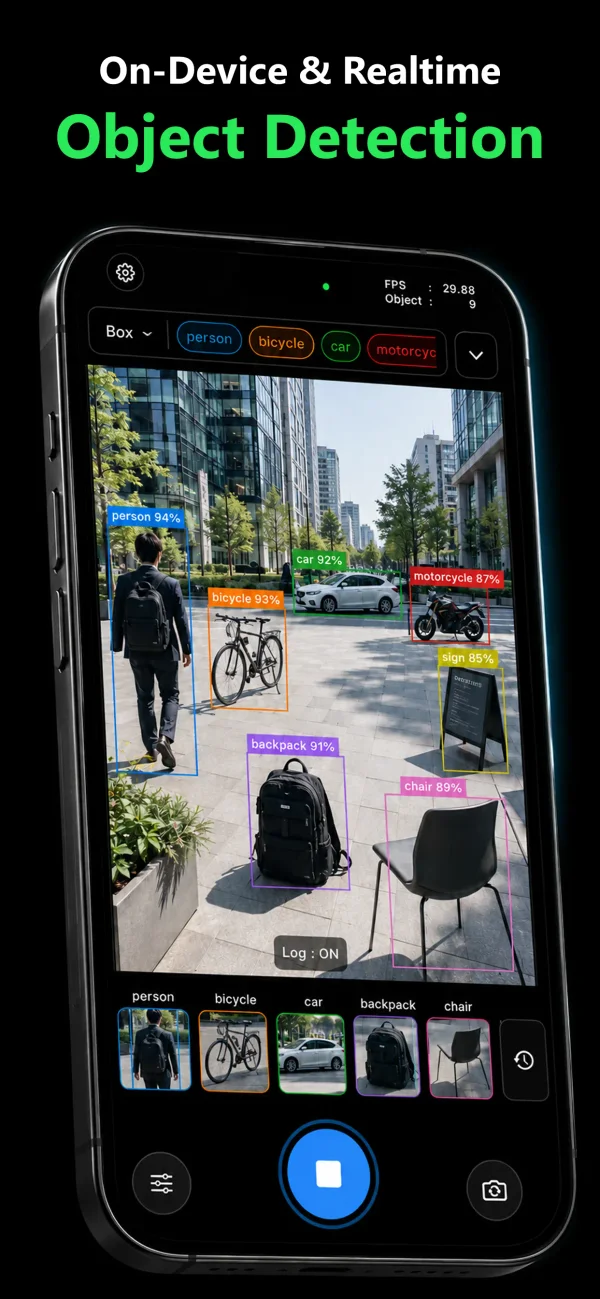
Visual Finder detects people and objects in your iPhone or iPad camera feed in real time, letting you review, track, and record results as they happen.
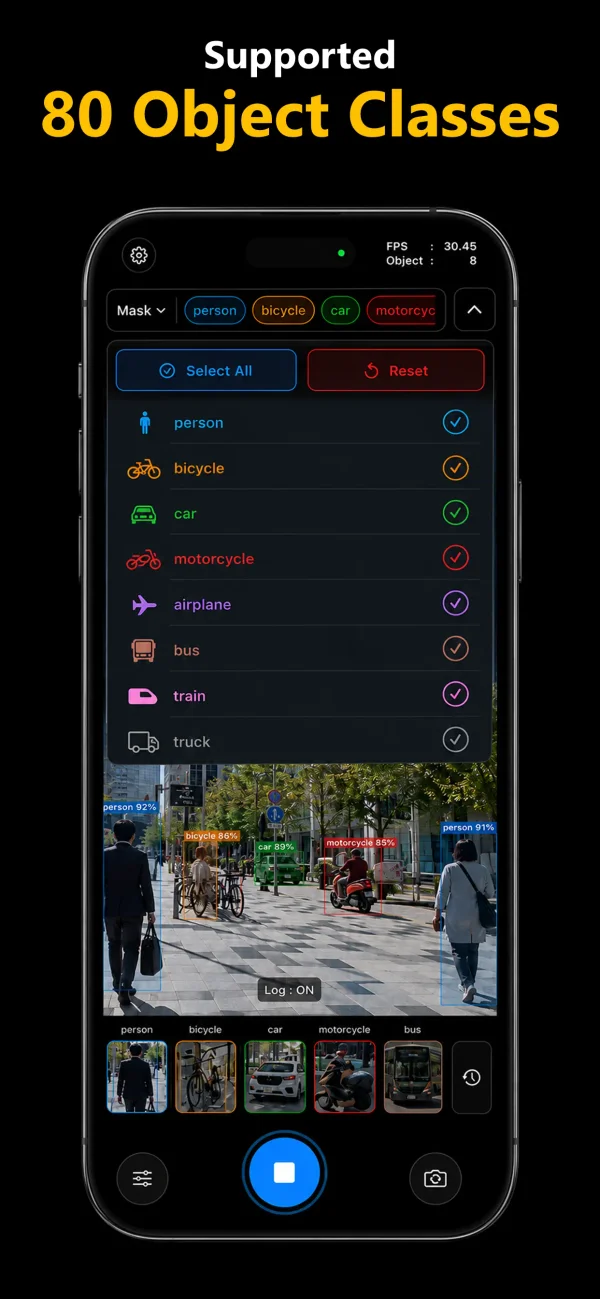
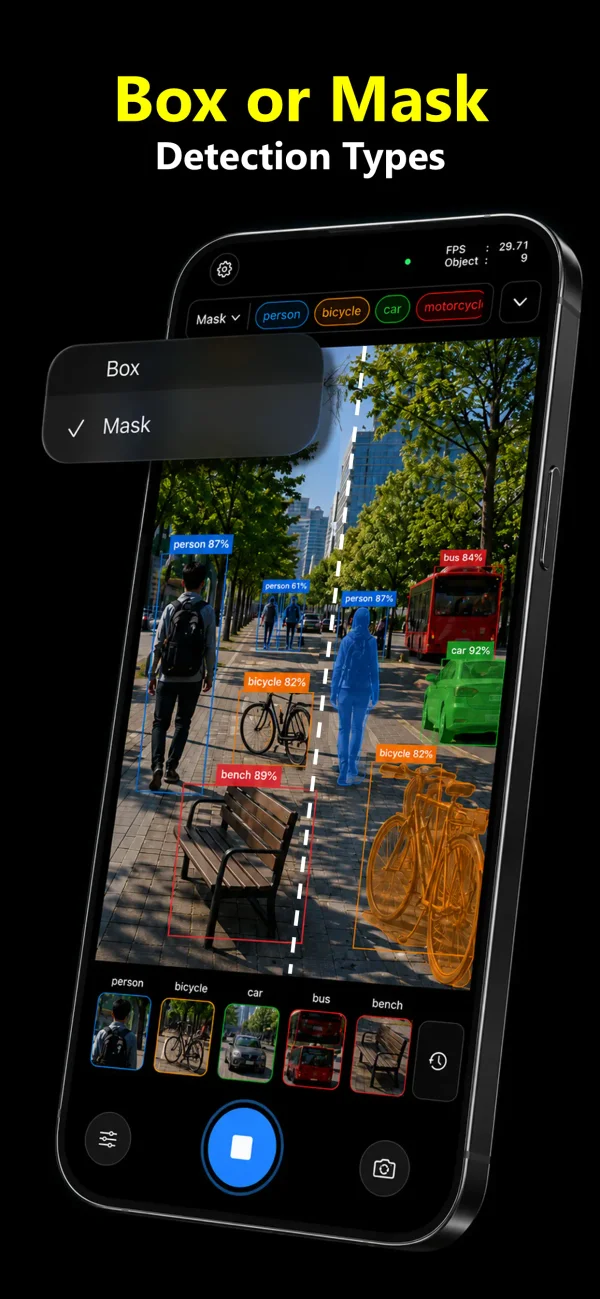
It supports 80 COCO-based categories, including people, vehicles, animals, and everyday items. Switch between Box, which marks objects with bounding boxes, and Mask, which highlights each object’s shape.
Track detected objects, revisit them as cropped images, review each session through statistics and charts, and export results as CSV. Detection runs with Core ML directly on your device.
——————————
■ Real-time object detection
Detect objects live through your camera. Choose only the categories you need or select all available categories.
Each result shows its location, category, and confidence. The screen also displays the current detection count and inference FPS.
——————————
■ Box and Mask display modes
Box surrounds each object with a bounding box for a clear view of its location and size.
Mask uses instance segmentation to show the region along the object’s shape, revealing contours and occupied areas that a rectangle alone cannot capture. Use both modes to compare the same scene from different perspectives.
——————————
■ Object tracking
Follow moving objects across camera frames. Each tracked object receives an ID, making it easy to distinguish multiple objects in the same category.
——————————
■ Cropped detection images
Recent detections appear as object crops at the bottom of the screen. Tap a crop for a larger view and save selected images to your photo library.
In Mask mode, crops follow the segmented shape. They can be saved as PNG files with everything outside the object made transparent. You can also adjust the history limit and haptic feedback for new crops.
——————————
■ Session summaries
Results from start to stop are grouped into one session. Logs include:
• Detection duration
• Processed frames and total detections
• Detected categories and counts by category
• Detected frames and appearance rate
• Average confidence and detection area
• Maximum detections per frame
• Average FPS
Charts show changes over time and each category’s share. Review not only what appeared, but how frequently it was detected.
——————————
■ CSV export
Export session logs in two formats: Summary, with overall and category statistics, and Data, with results for each frame.
Share files through the iOS or iPadOS share sheet for use with spreadsheets and analysis tools.
——————————
■ Adjustable detection settings
Fine-tune the maximum detection rate, confidence threshold, IoU threshold, minimum detection size, and Object Tracking.
Choose 1, 5, 10, 20 FPS, or Max. Actual inference speed depends on the device, model, scene, and device conditions.
——————————
■ Camera selection
Use available Wide, Ultra Wide, Telephoto, and Front cameras. Compatible external cameras exposed through AVCapture can also be selected.
Camera availability and behavior vary by device, OS, and connected camera.
——————————
■ On-device processing
Visual Finder uses Core ML. Camera frames are processed on your device and do not need to be sent to an external AI server for object detection.
——————————
■ Ideal for
Explore AI, object detection, instance segmentation, and tracking with a live camera. Compare Box and Mask results, save object crops, analyze sessions or CSV data, and use the app for research, development, learning, demos, or external-camera tests.
Some detection categories, Object Tracking, and ad removal require an in-app purchase.
Results vary with device performance, lighting, object size and orientation, motion, occlusion, and other conditions. This app is not intended for medical, safety management, identity verification, or other uses where false or missed detections could have serious consequences.
Terms of Use (Apple Standard EULA):
https://www.apple.com/legal/internet-services/itunes/dev/stdeula/
Có gì mới
Phiên bản 1.2.1 · 11/11/2026
• Minor usability and stability fixes and improvements.
Quyền riêng tư của ứng dụng
Những gì kentaro hirahara khai báo trên App Store về cách ứng dụng này xử lý dữ liệu.
-
Dữ liệu được sử dụng để theo dõi bạn
Có thể được sử dụng để theo dõi bạn trên các ứng dụng và trang web do công ty khác sở hữu.
- Vị trí
- Mã định danh
- Dữ liệu sử dụng
-
Dữ liệu liên kết với bạn
Có thể được thu thập và liên kết với danh tính của bạn.
- Vị trí
- Mã định danh
- Dữ liệu sử dụng
-
Dữ liệu không liên kết với bạn
Có thể được thu thập nhưng không liên kết với danh tính của bạn.
- Mục mua
- Chẩn đoán
Phương thức đảm bảo quyền riêng tư có thể khác nhau, chẳng hạn như tuỳ theo các tính năng bạn sử dụng hoặc độ tuổi của bạn.
Thông tin
- Người bán
- kentaro hirahara
- Danh mục
- Tiện Ích
- Phiên bản
- 1.2.1
- Cập nhật
- 11/11/2026
- Phát hành
- 11/06/2026
- Kích thước
- 49,8 MB
- Yêu cầu
- iOS 18.0 trở lên
- Độ tuổi
- 4+
- Giá
- Miễn phí
- Mua hàng trong ứng dụng
- Có
- Ngôn ngữ
- Tiếng Anh, Tiếng Ả Rập, Tiếng Pháp, Tiếng Đức, Tiếng Ý, Tiếng Nhật, Tiếng Hàn, Tiếng Bồ Đào Nha, Tiếng Nga, Tiếng Trung Giản thể, Tiếng Tây Ban Nha, Tiếng Thái + 1 ngôn ngữ khác
- Bản quyền
- © 2026 Kentaro Hirahara
Có thể bạn cũng thích
-
 RobotVision - Object DetectionTiện Ích
-
 Sense I: Who's NearTiện Ích
-
 Eye Spy AppTiện Ích
-
 MoFind- chuyển động videoTìm chuyển động trong video
-
 VertexTiện Ích
-
 Antique ID: Value Scan ExpertĐịnh Giá Cổ Vật & Dấu Triện
-
 Find Lost Items: AI FinderTiện Ích
-
 FaceMonitorTiện Ích
-
 GateSpy2.0Tiện Ích
-
 Redact TapTiện Ích