- Độ tuổi4+
- Danh mụcHiệu Suất
- Nhà phát triểnMiller-Lange LLC
- Ngôn ngữTiếng Anh
- Kích thước2,7 MB
Liên kết đến trang App Store chính thức
Download.org không lưu trữ tệp nào của ClipMesh. Nút này mở trang ứng dụng trên App Store, nơi Miller-Lange LLC phát hành ứng dụng. Trang được kiểm tra lần cuối: 13/11/2026.
Ảnh chụp màn hình

Giới thiệu
Nhà phát triển chưa cung cấp nội dung này bằng ngôn ngữ của bạn.
ClipMesh is a cross-platform clipboard sync tool that works entirely on your local network. Share clipboard text between iPhone, iPad, Mac, Windows, and desktop Linux — no cloud, no accounts, no servers in the data path.
KEY FEATURES
• End-to-end encryption — Every clipboard payload is encrypted with AES-256-GCM using a shared secret you set up once. Only devices that share the secret can decrypt the content.
• LAN-only — Clipboard data travels directly between devices on your local network. Nothing is routed through Miller-Lange LLC or any third party.
• Cross-platform — The same shared secret pairs your iPhone, iPad, Mac, Windows PC, and desktop Linux machines. Copy on any platform; paste on any platform.
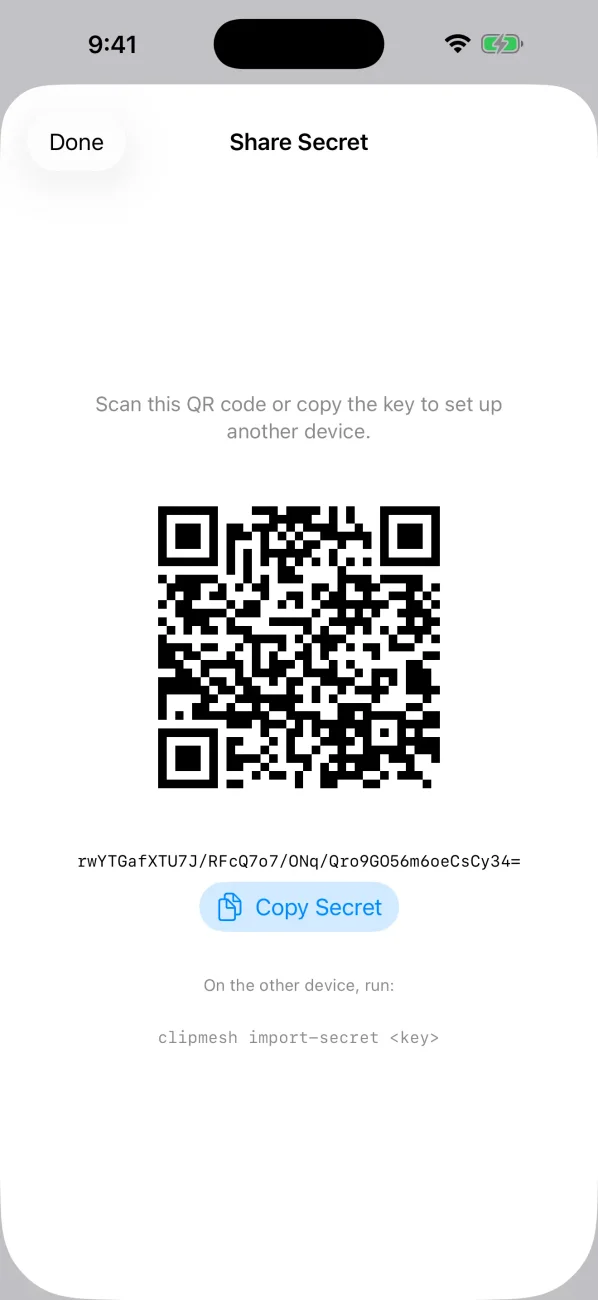
• QR code pairing — Scan the QR code from your desktop or another device to import the shared secret. No typing, no manual configuration.
• Free — This app is free. A separate ClipMesh desktop application for macOS, Windows, and desktop Linux is available at miller-lange.org.
HOW THE APP WORKS
ClipMesh has three tabs:
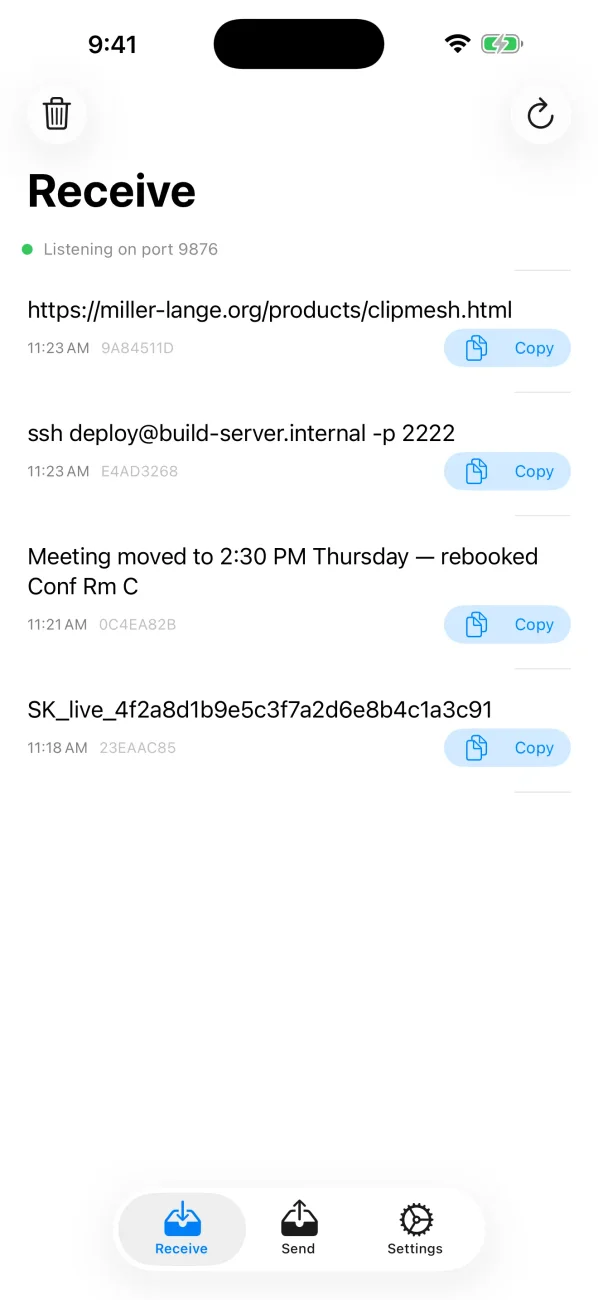
• Receive — Incoming clipboard items from other ClipMesh devices appear here as a list, newest first. Open an item to read and select its full text, or tap Copy to put the entire item into your device's system clipboard. Wider layouts show the list and selected item side by side.
• Send — Type text into the editor, or tap Paste to load the current contents of your system clipboard, then tap Send. The text is encrypted and broadcast to peer devices on your local network. This manual flow is intentional: iOS shows a privacy notification every time an app reads the clipboard automatically, so ClipMesh leaves the "what to send" decision in your hands.
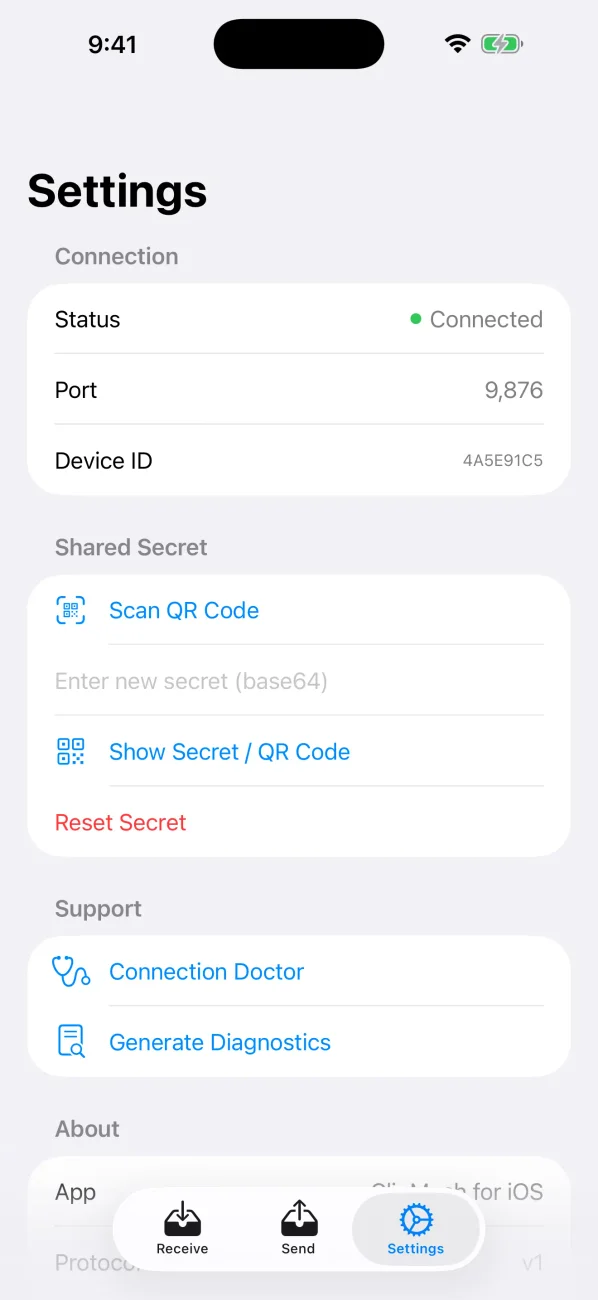
• Settings — Manage your shared secret (scan QR, show QR, reset), check the Connection Doctor if devices aren't pairing, and generate diagnostics for support requests.
MISSED A COPY?
ClipMesh broadcasts each clipboard payload once. If you open the app after another device has already sent something, the broadcast has already finished and the Receive list will be empty. Tap the refresh icon (clockwise arrow) in the top-right of the Receive tab to ask peer devices to resend their most recent clipboard payload — the content appears in the list within about a second.
FOREGROUND-ONLY SYNC
iOS restricts apps from running general LAN network listeners in the background. ClipMesh therefore syncs only while the app is open and on screen. If you want clipboard content from another device, open ClipMesh first; the refresh icon catches you up to whatever was copied while you were away.
The ClipMesh desktop apps (macOS, Windows, desktop Linux) run continuously in the background and don't have this restriction.
PRIVACY
ClipMesh collects no data on our behalf. Clipboard content is encrypted on-device and transmitted only to other devices on your local network that share the same secret. No clipboard data, usage data, telemetry, or crash reports are transmitted to Miller-Lange LLC at any time.
Privacy policy: https://miller-lange.org/privacy.html
REQUIREMENTS
• iOS 16 or later
• Connected to the same local network as at least one other device running ClipMesh (Wi-Fi or Ethernet, same subnet)
• Camera (for QR code pairing — manual base64 entry also supported)
SUPPORT
Email: info@miller-lange.org
Support: https://miller-lange.org/support/index.html
ClipMesh is a trademark of Miller-Lange LLC.
Có gì mới
Phiên bản 1.0.3 · 21/10/2026
Improved layouts for iPhone Duo, larger screens, and Split View.
• Open clipboard items to read and select their full text, with a side-by-side list and detail view when space allows.
• Keep long clipboard items readable at larger text sizes.
• Dismiss the Send keyboard with Done while keeping your draft, and scroll to the controls in compact layouts.
• More flexible setup and sharing screens, plus improved QR scanner cancellation.
Quyền riêng tư của ứng dụng
Những gì Miller-Lange LLC khai báo trên App Store về cách ứng dụng này xử lý dữ liệu.
-
Dữ liệu không được thu thập
Nhà phát triển không thu thập bất kỳ dữ liệu nào từ ứng dụng này.
Phương thức đảm bảo quyền riêng tư có thể khác nhau, chẳng hạn như tuỳ theo các tính năng bạn sử dụng hoặc độ tuổi của bạn.
Thông tin
- Người bán
- Miller-Lange LLC
- Danh mục
- Hiệu Suất
- Phiên bản
- 1.0.3
- Cập nhật
- 21/10/2026
- Phát hành
- 04/06/2026
- Kích thước
- 2,7 MB
- Yêu cầu
- iOS 16.0 trở lên
- Độ tuổi
- 4+
- Giá
- Miễn phí
- Ngôn ngữ
- Tiếng Anh
- Bản quyền
- © 2026 Miller-Lange LLC
Có thể bạn cũng thích
-
 bridge365Hiệu Suất
-
 MDDockHiệu Suất
-
 HabitMark - BattleHiệu Suất
-
 Uniclip - Universal ClipboardHiệu Suất
-
 Noteline - Markdown NotesHiệu Suất
-
 Dian Dian - Year TrackerHiệu Suất
-
 PopNotes: Diary & Widget MemoHiệu Suất
-
 Cross Paste: Truyền ảnhGửi tệp & đồng bộ clipboard
-
 List'm: Note, List, ShareHiệu Suất
-
 Notelane - Markdown EditorHiệu Suất