
ClipRing
Clipboard History, Everywhere
Được thiết kế cho iPhone, iPad, Mac
Miễn phí · Mua hàng trong ứng dụng
- Độ tuổi4+
- Danh mụcHiệu Suất
- Nhà phát triểnMicrodog Labs LLC
- Ngôn ngữTiếng Anh
- Kích thước3,5 MB
Liên kết đến trang App Store chính thức
Download.org không lưu trữ tệp nào của ClipRing. Nút này mở trang ứng dụng trên App Store, nơi Microdog Labs LLC phát hành ứng dụng. Trang được kiểm tra lần cuối: 15/11/2026.
Ảnh chụp màn hình


Giới thiệu
Nhà phát triển chưa cung cấp nội dung này bằng ngôn ngữ của bạn.
ClipRing is a clipboard history manager for iPhone, iPad, and Mac. Every time you copy text, ClipRing quietly saves it — so nothing you copy is ever lost again.
Free to download and use. Upgrade to ClipRing Pro with a single one-time purchase — no subscription, ever.
▼ NEW: QUICK-PASTE PALETTE (MAC)
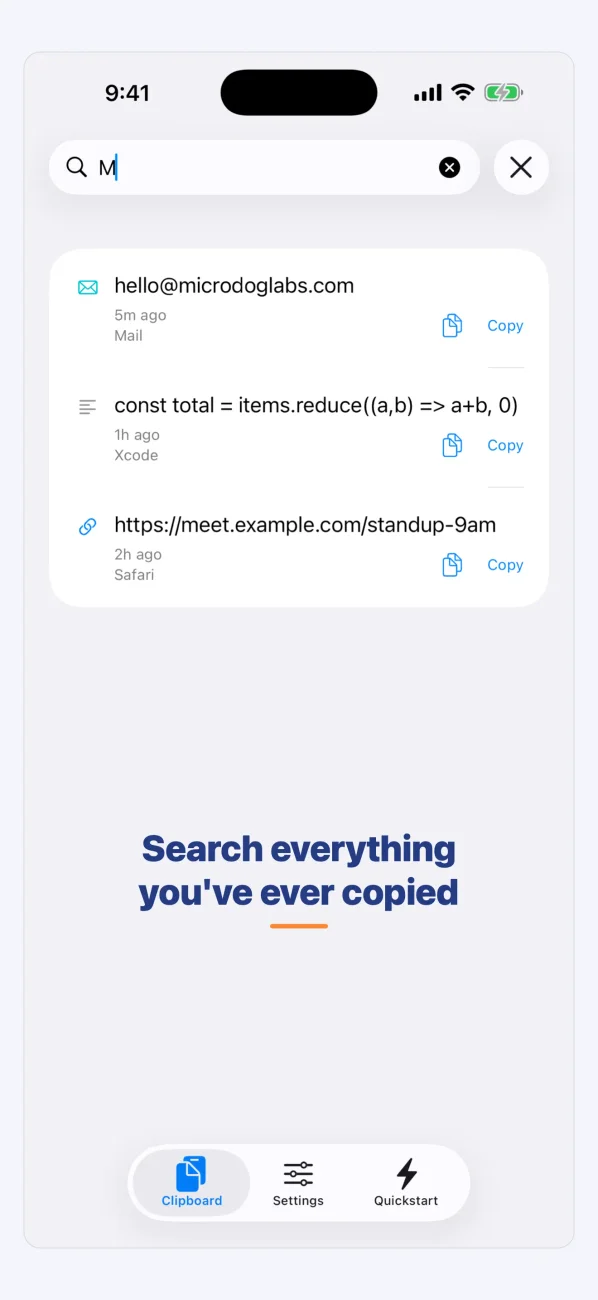
Press ⌥⌘V in any app and a Spotlight-style panel appears with your clipboard history. Type to search, press Return, and the clip pastes right into the app you were in. ⌘1–⌘9 paste a row instantly. It's the fastest way to get that thing you copied twenty minutes ago back under your cursor.
▼ NEW: ICLOUD SYNC (PRO)
Copy on your Mac, paste on your iPhone. Your clipboard history syncs privately through your own iCloud account — never through our servers. One ring, all your devices.
▼ CLIPRING KEYBOARD (IPHONE & IPAD)
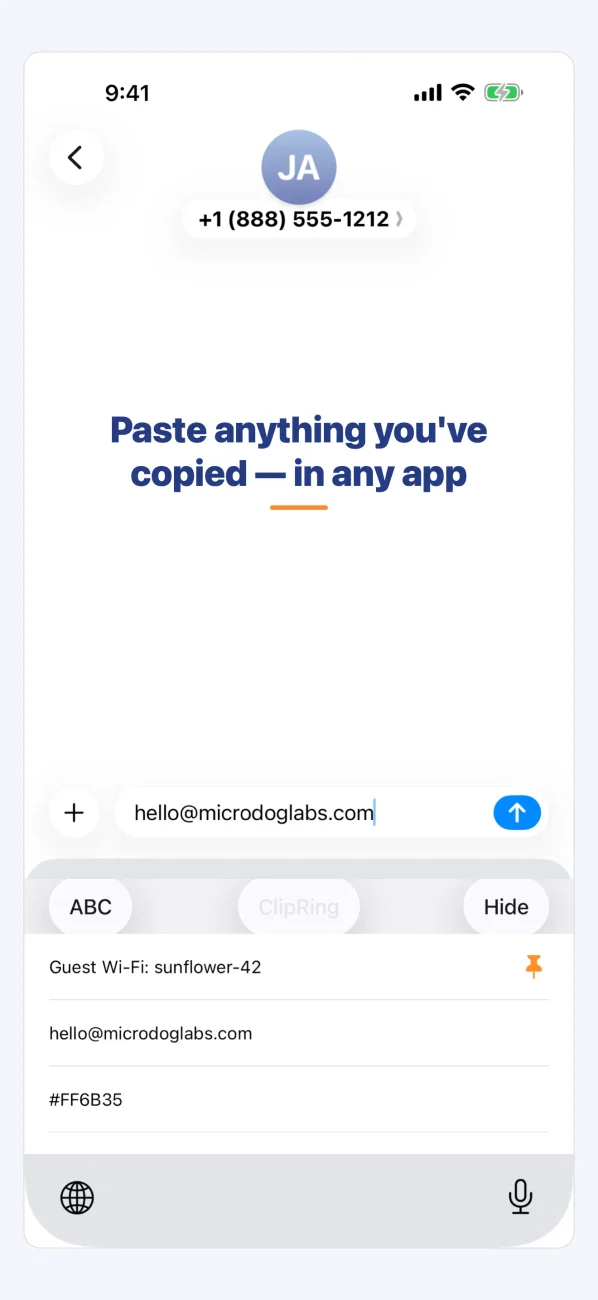
Switch to the ClipRing keyboard in any app to paste any item from your history. Tap to paste, swipe to delete. No app switching, no hunting for what you copied earlier.
▼ SAVE FROM ANYWHERE
Copy text on your Mac and it's captured automatically. On iPhone, just copy and open ClipRing — auto-save captures your clipboard the moment the app appears. Prefer other routes? The Share sheet, a one-tap import button, and Shortcuts actions (pair "Save Text to ClipRing" with Back Tap) are all there too.
▼ HOME SCREEN WIDGET (IPHONE & IPAD)
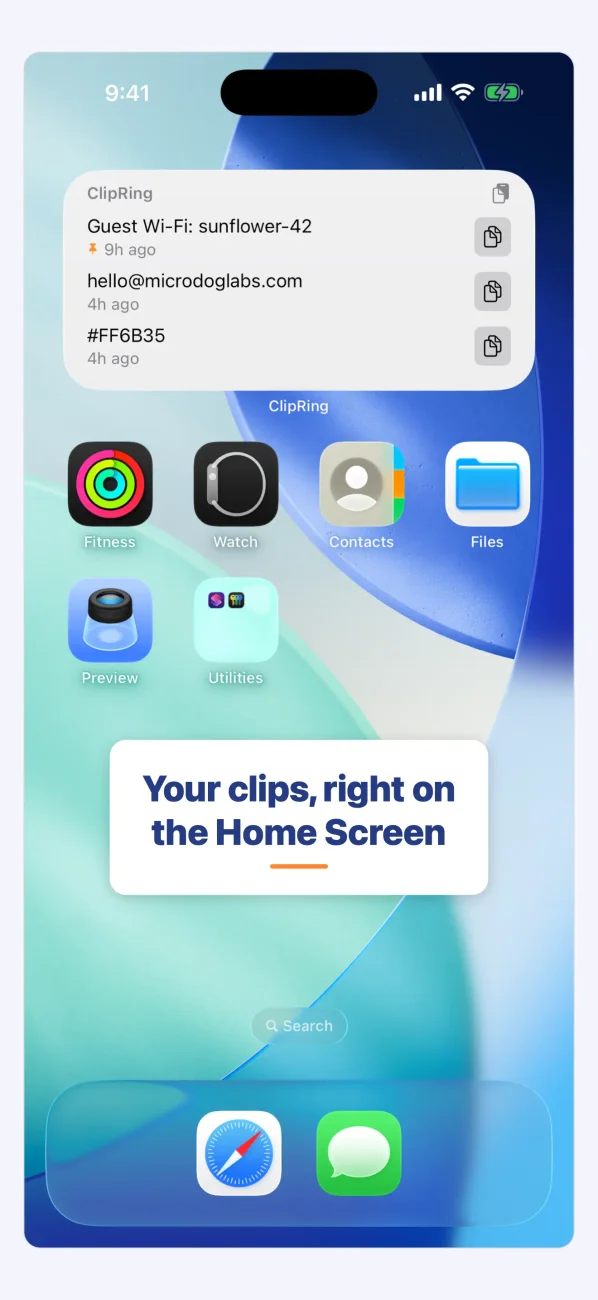
Put your recent clips on the Home Screen. Tap the copy button on any row and it's back on your clipboard — without even opening the app.
▼ MAC POWER FEATURES
• ⇧⌘V cycles through history in place — works even in terminal apps (iTerm2, Terminal, Warp, kitty and more)
• Pin favorites: pinned clips never expire and never get pushed out
• Launch at login, and an optional menu-bar-only mode (no Dock icon)
• Shortcuts support: read your latest clip, pick from recent clips, or save text from any automation — bind "Choose a Clip" to Back Tap or the Action button for instant paste access
▼ FULLY CONFIGURABLE
• Ring size up to 100 items (Pro), auto-expiration from 1 hour to 30 days, deduplication, max text length
▼ PRIVATE BY DESIGN
ClipRing works entirely on your device. Passwords copied from password managers are automatically excluded and never recorded. No analytics, no ads, no tracking — and sync, if you enable it, goes only through your personal iCloud account. Ever.
■ FREE VS PRO
• Free: full capture, quick-paste palette, keyboard, Share sheet, 10 most recent items, 1 pin.
• Pro (one-time purchase): ring size up to 100, unlimited pins, iCloud sync.
Bought ClipRing 1.x when it was a paid app? You get Pro automatically — thank you for the early support.
Có gì mới
Phiên bản 2.0 · 16/07/2026
ClipRing is now free to download!
• NEW Quick-Paste Palette (Mac): press ⌥⌘V anywhere, search your history, paste with Return
• NEW iCloud Sync (Pro): copy on your Mac, paste on your iPhone
• NEW ClipRing Pro one-time upgrade — no subscription. Bought 1.x? You're upgraded automatically.
• NEW Home Screen widget (iOS): recent clips at a glance, tap to copy
• Shortcuts support: "Get Latest Clip", "Save Text to ClipRing", and "Choose a Clip" actions — trigger them from Back Tap, Siri, or Spotlight
• Launch at login and menu-bar-only mode (Mac)
• Passwords from password managers are now automatically excluded
• Keyboard navigation in the menu-bar popover, monospaced code previews, one-tap clipboard import on iOS
Note: ClipRing 2.0 requires iOS 17 / macOS 14 or later. Devices on older OS versions keep ClipRing 1.0.
Quyền riêng tư của ứng dụng
Những gì Microdog Labs LLC khai báo trên App Store về cách ứng dụng này xử lý dữ liệu.
-
Dữ liệu không được thu thập
Nhà phát triển không thu thập bất kỳ dữ liệu nào từ ứng dụng này.
Phương thức đảm bảo quyền riêng tư có thể khác nhau, chẳng hạn như tuỳ theo các tính năng bạn sử dụng hoặc độ tuổi của bạn.
Thông tin
- Người bán
- Microdog Labs LLC
- Danh mục
- Hiệu Suất
- Phiên bản
- 2.0
- Cập nhật
- 16/07/2026
- Phát hành
- 15/06/2026
- Kích thước
- 3,5 MB
- Yêu cầu
- iOS 17.0 trở lên
- Độ tuổi
- 4+
- Giá
- Miễn phí
- Mua hàng trong ứng dụng
- Có
- Ngôn ngữ
- Tiếng Anh
- Bản quyền
- © 1.0
Có thể bạn cũng thích
-
 ClipperHubHiệu Suất
-
 Switchy - Bàn phím văn bảnTrả lời, email, tên một chạm
-
 MeshNotesHiệu Suất
-
 SmartMgmtHiệu Suất
-
 focus timer & tracker - foku.Hiệu Suất
-
 Shelver: Sắp xếp nhàTheo dõi đồ đạc
-
 LOCKD: Life Reset & Lock inHiệu Suất
-
 Sync: Kế hoạch vs Thực tếQuản lý thời gian, lịch trình
-
 Glance - Home Screen FeedsHiệu Suất
-
 PastePal - Clipboard AssistantHiệu Suất