
GUGA-Hyperboard
Notebook + Board + Card = GUGA
Được thiết kế cho iPhone, iPad, iPod touch
Miễn phí · Mua hàng trong ứng dụng
- Độ tuổi4+
- Danh mụcHiệu Suất
- Nhà phát triểnGutenbergGalaxy Technology Co.
- Ngôn ngữTiếng Anh+ 9 ngôn ngữ khác
- Kích thước705,3 MB
Liên kết đến trang App Store chính thức
Download.org không lưu trữ tệp nào của GUGA-Hyperboard. Nút này mở trang ứng dụng trên App Store, nơi GutenbergGalaxy Technology Co. phát hành ứng dụng. Trang được kiểm tra lần cuối: 19/11/2026.
Ảnh chụp màn hình
Giới thiệu
Nhà phát triển chưa cung cấp nội dung này bằng ngôn ngữ của bạn.
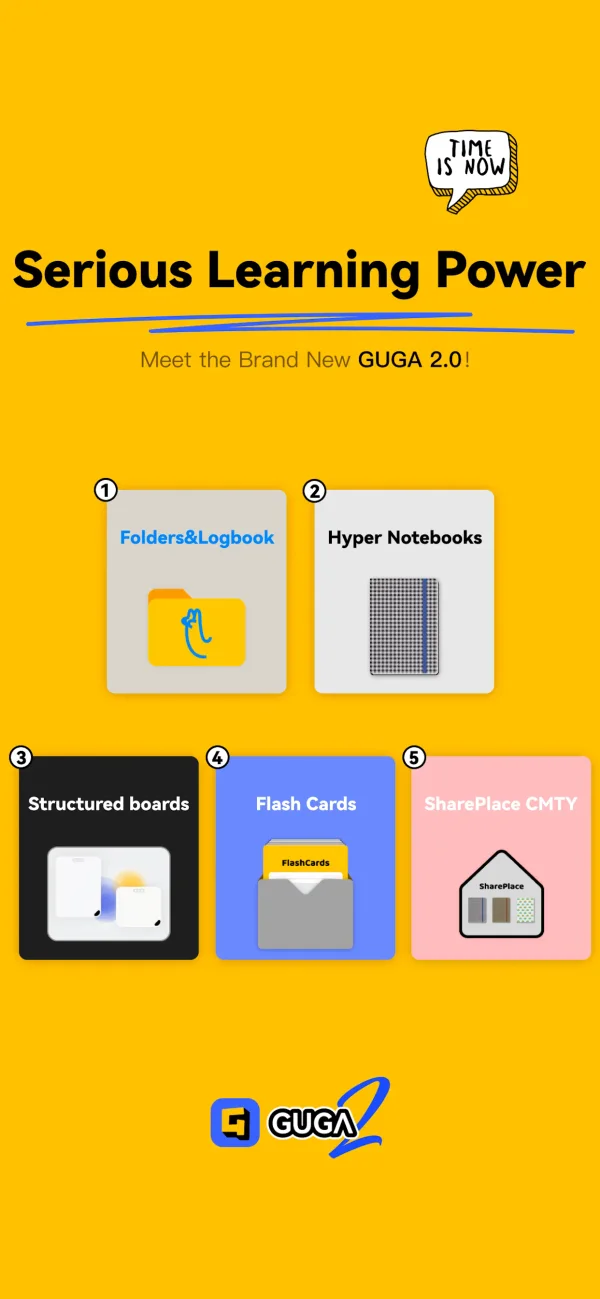
GUGA is a hyper learning tool that can meet your learning needs in different scenarios.
“Notebook”, “Whiteboard” and “Cards” are the three most important functions of GUGA.
In addition, GUGA also provides users with a community-SharePlace to share learning data; and provides a "Inspiration Shorthand" function to send data and record information across devices; and GUGA also provides a large number of shortcuts for you to use after connecting to the keyboard mouse.
The “Notebook” is the most common learning material and the most basic learning scenario. GUGA's notebook:
1. Not only other notebook software, but also support a variety of formats to be imported into notebooks, create new notebooks, add/reduce pages, provide more than 100 inner pages and cover templates, DIY outline catalogues, edit page jumps, import pictures/text, etc.
2. It also supports adding an unlimited number of handwriting layers to each page of the notebook, hiding/displaying/merging handwriting layers, which is convenient for brushing questions and other uses when learning.
And, 3. You can also long press to select the content on the notebook to mark/excerpt while writing and taking notes, and make cards for other uses based on the excerpt content.
The “Whiteboard” is a multi-data learning console and a richer learning scenario. GUGA's whiteboard:
1. Support the import of multiple notebooks and use them in one whiteboard at the same time. You can also add/import data in other formats to learn and use them together.
2. Provide a notebook floating window system, which makes it more convenient for you to use multiple notebooks and whiteboards at the same time. The notebook in the whiteboard can be presented in the form of a floating window. The floating window has a variety of states (maximizing/mini window/up and down left and right side windows), which can hide/close/display all floating windows with one click; support floating window memory, type again Open the whiteboard, and all floating windows that are not closed can continue to be used.
3 Provide the "multi-level" whiteboard function. The whiteboard can create a lower-layer whiteboard, or it can be connected with other whiteboards to form a link relationship, thus creating a relationship between learning scenes.
4 You can copy the selected content in the floating notebook to the whiteboard to form a card. The cards on the whiteboard can be freely combined and split, and the cards can also be connected to form a brain map; the jump relationship can be set between the cards.
5 The whiteboard can be divided by frame, and it can also be positioned with pins to make it easier to use and manage the whiteboard content.
In addition, 6 The entire whiteboard can be emitted as pdf, and the frame can also be emitted as a multi-page PDF, and the jump relationship between the frames will also be retained.
The card is the achievement of atomization learning, and the card package is the collection of your achievements. GUGA's card:
1. Excerpt cards in the notebook and cards on the whiteboard can be collected in the card package.
2. You can use the "Inspiration Catcher" function of the GUGA WeChat official account/browser's GUGA plug-in to transfer the information you want to save to any of your card package at any time.
3. Each card is a "blocked" rich text editor, which can be combined and split on the whiteboard, or any block can be set as an answer block in flash card mode.
4. Card packs can be converted between ordinary packs and flash card packs; the function of flash card packs is consistent with other flash card software (Anki).
5. Each flash card pack can choose different learning modes and different memory algorithms to help you better learn and review cards.
In addition, 6. The daily learning plan of flash cards will automatically appear in the GUGA log (My Logbook) on the right to learn flash card packages at any time.
Have Fun with GUGA 2.0, and Enjoy Your Serious Learning Power.
Có gì mới
Phiên bản 2.0.38 · 29/10/2025
Version 2.0.38 is compatible with the new iPadOS 26 system and optimizes several bugs.
The next major version will be the iPhone version.
Quyền riêng tư của ứng dụng
Những gì GutenbergGalaxy Technology Co. khai báo trên App Store về cách ứng dụng này xử lý dữ liệu.
-
Dữ liệu không liên kết với bạn
Có thể được thu thập nhưng không liên kết với danh tính của bạn.
- Mục mua
- Nội dung của người dùng
- Lịch sử tìm kiếm
- Lịch sử duyệt web
- Mã định danh
- Dữ liệu sử dụng
- Chẩn đoán
Phương thức đảm bảo quyền riêng tư có thể khác nhau, chẳng hạn như tuỳ theo các tính năng bạn sử dụng hoặc độ tuổi của bạn.
Thông tin
- Người bán
- GutenbergGalaxy Technology Co.
- Danh mục
- Hiệu Suất
- Phiên bản
- 2.0.38
- Cập nhật
- 29/10/2025
- Phát hành
- 19/05/2022
- Kích thước
- 705,3 MB
- Yêu cầu
- iOS 15.0 trở lên
- Độ tuổi
- 4+
- Giá
- Miễn phí
- Mua hàng trong ứng dụng
- Có
- Ngôn ngữ
- Tiếng Anh, Tiếng Pháp, Tiếng Đức, Tiếng Ý, Tiếng Nhật, Tiếng Hàn, Tiếng Nga, Tiếng Trung Giản thể, Tiếng Tây Ban Nha, Tiếng Trung Phồn thể
- Bản quyền
- © 2022-2024 GutenbergGalaxy Co.
Có thể bạn cũng thích
-
 BoardNotes: Notes, PDF, DocsHiệu Suất
-
 TouchMind-handwritten mind mapHiệu Suất
-
 MarginNote 5Hiệu Suất
-
 MarginNote 3Hiệu Suất
-
 BigPaper -Mind Map, PDF MarkupHiệu Suất
-
 Noting Pro - 专业手写笔记,支持图层和渐变色Hiệu Suất
-
 touchnotesPro: Notes & PDFHiệu Suất
-
 Progress: Mục tiêu & Công việcTiến độ & ước tính thời gian
-
 Cubox: AI Read-It-Later AppHiệu Suất
-
 InfDraft - Unlimited canvasHiệu Suất