
JSON View : Editor & Formatter
View, Edit & Validate JSON
Được thiết kế cho iPhone, iPad, iPod touch
Miễn phí
- Độ tuổi4+
- Danh mụcCông Cụ Nhà Phát Triển
- Nhà phát triểnGautam Singh Rathor
- Ngôn ngữTiếng Anh
- Kích thước60,9 MB
Liên kết đến trang App Store chính thức
Download.org không lưu trữ tệp nào của JSON View : Editor & Formatter. Nút này mở trang ứng dụng trên App Store, nơi Gautam Singh Rathor phát hành ứng dụng. Trang được kiểm tra lần cuối: 12/11/2026.
Ảnh chụp màn hình
Giới thiệu
Nhà phát triển chưa cung cấp nội dung này bằng ngôn ngữ của bạn.
JSON View is a clean JSON viewer and editor. Open, view, edit, format, and validate JSON files — all offline, no account required, no ads.
Whether you're a developer debugging an API response, a data analyst inspecting config files, a student learning JSON syntax, or someone who just received a .json file and needs to read it — JSON View handles it efficiently.
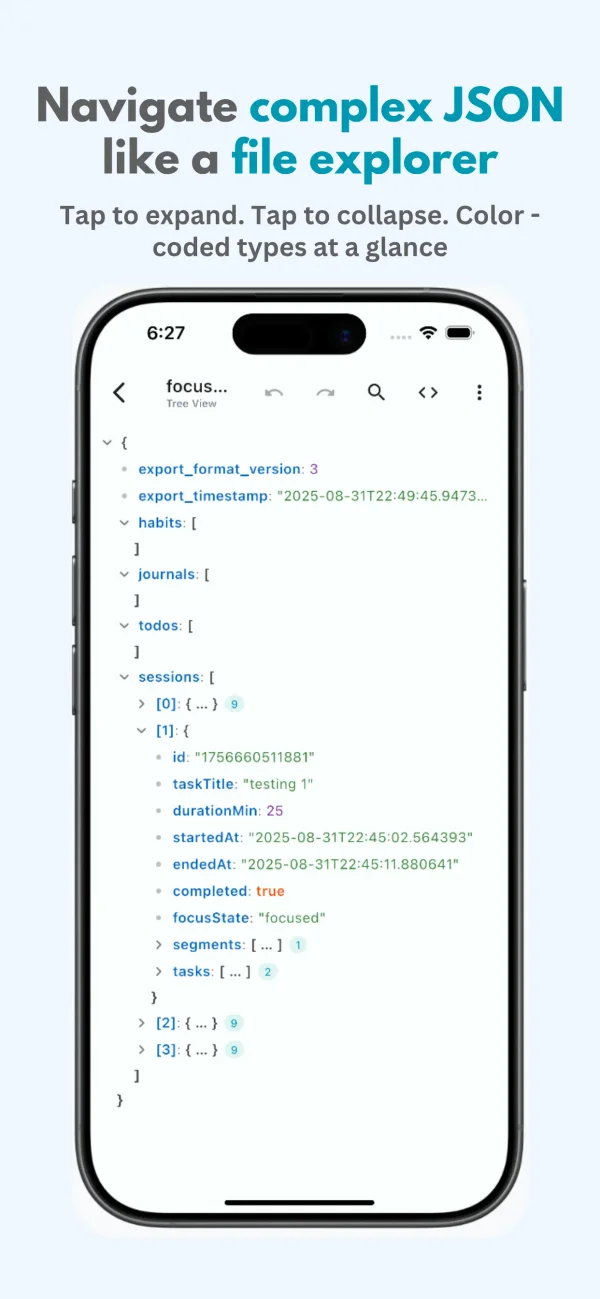
TREE VIEW — EXPLORE JSON VISUALLY
Navigate complex, deeply nested JSON with a collapsible tree view. Each node shows the key name, value type, and child count at a glance. Tap to expand or collapse any object or array. Color-coded types make it easy to spot strings, numbers, booleans, and null values without reading every line.
Auto-expands the first two levels when you open a file — so you see structure immediately, not a wall of collapsed nodes.
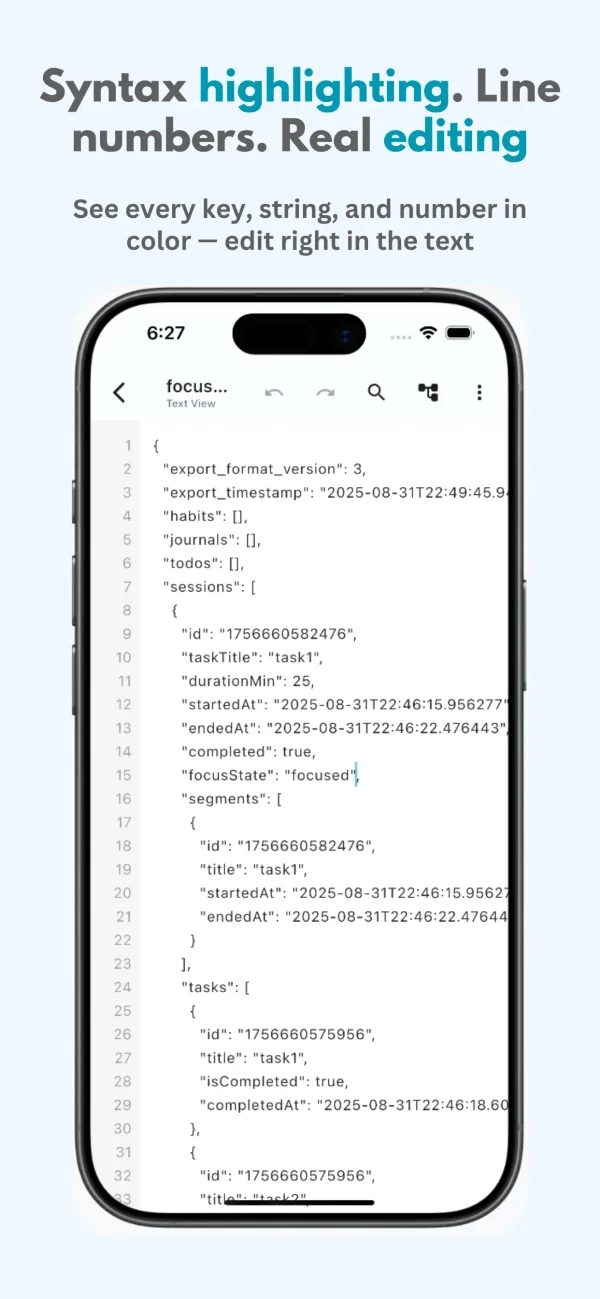
TEXT VIEW — READ & EDIT WITH SYNTAX HIGHLIGHTING
Switch to a full syntax-highlighted text view with line numbers. Every key, string, number, boolean, and bracket is color-coded for quick scanning. Edit your JSON directly in the text editor — fix typos, update values, restructure data.
JSON View gives you both a visual tree view AND a real text editing mode with syntax highlighting, giving you the flexibility to work exactly how you want.
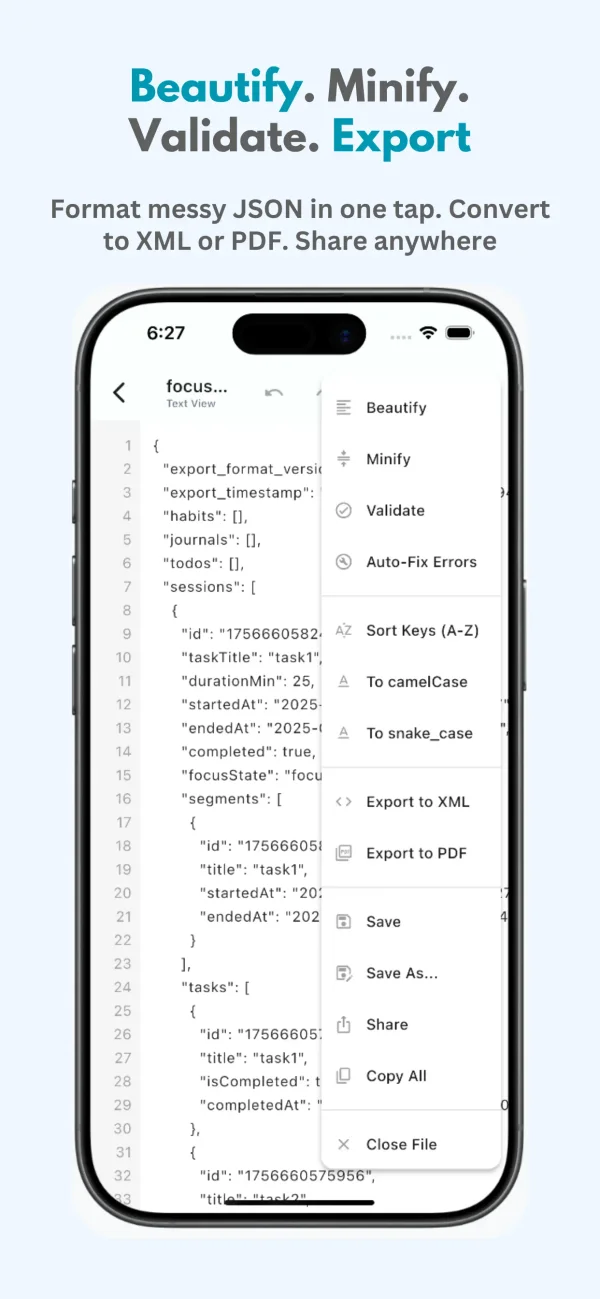
FORMAT & BEAUTIFY
Beautify messy, minified JSON into a clean, readable structure with one tap. Choose your indentation — 2 spaces, 4 spaces, or tabs. Minify bloated JSON into compact single-line output for APIs or configs. Sort keys alphabetically to organize your data.
VALIDATE BEFORE YOU SAVE
Real-time JSON validation catches syntax errors before you save. See exactly which line and column has the problem — no more guessing. JSON View validates your file every time you save, so you never accidentally corrupt a file.
Auto-fix common mistakes like trailing commas, missing quotes, and extra brackets.
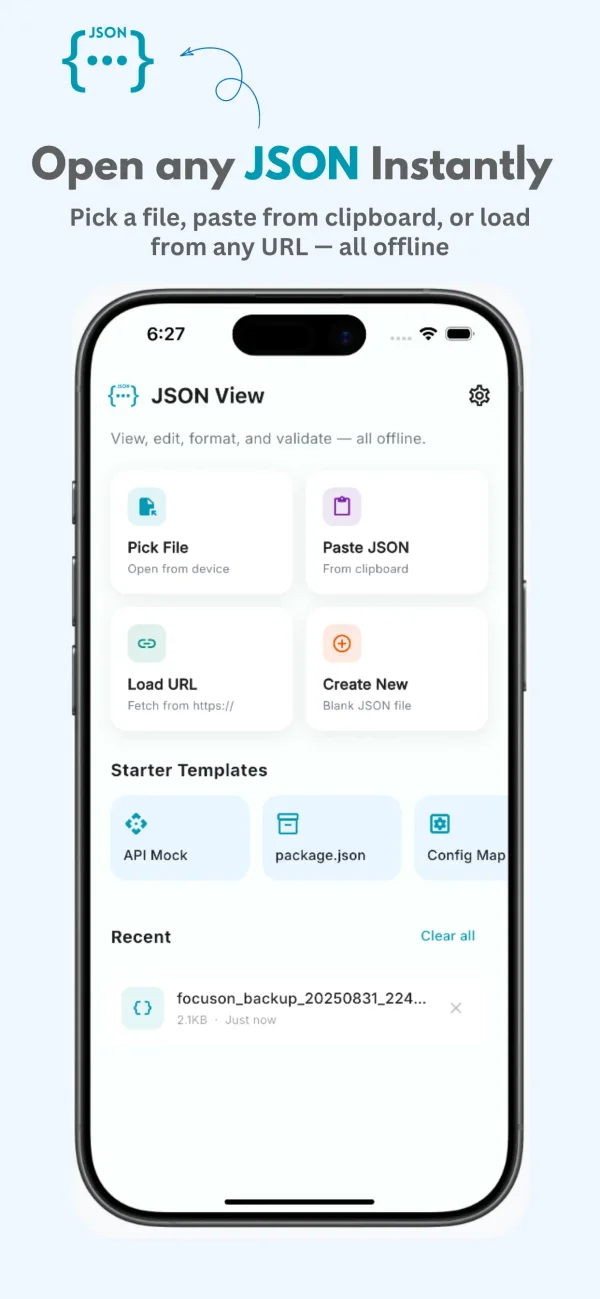
OPEN JSON FROM ANYWHERE
Pick a .json file from your device storage using the built-in file browser. Paste JSON directly from your clipboard — no file needed. Load JSON from any URL (paste an API endpoint and see the response). Receive JSON shared from other apps. Start from scratch with a blank file or use starter templates (API Mock, package.json, Config Map).
JSON View works with the Files app — tap any JSON file and open it directly in JSON View.
SAVE, SHARE & EXPORT
Save changes back to the original file. Save as a new .json file anywhere on your device. Export to XML or PDF for sharing with non-technical colleagues. Share formatted JSON as text to any messaging or note-taking app. Copy the entire file to your clipboard with one tap.
CONVERT BETWEEN FORMATS
Convert JSON to XML and XML to JSON with a single tap. Useful when you need to switch between data formats for different systems, APIs, or team members.
Transform key casing — convert between camelCase, snake_case, and PascalCase across all keys in your file.
DESIGNED FOR REAL USE
Modern, clean interface optimized for your device. Dark mode and light mode with system-aware auto-switching. Works completely offline — no internet connection needed. No account, no sign-up, no login. No data collection — your JSON files never leave your device. Handles deeply nested structures and large files smoothly.
Built by Garoono — indie developers who ship useful tools for real people.
Have feedback? We read every message.
Contact: garoono.digital@gmail.com
Website: garoono.in
Privacy Policy: https://sites.google.com/view/jsonview-privacy/privacypolicy
Terms of Use: https://sites.google.com/view/jsonview-eula/privacypolicy
Quyền riêng tư của ứng dụng
Những gì Gautam Singh Rathor khai báo trên App Store về cách ứng dụng này xử lý dữ liệu.
-
Dữ liệu không được thu thập
Nhà phát triển không thu thập bất kỳ dữ liệu nào từ ứng dụng này.
Phương thức đảm bảo quyền riêng tư có thể khác nhau, chẳng hạn như tuỳ theo các tính năng bạn sử dụng hoặc độ tuổi của bạn.
Thông tin
- Người bán
- Gautam Singh Rathor
- Danh mục
- Công Cụ Nhà Phát Triển
- Phiên bản
- 0.1.1+3
- Cập nhật
- 25/05/2026
- Phát hành
- 25/05/2026
- Kích thước
- 60,9 MB
- Yêu cầu
- iOS 15.0 trở lên
- Độ tuổi
- 4+
- Giá
- Miễn phí
- Ngôn ngữ
- Tiếng Anh
- Bản quyền
- © 2026 garoono
Có thể bạn cũng thích
-
 Syntex - Developer ToolkitCông Cụ Nhà Phát Triển
-
 JavaScript IDE - HTML & CSSChạy và Học JS + TypeScript
-
 Regex PlaygroundCông Cụ Nhà Phát Triển
-
 PushwordCông Cụ Nhà Phát Triển
-
 Pad Code AI: Lập trình & IDEChạy Python, C++ và JavaScript
-
 Claw CompanionCông Cụ Nhà Phát Triển
-
 PyodiosCông Cụ Nhà Phát Triển
-
 DevSnoop - Developer BrowserCông Cụ Nhà Phát Triển
-
 Text Editor : Code EditorCông Cụ Nhà Phát Triển
-
 Crash Buddy - Debug crash logsCông Cụ Nhà Phát Triển