
Mr Prompter
Voice-following teleprompter
Được thiết kế cho iPhone, iPad, Mac
Miễn phí
- Độ tuổi4+
- Danh mụcẢnh & Video
- Nhà phát triểnSebastien Raynal
- Ngôn ngữTiếng Anh+ 5 ngôn ngữ khác
- Kích thước8,7 MB
Liên kết đến trang App Store chính thức
Download.org không lưu trữ tệp nào của Mr Prompter. Nút này mở trang ứng dụng trên App Store, nơi Sebastien Raynal phát hành ứng dụng. Trang được kiểm tra lần cuối: 26/11/2026.
Ảnh chụp màn hình


Giới thiệu
Nhà phát triển chưa cung cấp nội dung này bằng ngôn ngữ của bạn.
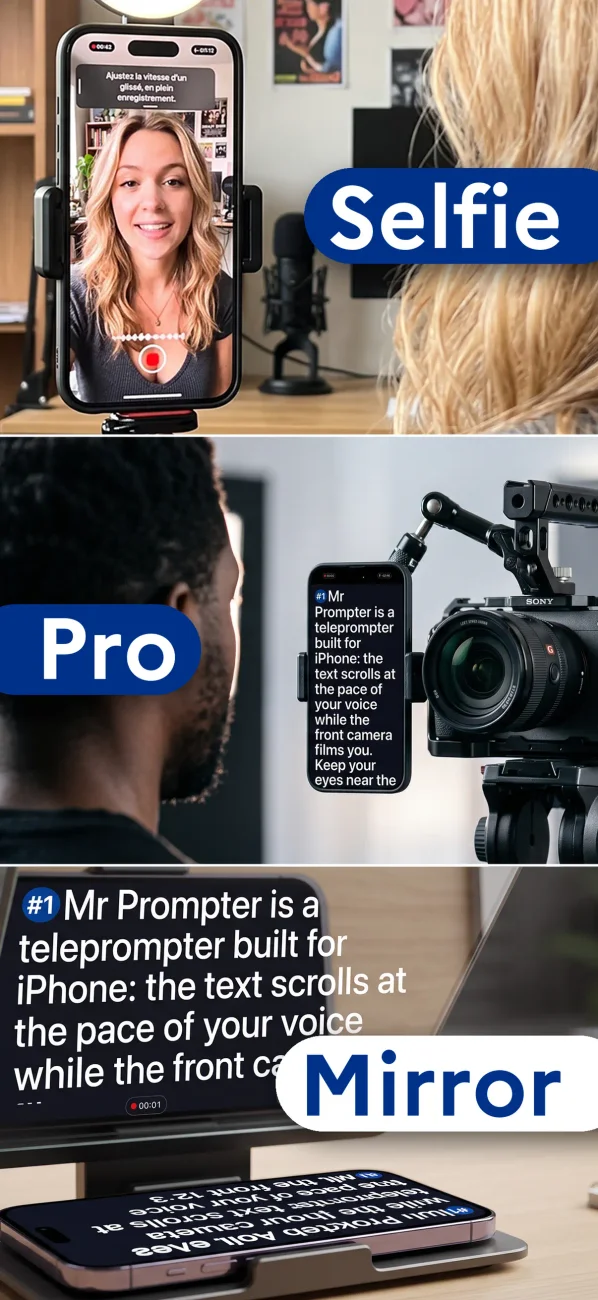
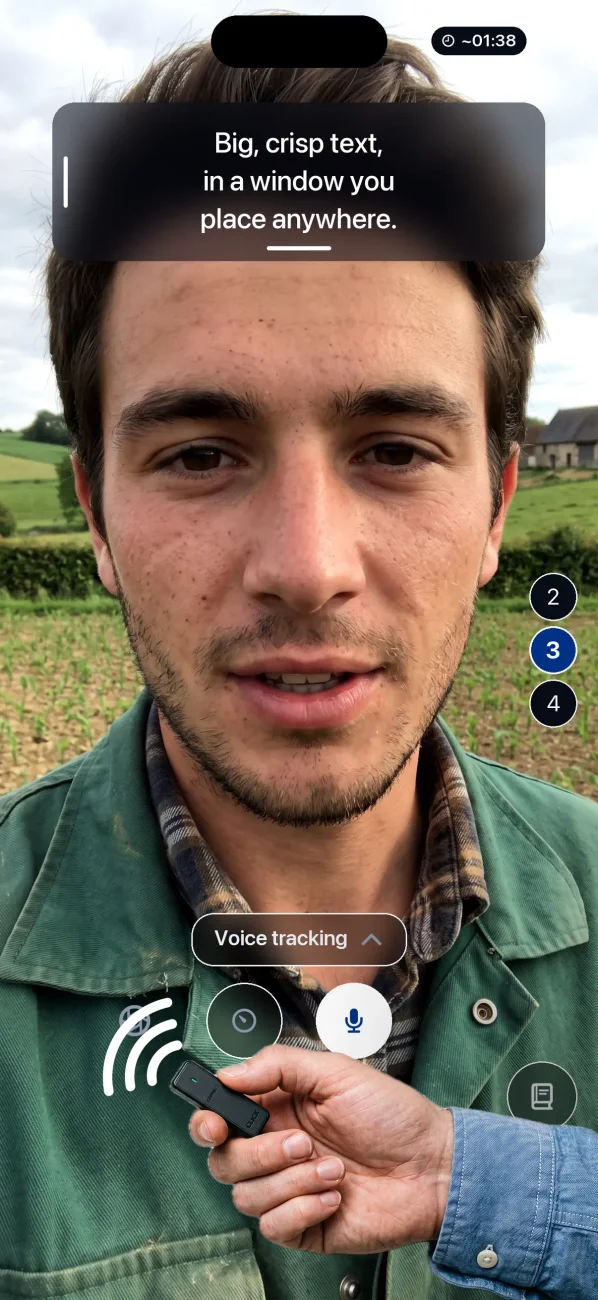
Mr Prompter (Mister Prompter) is an all-in-one teleprompter for iPhone, iPad and Mac: a selfie mode with voice tracking to film yourself alone, a pro mode with a mirror for teleprompter glass, and a remote mode to control another iPhone, iPad or Mac.
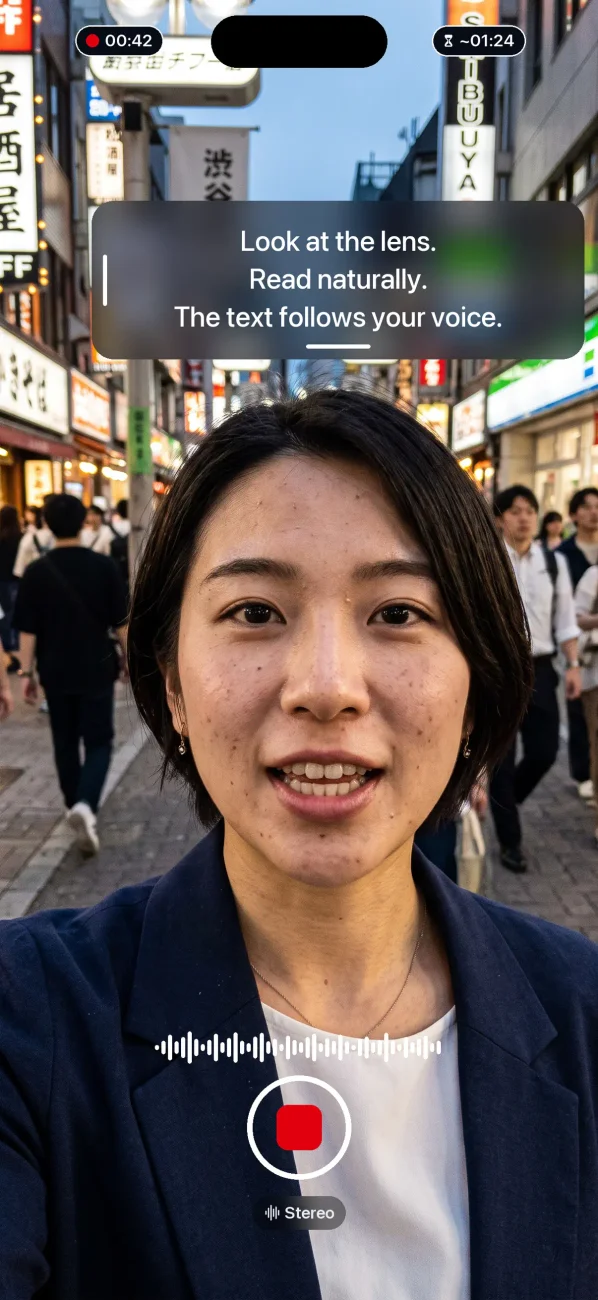
And its signature: the text scrolls at exactly your pace while you speak, with no button to press and no speed to guess. Keep your eyes near the lens, talk naturally, and the prompter follows.
SELFIE: ALONE IN FRONT OF THE CAMERA
• The front camera films you and the text sits right next to the lens. Or pick a rear lens to film what is in front of you while you read.
• Voice tracking moves the text along with you; say "GO" to start recording, hands-free.
• Cinematic mode (background blur on supported iPhones) and video stabilization.
• ProRes on iPhone Pro models, in 422 or 422 HQ, with Apple Log where the iPhone offers it, and 4K at 60 fps on an external SSD.
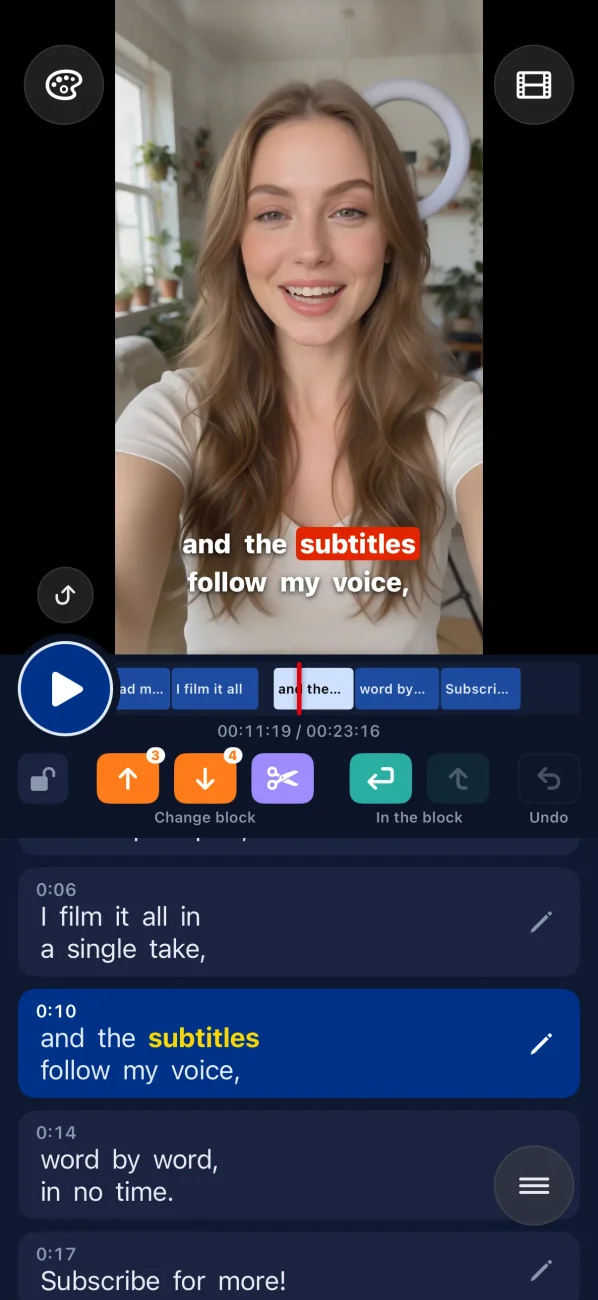
SUBTITLES FROM YOUR OWN TEXT
• After a take, the app listens to the video and lays your script on it, word by word, with your spelling and punctuation.
• 8 styles, TikTok and karaoke included. Edit the blocks, and fine-tune each word on the waveform.
• Translate your subtitles and add your logo. Export the video with everything burned in, or the .srt file.
PRO AND TELEPROMPTER GLASS
• Nothing is recorded: the camera may stay on, but its image is neither shown nor kept. The screen becomes a prompter for a real camera, a teleprompter glass or an audience, and your voice still drives the text.
• Mirror effect in one tap: the text flips for a beamsplitter rig, before you even start.
• On iPad, pro mode fills the screen: set the tablet under the glass and read straight through it.
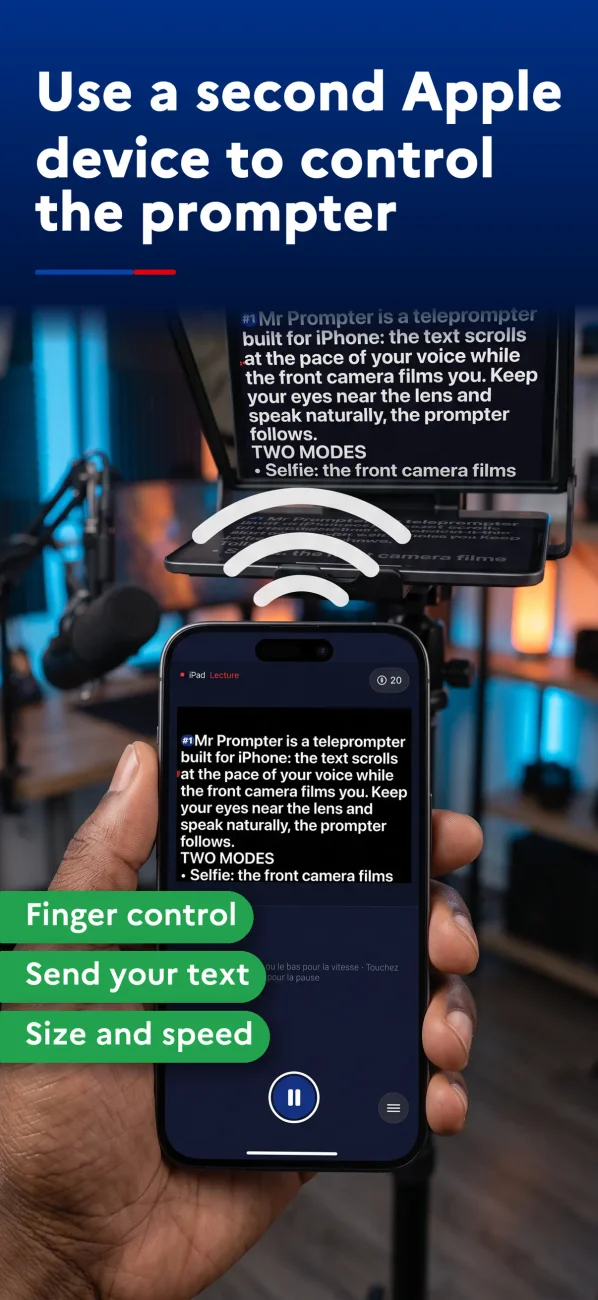
ANOTHER DEVICE AS A REMOTE
• An iPhone, iPad or Mac running Mr Prompter controls another one, in any direction: start, stop, speed, chapters.
• The remote shows your text exactly as it appears on the prompter. Position it with a finger, and set the size, line spacing, speed, mirror and presets of the controlled device from where you stand. Send it one of your scripts, or have it open one of its own.
• A direct link between the two devices, no router and no server: just turn on Wi-Fi and Bluetooth. A four-digit code pairs them.
CAMERA CONTROL, KEYBOARD AND PRESENTER REMOTE
• On iPhone, a click on the Camera Control starts and stops the take, and a slide along it sets the speed. The volume buttons start and stop it too, on iPhone and iPad.
• A presenter remote starts and stops the take, pauses in pro mode and jumps between chapters, without touching the screen. Ideal on an iPad set on a stand, out of reach.
• On a keyboard, the arrow keys also set the speed, even while recording.
MADE TO FIT
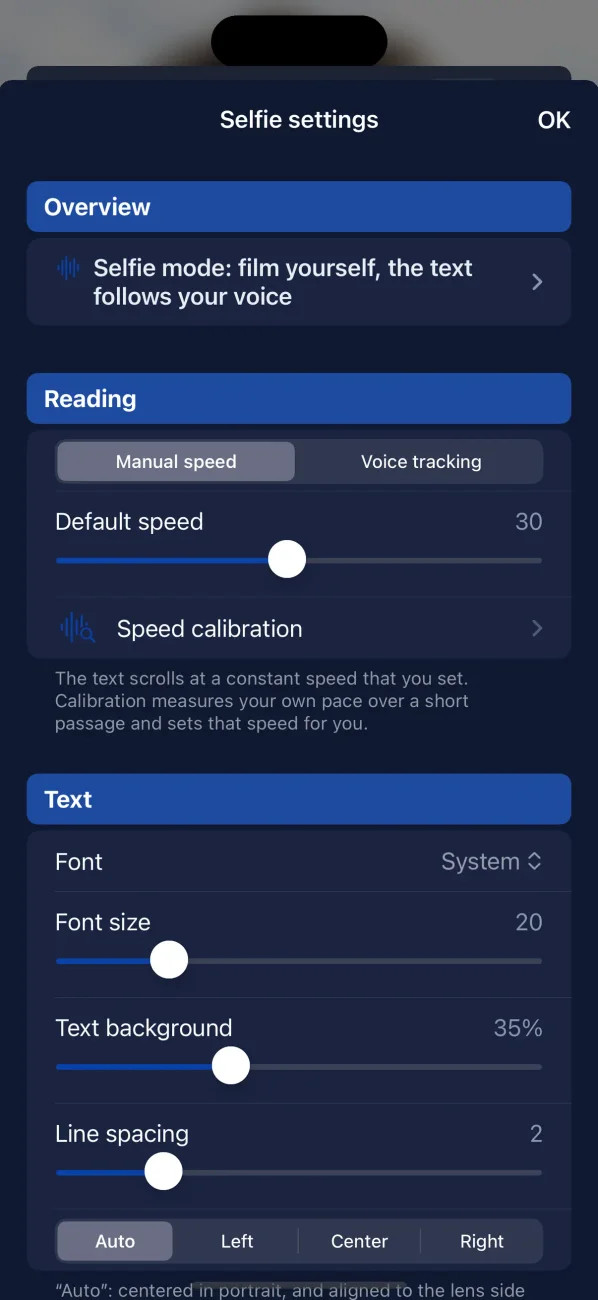
• Manual mode: a constant speed you set, adjustable with a swipe while recording. Or by hand: the text moves only under your finger.
• Auto stop at the end of the text, on by default.
• Calibration: read a short passage and the app measures your natural pace.
• Adjustable font, size and line spacing, white on black or black on white.
• Movable, resizable text window, placed near the lens whichever edge it sits on.
• Chapters to cut a long script and jump where you need, even added on the fly while you read.
• Presets to recall your favorite settings in one tap.
• Import and share your texts: .txt, .rtf, .pdf and Word (.docx).
PRIVACY FIRST
No sign-up, no account, no data collection. Your videos go to your photo library, or on Mac to a folder you choose, and they stay on your device. The remote links your devices directly: nothing goes through the internet.
ON IPHONE, IPAD AND MAC
The same app, the same scripts, on the three screens, and each one can control the others. Free on all of them, with no watermark and no subscription.
Perfect for creators, trainers, journalists, speakers, and anyone who wants to talk to camera without losing their place, or their eye contact.
Có gì mới
Phiên bản 2.9 · 25/11/2026
Film what is in front of you while you read.
• New in selfie mode: film with a rear lens, Ultra Wide, Wide or Telephoto depending on your iPhone or iPad, and keep reading the text next to the front camera. Perfect for a demo, a recipe, a tour or a product.
• To turn it on: Settings › Video › Manual mode and camera. Then, in selfie mode, tap the aperture button: the Camera row, above Brightness, shows Selfie and your lenses. Swipe through them if they don't all fit.
• Your settings are never changed. If a lens can't use one of them (resolution, Cinematic, Log, codec), a message tells you, and the setting comes back with a camera that supports it.
• The app always opens on Selfie, and pro mode switches back to Selfie.
• After a take, the thumbnail fades away after 10 seconds, and ST slides into its place.
Quyền riêng tư của ứng dụng
Những gì Sebastien Raynal khai báo trên App Store về cách ứng dụng này xử lý dữ liệu.
-
Dữ liệu không được thu thập
Nhà phát triển không thu thập bất kỳ dữ liệu nào từ ứng dụng này.
Phương thức đảm bảo quyền riêng tư có thể khác nhau, chẳng hạn như tuỳ theo các tính năng bạn sử dụng hoặc độ tuổi của bạn.
Thông tin
- Người bán
- Sebastien Raynal
- Danh mục
- Ảnh & Video
- Phiên bản
- 2.9
- Cập nhật
- 25/11/2026
- Phát hành
- 27/07/2026
- Kích thước
- 8,7 MB
- Yêu cầu
- iOS 17.0 trở lên
- Độ tuổi
- 4+
- Giá
- Miễn phí
- Ngôn ngữ
- Tiếng Anh, Tiếng Pháp, Tiếng Đức, Tiếng Ý, Tiếng Bồ Đào Nha, Tiếng Tây Ban Nha
- Bản quyền
- © 2026 Sébastien Raynal
Có thể bạn cũng thích
-
 Open PrompterẢnh & Video
-
 VoicePrompt: TeleprompterẢnh & Video
-
 Teleprompter-GoẢnh & Video
-
 Teleprompter: Nhắc chữ và quayKịch bản bám theo giọng nói
-
 Prompto: Teleprompter CameraẢnh & Video
-
 Teleprompt OverlayẢnh & Video
-
 Moody Teleprompter: PrompterẢnh & Video
-
 Suflo: Video TeleprompterẢnh & Video
-
 Cam Reader - TeleprompterẢnh & Video
-
 Teleprompter-Máy Nhắc Kịch BảnĐọc kịch bản khi quay video