- Age rating4+
- CategoryPhoto & Video
- DeveloperSebastien Raynal
- LanguagesEnglish+ 5 more
- Size8.6 MB
Links to the official App Store page
Download.org hosts no file of Mr Prompter. The button opens its official App Store page, published by Sebastien Raynal. Listing last checked on Nov 21, 2026.
Screenshots


About
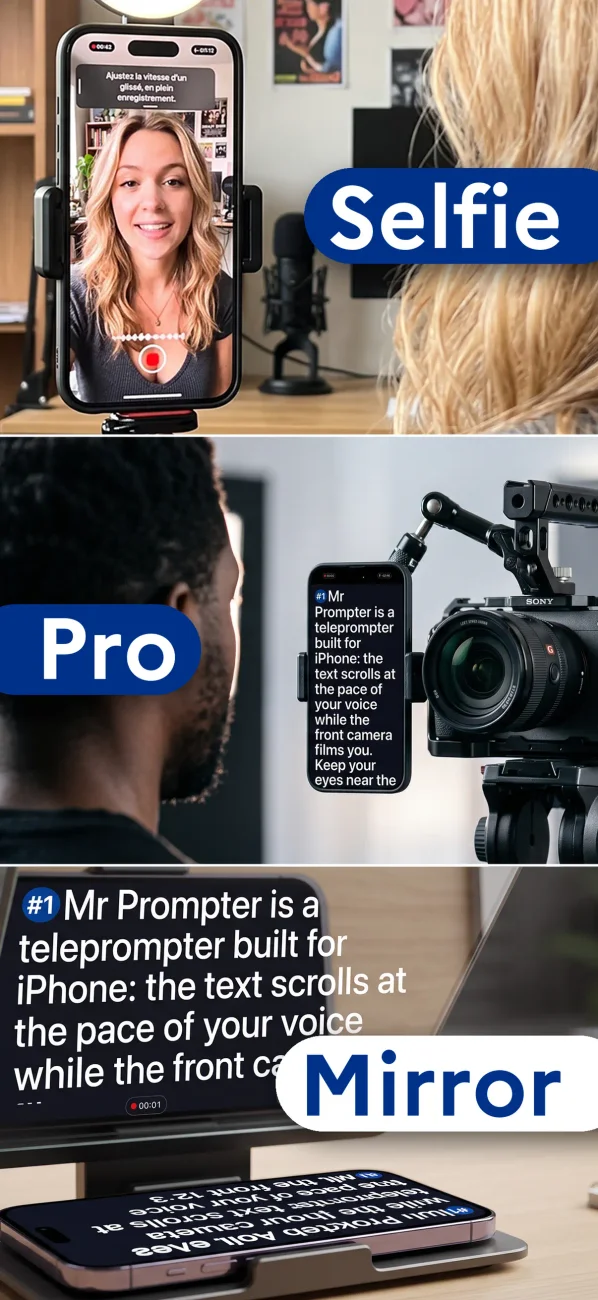
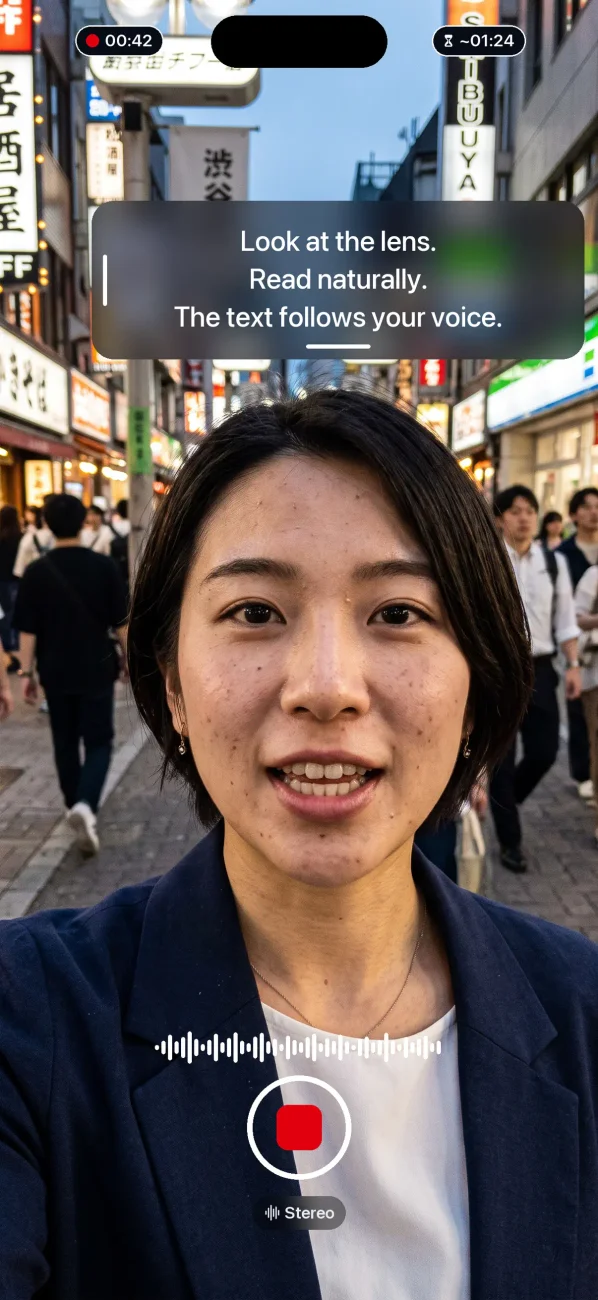
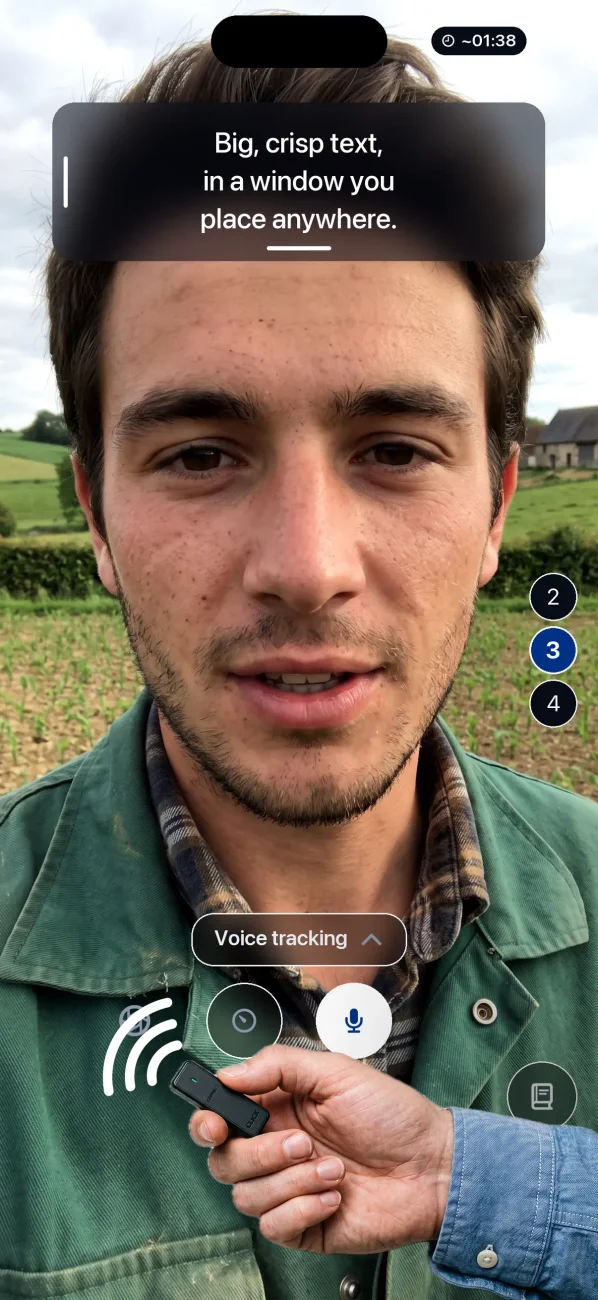
Mr Prompter (Mister Prompter) is an all-in-one teleprompter for iPhone, iPad and Mac: a selfie mode with voice tracking to film yourself alone, a pro mode with a mirror for teleprompter glass, and a remote mode to control another iPhone, iPad or Mac.
And its signature: the text scrolls at exactly your pace while you speak, with no button to press and no speed to guess. Keep your eyes near the lens, talk naturally, and the prompter follows.
SELFIE: ALONE IN FRONT OF THE CAMERA
• The front camera films you and the text sits right next to the lens. You read, you record, it is done.
• Voice tracking moves the text along with you; say "GO" to start recording, hands-free.
• Cinematic mode (background blur on supported iPhones) and video stabilization.
• ProRes on iPhone Pro models, in 422 or 422 HQ, with Apple Log where the iPhone offers it, and 4K at 60 fps on an external SSD.
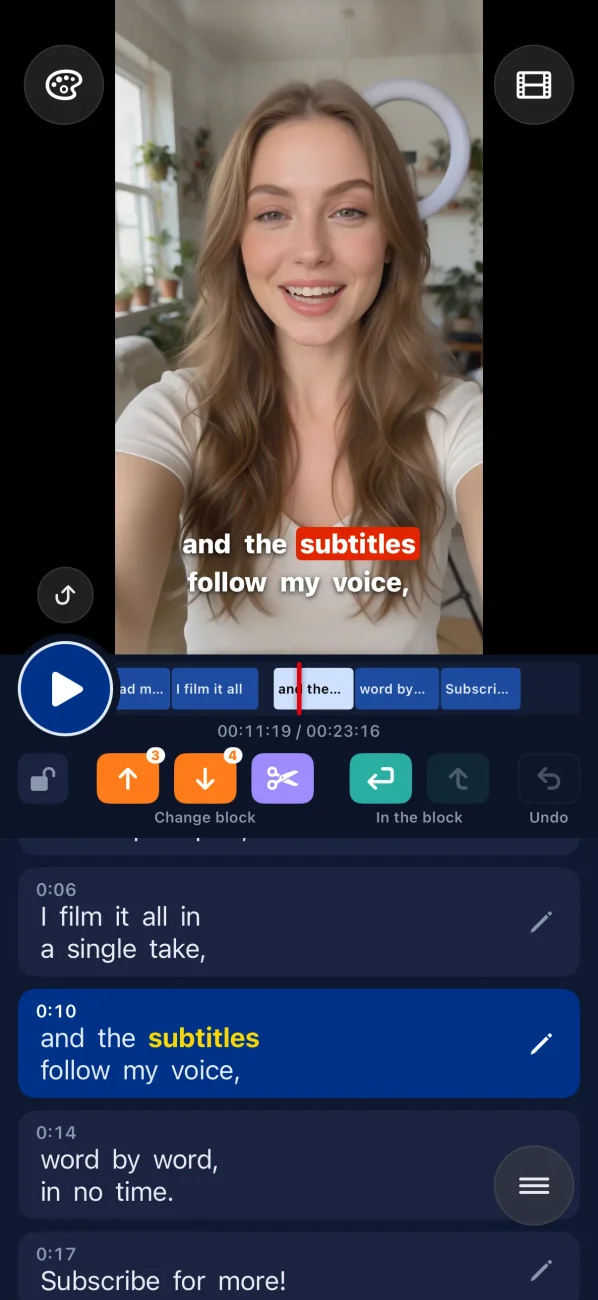
SUBTITLES FROM YOUR OWN TEXT
• After a take, the app listens to the video and lays your script on it, word by word, with your spelling and punctuation.
• 8 styles, TikTok and karaoke included. Edit the blocks, and fine-tune each word on the waveform.
• Translate your subtitles and add your logo. Export the video with everything burned in, or the .srt file.
PRO AND TELEPROMPTER GLASS
• Nothing is recorded: the camera may stay on, but its image is neither shown nor kept. The screen becomes a prompter for a real camera, a teleprompter glass or an audience, and your voice still drives the text.
• Mirror effect in one tap: the text flips for a beamsplitter rig, before you even start.
• On iPad, pro mode fills the screen: set the tablet under the glass and read straight through it.
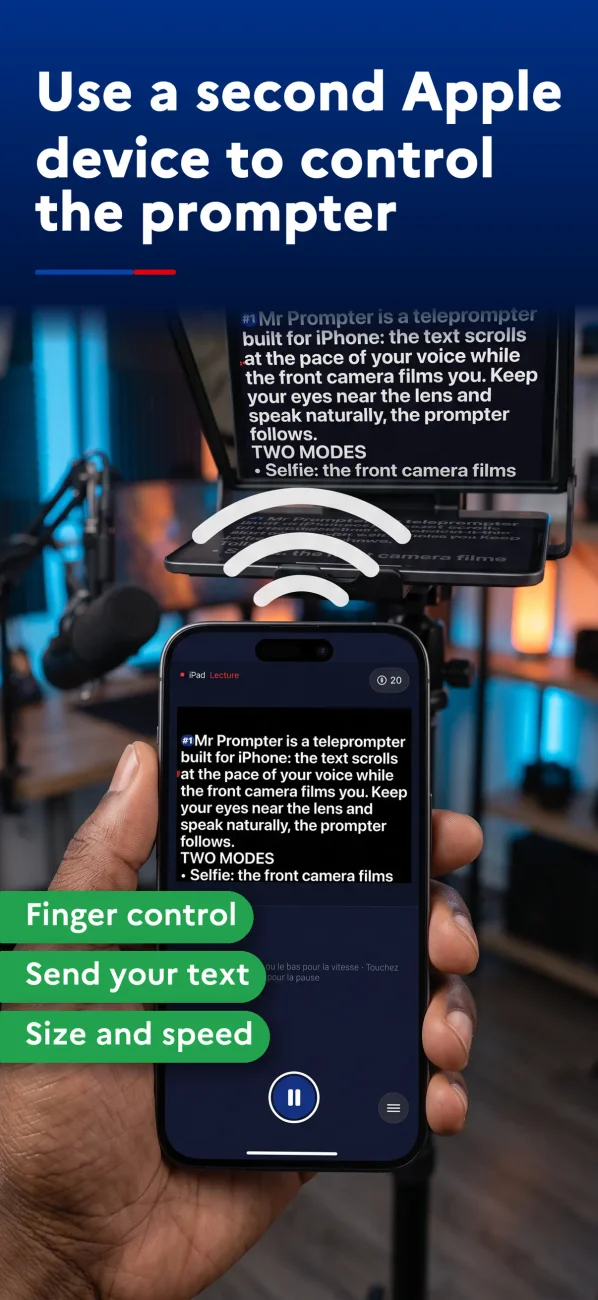
ANOTHER DEVICE AS A REMOTE
• An iPhone, iPad or Mac running Mr Prompter controls another one, in any direction: start, stop, speed, chapters.
• The remote shows your text exactly as it appears on the prompter. Position it with a finger, and set the size, line spacing, speed, mirror and presets of the controlled device from where you stand. Send it one of your scripts, or have it open one of its own.
• A direct link between the two devices, no router and no server: just turn on Wi-Fi and Bluetooth. A four-digit code pairs them.
CAMERA CONTROL, KEYBOARD AND PRESENTER REMOTE
• On iPhone, a click on the Camera Control starts and stops the take, and a slide along it sets the speed. The volume buttons start and stop it too, on iPhone and iPad.
• A presenter remote starts and stops the take, pauses in pro mode and jumps between chapters, without touching the screen. Ideal on an iPad set on a stand, out of reach.
• On a keyboard, the arrow keys also set the speed, even while recording.
MADE TO FIT
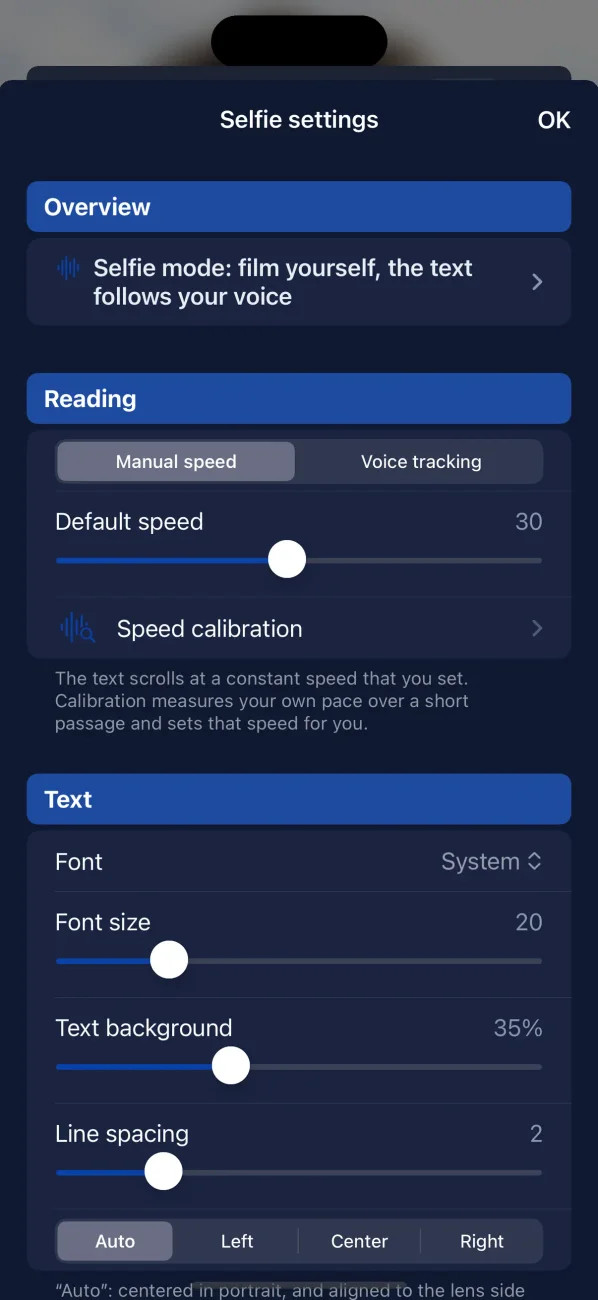
• Manual mode: a constant speed you set, adjustable with a swipe while recording. Or by hand: the text moves only under your finger.
• Auto stop at the end of the text, on by default.
• Calibration: read a short passage and the app measures your natural pace.
• Adjustable font, size and line spacing, white on black or black on white.
• Movable, resizable text window, placed near the lens whichever edge it sits on.
• Chapters to cut a long script and jump where you need, even added on the fly while you read.
• Presets to recall your favorite settings in one tap.
• Import and share your texts: .txt, .rtf, .pdf and Word (.docx).
PRIVACY FIRST
No sign-up, no account, no data collection. Your videos go to your photo library, or on Mac to a folder you choose, and they stay on your device. The remote links your devices directly: nothing goes through the internet.
ON IPHONE, IPAD AND MAC
The same app, the same scripts, on the three screens, and each one can control the others. Free on all of them, with no watermark and no subscription.
Perfect for creators, trainers, journalists, speakers, and anyone who wants to talk to camera without losing their place, or their eye contact.
What’s new
Version 2.8.4 · Nov 19, 2026
Chapters at your fingertip.
• Press and hold a word: a chapter starts there, and reading will resume from that word. In voice-following mode it works even mid-take, handy to redo a sentence. Press and hold the same word again to remove the chapter.
• Chapters no longer take up room in your text: a small number in a blue circle sits in front of the word while the chapter bar is shown, and hides during the take.
• In selfie mode, when the text sits on a chapter, the trash button deletes it; hold the trash and confirm to clear them all. It now sits above ST in portrait, and in a row at the bottom in landscape.
• In pro mode too, the text before the current chapter is grayed out, and the gray follows the text during a take at manual speed.
• On iPhone, the bar at the bottom of the screen (resolution, video mode, mono or stereo) opens Settings at half height, on Video: the image stays in view and changes as you adjust it.
• Remote: chapter numbers now show on its screen too. Update both devices.
• Fixed: a take started right after creating or importing a text could jump back to the start.
App privacy
What Sebastien Raynal declares on the App Store about how this app handles data.
-
Data not collected
The developer does not collect any data from this app.
Privacy practices may vary, for example with the features you use or your age.
Information
- Seller
- Sebastien Raynal
- Category
- Photo & Video
- Version
- 2.8.4
- Updated
- Nov 19, 2026
- Released
- Jul 27, 2026
- Size
- 8.6 MB
- Requires
- iOS 17.0 or later
- Age rating
- 4+
- Price
- Free
- Languages
- English, French, German, Italian, Portuguese, Spanish
- Copyright
- © 2026 Sébastien Raynal
You might also like
-
 Open PrompterPro Teleprompter for Creators
-
 VoicePrompt: TeleprompterVoice Driven Teleprompter
-
 Teleprompter-GoPhoto & Video
-
 Teleprompter: Record and ShareScripts Scroll With Your Voice
-
 Prompto: Teleprompter CameraRead your script while filming
-
 Teleprompt OverlayRead scripts over your camera
-
 Moody Teleprompter: PrompterVideo Script Camera Recording
-
 Suflo: Video TeleprompterRead to camera, no watermark
-
 Cam Reader - TeleprompterPhoto & Video
-
 Teleprompter-Scrolling ScriptsVideo Recorder & Script Reader