PDF Studio: PDF Editor & Scan
Sign, annotate & merge PDFs
Được thiết kế cho iPhone, iPad
Miễn phí
- Độ tuổi4+
- Danh mụcHiệu Suất
- Nhà phát triểnyusuf hilal
- Ngôn ngữTiếng Anh+ 13 ngôn ngữ khác
- Kích thước4,1 MB
Liên kết đến trang App Store chính thức
Download.org không lưu trữ tệp nào của PDF Studio: PDF Editor & Scan. Nút này mở trang ứng dụng trên App Store, nơi yusuf hilal phát hành ứng dụng. Trang được kiểm tra lần cuối: 22/11/2026.
Ảnh chụp màn hình
Giới thiệu
Nhà phát triển chưa cung cấp nội dung này bằng ngôn ngữ của bạn.
PDF Studio is a calm, fast PDF editor and scanner. It is completely free: no ads, no subscription, no account. Your documents stay on your device.
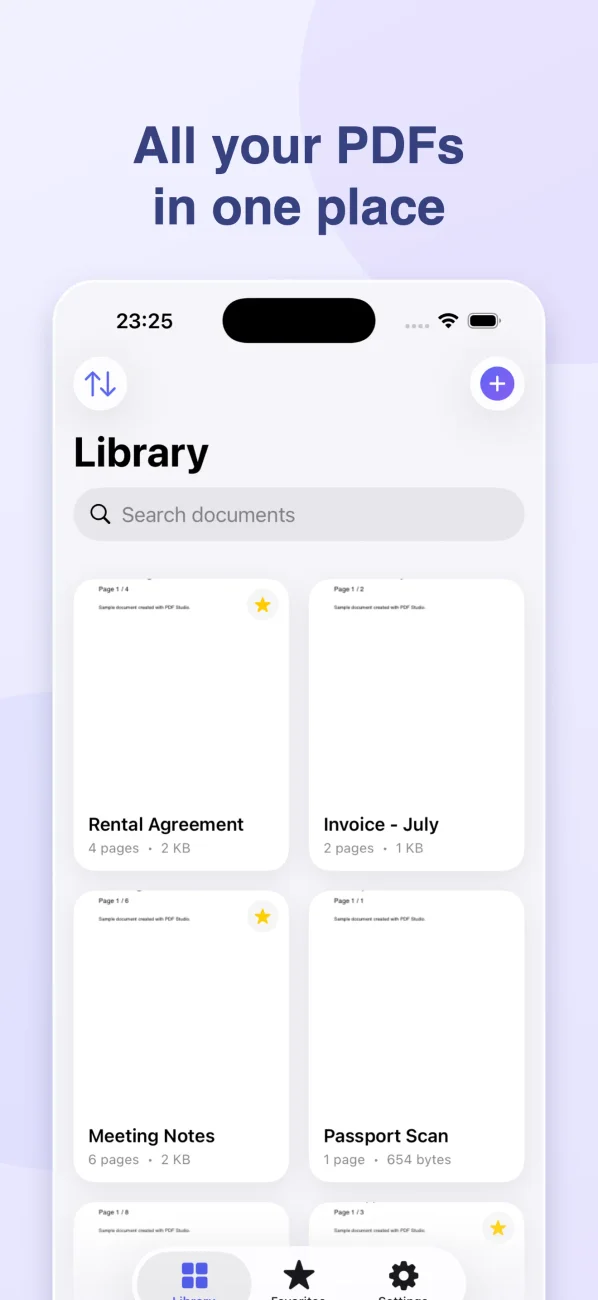
LIBRARY
• Recent documents, folders, tags and favorites
• Full-text search that finds words inside your PDFs and shows where they appear
• Drag one document onto another to merge them
• Grid or list view, trash with 30-day recovery
MARKUP
• Highlight, underline or strike through by dragging across text
• Pen, rectangle, oval and arrow — shapes snap neatly into place
• Sticky notes in four colors
• Tap with two fingers to undo, three fingers to redo
SIGN AND FILL
• Saved signatures, placed with corner handles to move and resize
• Add a date stamp under your signature with one tap
• Fill PDF forms or place text and checkmarks anywhere
PAGES
• Reorder pages by dragging, rotate, split, insert blank pages
• Drag pages in from other documents
• Deleted pages can be restored for five seconds
SCAN
• Scan paper with the document camera, fix perspective and choose a color mode
• On-device text recognition (OCR) turns scans into searchable PDFs
READING
• Night reading, smart zoom on double-tap, bookmarks and contents
• Comfort Reading with adjustable text and read-aloud
PRIVACY
• Everything is processed on your device, nothing is uploaded
• Lock the app with Face ID, protect PDFs with a password, back up your library
Available in 14 languages.
Có gì mới
Phiên bản 1.3.1 · 17/11/2026
A redesigned PDF Studio.
• New library: recents, folders, tags, full-text search and drag-to-merge
• Reading: tap to hide the bars, page scrubber, smart zoom and night reading
• Floating tool palette: drag to highlight, snapping shapes, sticky notes
• Signatures with corner handles and a one-tap date stamp
• Pages: drag to reorder, split, insert from other documents, undo delete
• Scans become searchable PDFs automatically
• Two-finger tap to undo, three-finger tap to redo
Quyền riêng tư của ứng dụng
Những gì yusuf hilal khai báo trên App Store về cách ứng dụng này xử lý dữ liệu.
-
Dữ liệu không được thu thập
Nhà phát triển không thu thập bất kỳ dữ liệu nào từ ứng dụng này.
Phương thức đảm bảo quyền riêng tư có thể khác nhau, chẳng hạn như tuỳ theo các tính năng bạn sử dụng hoặc độ tuổi của bạn.
Thông tin
- Người bán
- yusuf hilal
- Danh mục
- Hiệu Suất
- Phiên bản
- 1.3.1
- Cập nhật
- 17/11/2026
- Phát hành
- 14/07/2026
- Kích thước
- 4,1 MB
- Yêu cầu
- iOS 17.0 trở lên
- Độ tuổi
- 4+
- Giá
- Miễn phí
- Ngôn ngữ
- Tiếng Anh, Tiếng Ả Rập, Tiếng Pháp, Tiếng Đức, Hindi, Tiếng Indonesia, Tiếng Ý, Tiếng Nhật, Tiếng Hàn, Tiếng Bồ Đào Nha, Tiếng Nga, Tiếng Trung Giản thể + 2 ngôn ngữ khác
- Bản quyền
- © 2026 Yusuf Hilal
Có thể bạn cũng thích
-
 FastPDF – PDF Editor & ReaderHiệu Suất
-
 PDF Editor: Scan & CompressHiệu Suất
-
 PencovaHiệu Suất
-
 Teapot Notes: Digital NotebookHiệu Suất
-
 Evrak: UDF PDF ConverterHiệu Suất
-
 PDF Editor & Scanner Tài LiệuScan, Quét, Chỉnh Sửa & Chữ Ký
-
 Flatten Scan: Offline PDFHiệu Suất
-
 Oko PDFHiệu Suất
-
 UDF StudioHiệu Suất
-
 Dopamin: DEHB Görev YöneticisiHiệu Suất