
PrintRight: Printer & Scanner
Wi-Fi Printing & PDF Tools
Được thiết kế cho iPhone, iPad
Miễn phí · Mua hàng trong ứng dụng
- Độ tuổi17+
- Danh mụcKinh Doanh
- Nhà phát triểnBurim Bilali
- Ngôn ngữTiếng Anh
- Kích thước67,4 MB
Liên kết đến trang App Store chính thức
Download.org không lưu trữ tệp nào của PrintRight: Printer & Scanner. Nút này mở trang ứng dụng trên App Store, nơi Burim Bilali phát hành ứng dụng. Trang được kiểm tra lần cuối: 12/11/2026.
Ảnh chụp màn hình

Giới thiệu
Nhà phát triển chưa cung cấp nội dung này bằng ngôn ngữ của bạn.
Turn your phone or tablet into a fast, reliable wireless printer and HD document scanner! PrintRight: Smart Printer App makes it easy to print PDFs, documents, photos, shipping labels, webpages, and emails to 10,000+ AirPrint, IPP, and Wi-Fi printers—including HP, Canon, Epson, Brother, Samsung, Xerox, Dell, Lexmark, Ricoh, and Kyocera.
Unlike apps that lock you behind a paywall before you know if your printer works, PrintRight lets you connect your printer, run our Wi-Fi Network Doctor, and print a FREE diagnostic test page with zero ads and no credit card required!
WHY USERS SWITCH TO PRINTRIGHT:
1. NEVER LOSE YOUR PRINTER ON WI-FI (IPP + BONJOUR STICKY CONNECTION)
Tired of your printer showing "Offline" or vanishing from Wi-Fi? PrintRight pairs AirPrint / Bonjour discovery with Direct IPP (Port 631 & 9100) subnet probing. Even if mesh or dual-band 2.4GHz / 5GHz routers drop multicast packets, your printer stays connected.
2. BUILT-IN WI-FI & SUBNET NETWORK DOCTOR
Can't find your printer? Our 1-tap Network Doctor checks for 2.4GHz vs. 5GHz band isolation, active VPNs, guest Wi-Fi blocks, and local network permissions—with plain-English steps to fix connection issues in seconds.
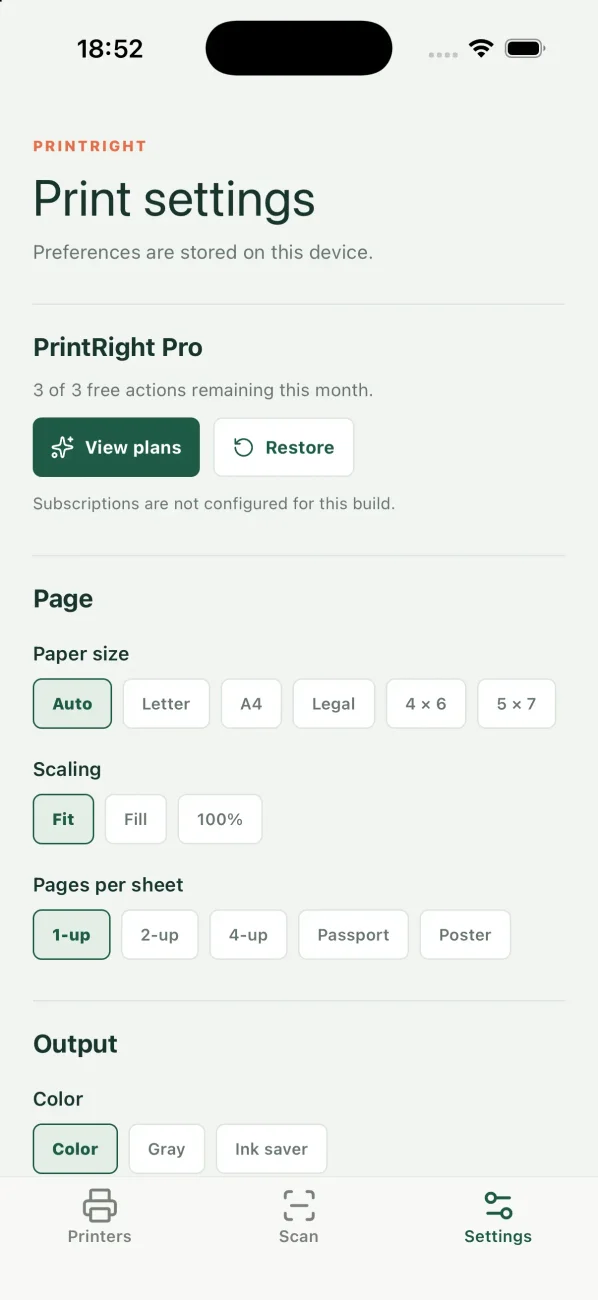
3. BLACK-ONLY INK SAVER MODE
Don't let an empty color cartridge block an urgent black-and-white contract or return label. PrintRight's Ink Saver filter converts files to true 1-bit monochrome before printing.
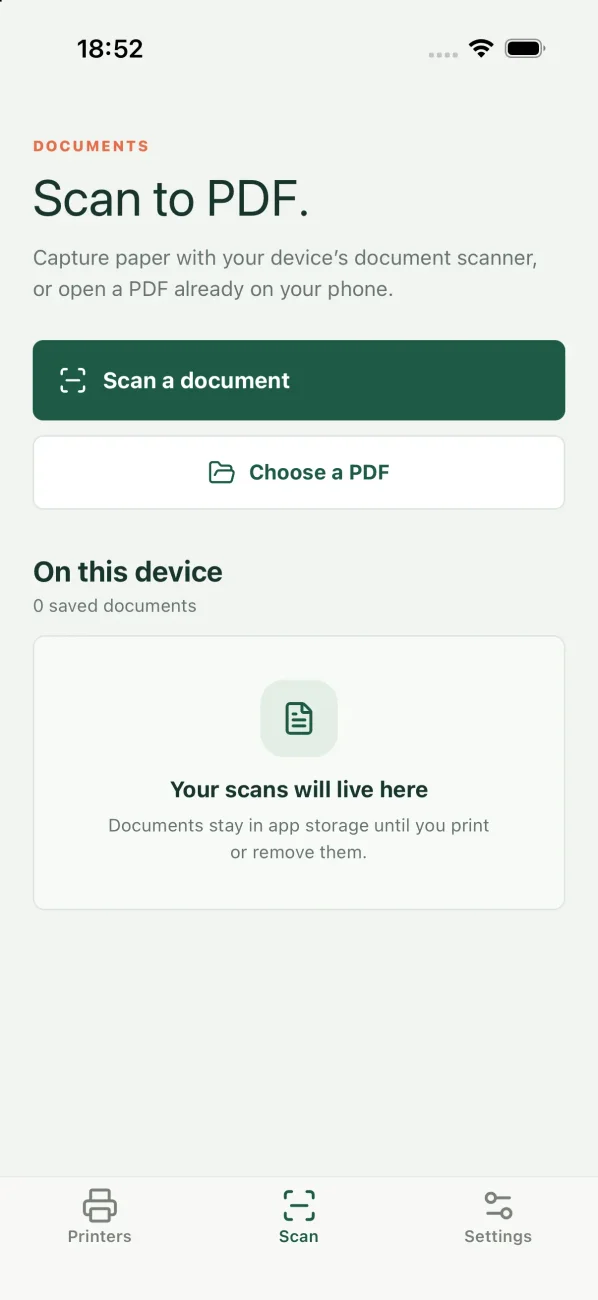
4. HD DOCUMENT SCANNER WITH FOCUS GUARD
- Auto edge detection, perspective straightening, and shadow removal.
- Focus Quality Guard alerts you instantly if a scan is blurry.
- True Page Normalization: Formats every scan to exact US Letter (8.5" x 11") or ISO A4 size—fixing uneven widths and chopped margins on multi-page PDFs.
5. PRINT ANY FILE, PHOTO, OR LAYOUT
- Documents & Office Files: Print PDF, Word (DOC/DOCX), Excel (XLS/XLSX), PowerPoint (PPT/PPTX), TXT, and CSV from Files, email, iCloud, or Google Drive.
- Photos & Collages: Print borderless 4x6 or 5x7 photos, or fit 2, 4, or 9 photos on one sheet.
- Passport Photos: Create exact 2x2" US or international ID photo grids.
- Labels & Webpages: Print 4x6 USPS, UPS, FedEx, and return labels or full webpages without clipped edges.
- Printables: Calendars, daily planners, checklists, graph paper, and fax cover sheets.
6. FULL PRINT JOB CONTROL
- Paper Sizes: US Letter, ISO A4, Legal, 4x6, 5x7, and custom labels.
- Scaling: Fit Printable Area, Fill Bleed, or 100% Actual Size.
- Duplex & Range: 1-sided or 2-sided printing, custom page ranges, and copies.
SUPPORTED PRINTER BRANDS & SERIES:
- HP: Envy, DeskJet, OfficeJet Pro, LaserJet, Tango, Smart Tank (2700, 2755e, 3755, 4155e, 6055e, 8025e, 9015e)
- Canon: PIXMA, imageCLASS, MAXIFY, SELPHY (MG3620, TS3522, TR4720, TR8620, G3270)
- Epson: EcoTank, WorkForce, Expression, SureColor (ET-2800, ET-2850, ET-3850, ET-4850, WF-2930, XP-4200)
- Brother: HL-L, MFC-L, DCP-L, INKvestment Tank Laser & Inkjet
- Plus Samsung, Xerox, Dell, Lexmark, Kyocera, Ricoh, Konica Minolta, and Sharp.
TRANSPARENT PRICING:
- Free Tier: Unlimited Wi-Fi discovery, Network Doctor, 1 free test print per printer, and 3 free prints/scans per month—ZERO pop-up ads.
- PrintRight Pro: Monthly, Annual (7-day free trial), or one-time Lifetime Unlock for unlimited printing, batch scanning, Passport grids, and Ink Saver.
Disclaimer: PrintRight is an independent app not affiliated with or endorsed by any printer brand mentioned. Trademarks belong to their respective owners and indicate compatibility only.
Terms of Use (EULA): https://www.apple.com/legal/internet-services/itunes/dev/stdeula/
Có gì mới
Phiên bản 1.0.1 · 23/10/2026
* Easier subscription management
* Multi-device
* Bug fixes
Quyền riêng tư của ứng dụng
Những gì Burim Bilali khai báo trên App Store về cách ứng dụng này xử lý dữ liệu.
-
Dữ liệu liên kết với bạn
Có thể được thu thập và liên kết với danh tính của bạn.
- Thông tin liên hệ
Phương thức đảm bảo quyền riêng tư có thể khác nhau, chẳng hạn như tuỳ theo các tính năng bạn sử dụng hoặc độ tuổi của bạn.
Thông tin
- Người bán
- Burim Bilali
- Danh mục
- Kinh Doanh
- Phiên bản
- 1.0.1
- Cập nhật
- 23/10/2026
- Phát hành
- 22/10/2026
- Kích thước
- 67,4 MB
- Yêu cầu
- iOS 16.4 trở lên
- Độ tuổi
- 17+
- Giá
- Miễn phí
- Mua hàng trong ứng dụng
- Có
- Ngôn ngữ
- Tiếng Anh
- Bản quyền
- © 2026 PrintRight
Có thể bạn cũng thích
-
 Printer App: Smart & Scan PDFKinh Doanh
-
 Mobile Printer: Print FilesKinh Doanh
-
 Smart Printer App - Print PDFKinh Doanh
-
 Printer: In ảnh, quét tài liệuIn PDF không dây từ điện thoại
-
 Smart Printer : Phone PrintHiệu Suất
-
 Photo Editing StationHiệu Suất
-
 Print Plus - Smart Printer AppKinh Doanh
-
 Glazr DOCX File Editor ProHiệu Suất
-
 Máy in thông minh - PaprioIn PDF & Tài liệu
-
 AnyPrinter: Mobile PrintHiệu Suất