
PrintRight: Printer & Scanner
Wi-Fi Printing & PDF Tools
Conçue pour iPhone, iPad
Gratuit · Achats intégrés
- Classification d’âge17+
- CatégorieÉconomie et entreprise
- DéveloppeurBurim Bilali
- LanguesAnglais
- Taille67,4 Mo
Renvoie vers la page App Store officielle
Download.org n’héberge aucun fichier de PrintRight: Printer & Scanner. Le bouton ouvre la page de l’application sur App Store, où Burim Bilali la publie. Fiche vérifiée pour la dernière fois le 12/11/2026.
Captures d’écran

À propos
Le développeur n’a pas fourni ce texte dans votre langue.
Turn your phone or tablet into a fast, reliable wireless printer and HD document scanner! PrintRight: Smart Printer App makes it easy to print PDFs, documents, photos, shipping labels, webpages, and emails to 10,000+ AirPrint, IPP, and Wi-Fi printers—including HP, Canon, Epson, Brother, Samsung, Xerox, Dell, Lexmark, Ricoh, and Kyocera.
Unlike apps that lock you behind a paywall before you know if your printer works, PrintRight lets you connect your printer, run our Wi-Fi Network Doctor, and print a FREE diagnostic test page with zero ads and no credit card required!
WHY USERS SWITCH TO PRINTRIGHT:
1. NEVER LOSE YOUR PRINTER ON WI-FI (IPP + BONJOUR STICKY CONNECTION)
Tired of your printer showing "Offline" or vanishing from Wi-Fi? PrintRight pairs AirPrint / Bonjour discovery with Direct IPP (Port 631 & 9100) subnet probing. Even if mesh or dual-band 2.4GHz / 5GHz routers drop multicast packets, your printer stays connected.
2. BUILT-IN WI-FI & SUBNET NETWORK DOCTOR
Can't find your printer? Our 1-tap Network Doctor checks for 2.4GHz vs. 5GHz band isolation, active VPNs, guest Wi-Fi blocks, and local network permissions—with plain-English steps to fix connection issues in seconds.
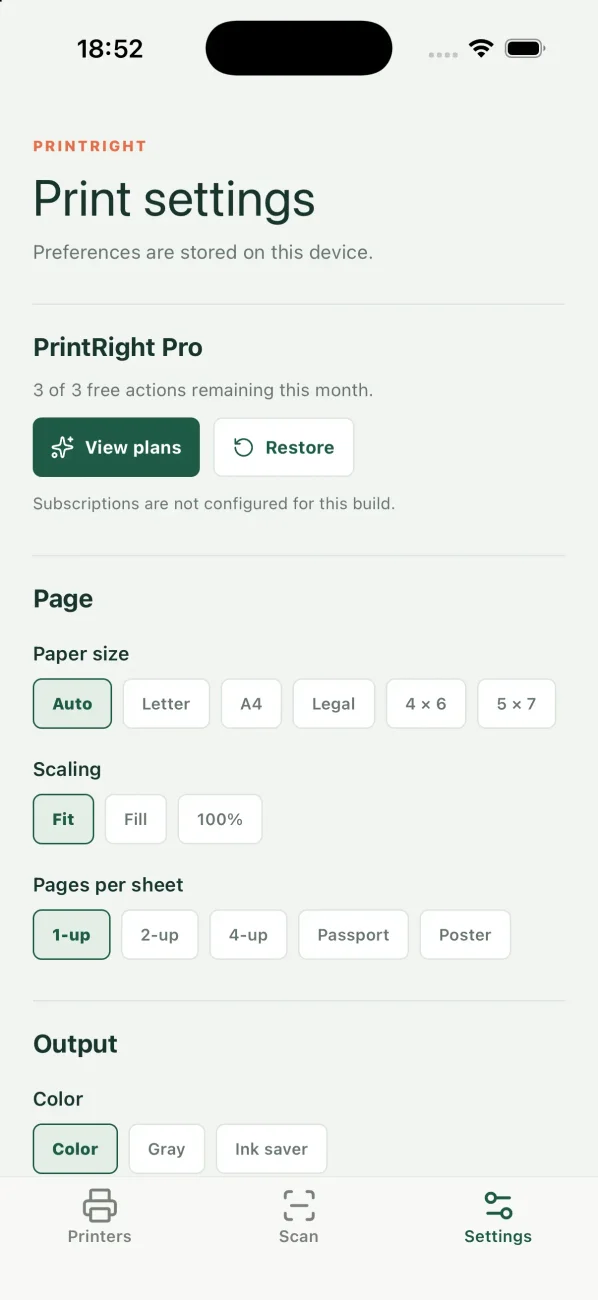
3. BLACK-ONLY INK SAVER MODE
Don't let an empty color cartridge block an urgent black-and-white contract or return label. PrintRight's Ink Saver filter converts files to true 1-bit monochrome before printing.
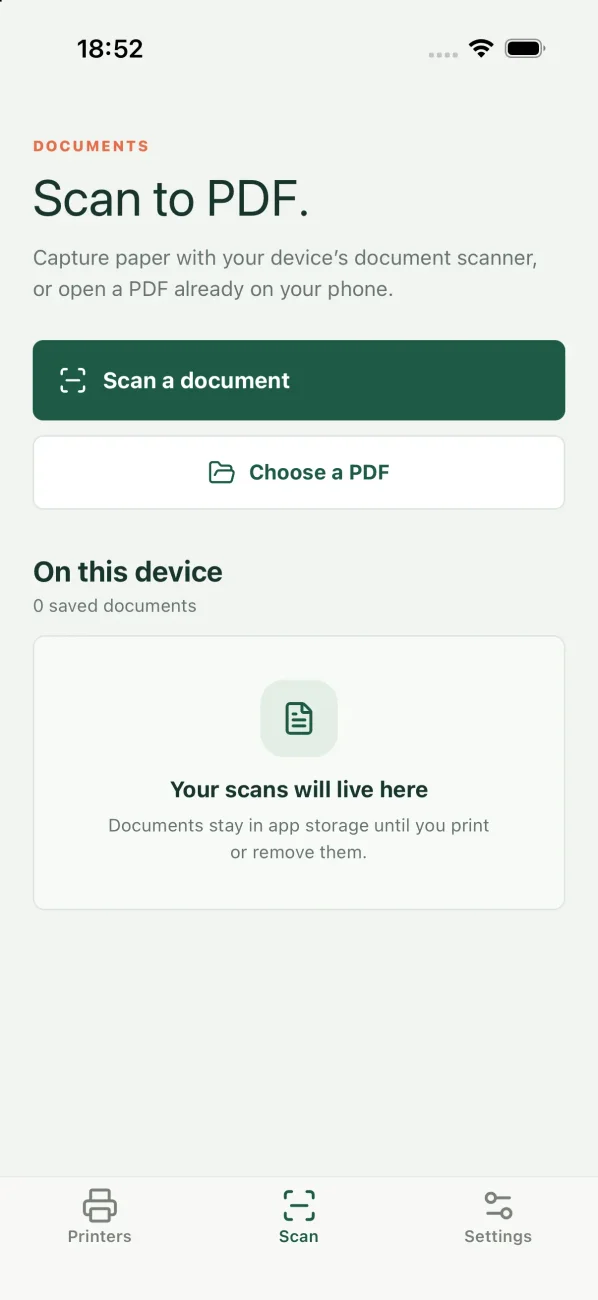
4. HD DOCUMENT SCANNER WITH FOCUS GUARD
- Auto edge detection, perspective straightening, and shadow removal.
- Focus Quality Guard alerts you instantly if a scan is blurry.
- True Page Normalization: Formats every scan to exact US Letter (8.5" x 11") or ISO A4 size—fixing uneven widths and chopped margins on multi-page PDFs.
5. PRINT ANY FILE, PHOTO, OR LAYOUT
- Documents & Office Files: Print PDF, Word (DOC/DOCX), Excel (XLS/XLSX), PowerPoint (PPT/PPTX), TXT, and CSV from Files, email, iCloud, or Google Drive.
- Photos & Collages: Print borderless 4x6 or 5x7 photos, or fit 2, 4, or 9 photos on one sheet.
- Passport Photos: Create exact 2x2" US or international ID photo grids.
- Labels & Webpages: Print 4x6 USPS, UPS, FedEx, and return labels or full webpages without clipped edges.
- Printables: Calendars, daily planners, checklists, graph paper, and fax cover sheets.
6. FULL PRINT JOB CONTROL
- Paper Sizes: US Letter, ISO A4, Legal, 4x6, 5x7, and custom labels.
- Scaling: Fit Printable Area, Fill Bleed, or 100% Actual Size.
- Duplex & Range: 1-sided or 2-sided printing, custom page ranges, and copies.
SUPPORTED PRINTER BRANDS & SERIES:
- HP: Envy, DeskJet, OfficeJet Pro, LaserJet, Tango, Smart Tank (2700, 2755e, 3755, 4155e, 6055e, 8025e, 9015e)
- Canon: PIXMA, imageCLASS, MAXIFY, SELPHY (MG3620, TS3522, TR4720, TR8620, G3270)
- Epson: EcoTank, WorkForce, Expression, SureColor (ET-2800, ET-2850, ET-3850, ET-4850, WF-2930, XP-4200)
- Brother: HL-L, MFC-L, DCP-L, INKvestment Tank Laser & Inkjet
- Plus Samsung, Xerox, Dell, Lexmark, Kyocera, Ricoh, Konica Minolta, and Sharp.
TRANSPARENT PRICING:
- Free Tier: Unlimited Wi-Fi discovery, Network Doctor, 1 free test print per printer, and 3 free prints/scans per month—ZERO pop-up ads.
- PrintRight Pro: Monthly, Annual (7-day free trial), or one-time Lifetime Unlock for unlimited printing, batch scanning, Passport grids, and Ink Saver.
Disclaimer: PrintRight is an independent app not affiliated with or endorsed by any printer brand mentioned. Trademarks belong to their respective owners and indicate compatibility only.
Terms of Use (EULA): https://www.apple.com/legal/internet-services/itunes/dev/stdeula/
Nouveautés
Version 1.0.1 · 23/10/2026
* Easier subscription management
* Multi-device
* Bug fixes
Confidentialité de l’application
Ce que Burim Bilali déclare sur l’App Store au sujet du traitement des données par cette application.
-
Données établissant un lien avec vous
Peuvent être collectées et liées à votre identité.
- Coordonnées
Les pratiques en matière de confidentialité peuvent varier, notamment en fonction des fonctionnalités que vous utilisez ou de votre âge.
Informations
- Vendeur
- Burim Bilali
- Catégorie
- Économie et entreprise
- Version
- 1.0.1
- Mis à jour
- 23/10/2026
- Publié
- 22/10/2026
- Taille
- 67,4 Mo
- Nécessite
- iOS 16.4 ou version ultérieure
- Classification d’âge
- 17+
- Prix
- Gratuit
- Achats intégrés
- Oui
- Langues
- Anglais
- Copyright
- © 2026 PrintRight
Vous aimerez peut-être aussi
-
 Printer App: Smart & Scan PDFÉconomie et entreprise
-
 Mobile Printer: Print FilesÉconomie et entreprise
-
 Smart Printer App - Print PDFÉconomie et entreprise
-
 Printer : imprimer et scannerPhotos et PDF sans fil
-
 Smart Printer : Phone PrintProductivité
-
 Photo Editing StationProductivité
-
 Print Plus - Smart Printer AppÉconomie et entreprise
-
 Glazr DOCX File Editor ProDOCX hors ligne • PDF
-
 Imprimante Smart - PaprioPDF & outils documents
-
 AnyPrinter: Mobile PrintProductivité