Quicki: Auto Paste Keyboard
Save & Paste Text Snippets
Được thiết kế cho iPhone
Miễn phí · Mua hàng trong ứng dụng
- Độ tuổi4+
- Danh mụcHiệu Suất
- Nhà phát triểnAmirmahdi Fathi
- Ngôn ngữTiếng Anh+ 15 ngôn ngữ khác
- Kích thước15,1 MB
Liên kết đến trang App Store chính thức
Download.org không lưu trữ tệp nào của Quicki: Auto Paste Keyboard. Nút này mở trang ứng dụng trên App Store, nơi Amirmahdi Fathi phát hành ứng dụng. Trang được kiểm tra lần cuối: 14/11/2026.
Ảnh chụp màn hình
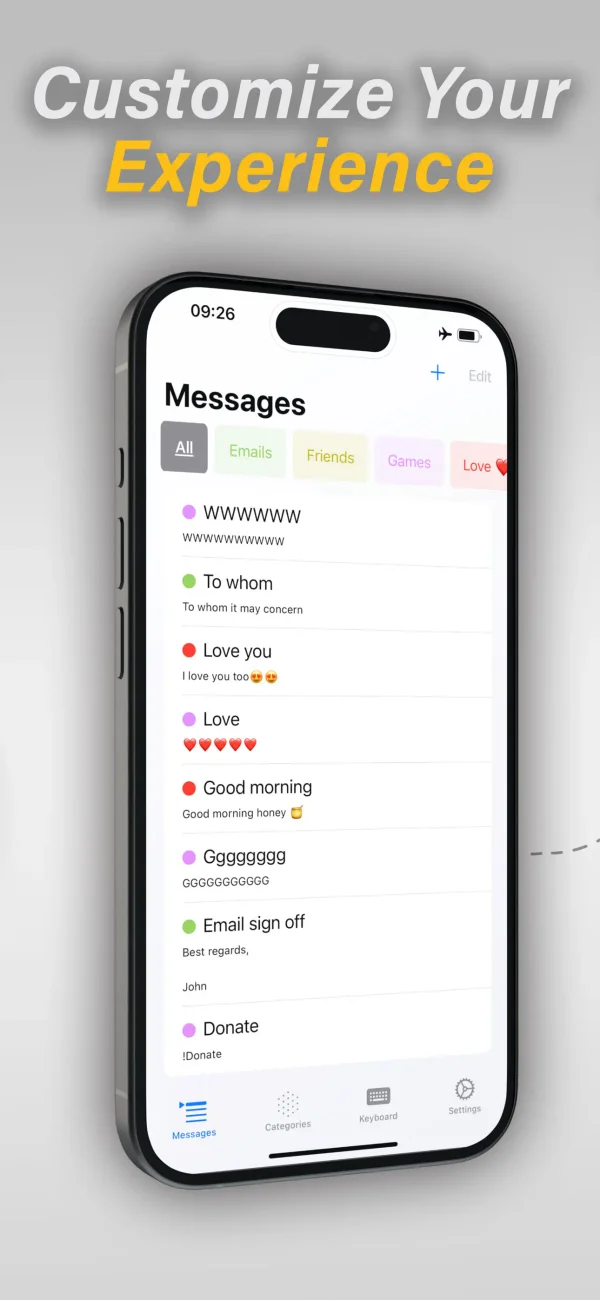


Giới thiệu
Nhà phát triển chưa cung cấp nội dung này bằng ngôn ngữ của bạn.
Stop typing the same thing twice. Save your go-to texts once, then paste any of them anywhere with one tap, straight from your keyboard.
No app switching. No copy-paste juggling. Tap, sent.
Quicki is a snippet keyboard: a text expander for people who answer the same messages all day. Sellers, streamers, support teams, freelancers, and anyone who keeps retyping their address, email signature or "on my way".
PERFECT FOR
• Replying to customer DMs on Instagram, WhatsApp, TikTok and Telegram
• Email templates and signatures
• Filling forms with your address, phone and email
• Stream chat commands, links and greetings
• Answering reviews and support tickets
• Birthday wishes, invites and the jokes you send every week
• Promo blurbs and social links
WHY QUICKI
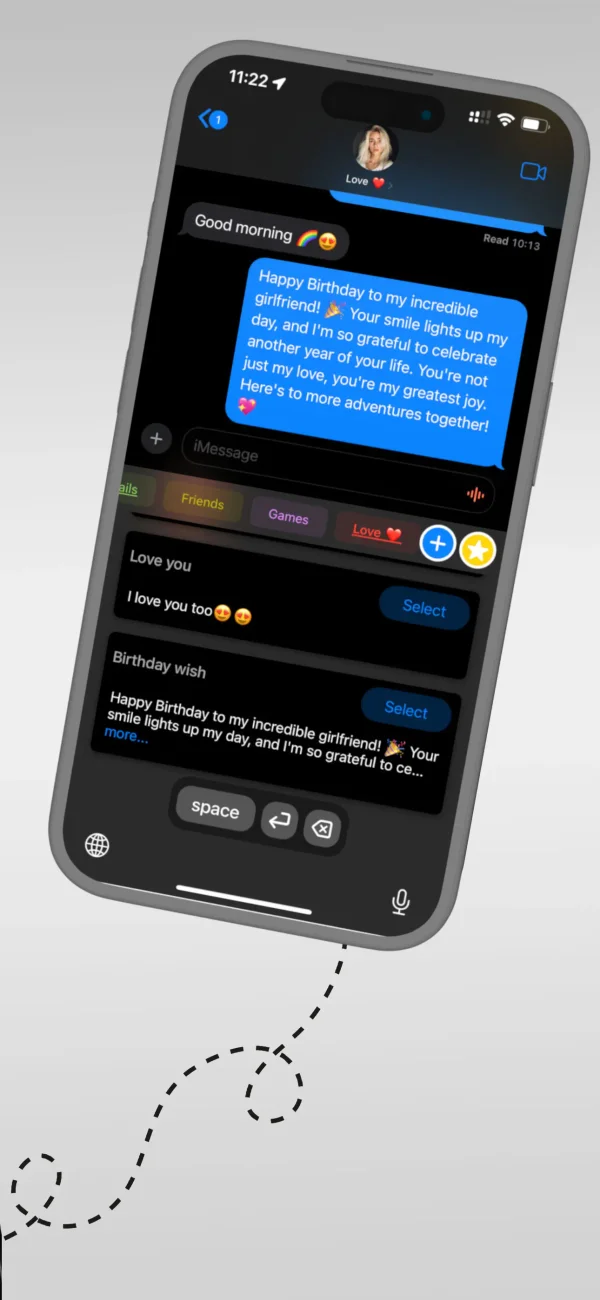
• One tap: open the Quicki keyboard, tap a snippet, it is pasted. No "copy" step.
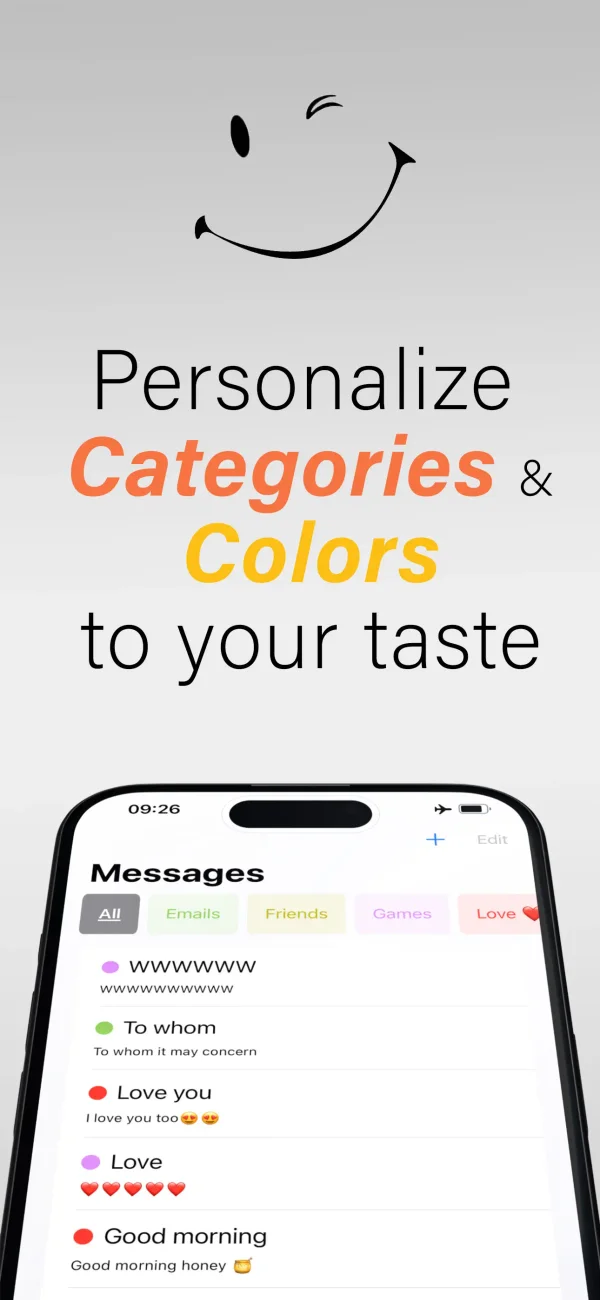
• Categories with colors: Shop DMs, Streaming, Support, Friends. Find the right text in a second.
• Works in every app: iMessage, WhatsApp, Instagram, Mail, Safari, Notes, anywhere a keyboard opens.
• Long texts, emojis and symbols supported. Preview any snippet before you send it.
• Fair price: monthly, quarterly or yearly. No weekly subscription.
HOW IT WORKS
1. Add your snippets in the Quicki app and sort them into categories.
2. Enable Quicki in Settings > General > Keyboard > Keyboards, and allow Full Access.
3. In any app, switch to the Quicki keyboard and tap a snippet. Done.
WHY FULL ACCESS
iOS only lets a keyboard read data shared by its own app when Full Access is on. Quicki uses it for one thing: reading the snippets you saved. Quicki does not log what you type, and your snippets are stored on your phone.
FREE VS PRO
Quicki is free to download. The free version includes 50 pastes and shows ads. After that, watch a short ad to get more pastes, or upgrade to Quicki Pro for unlimited pastes and no ads.
ADS AND PRIVACY
The free version shows ads from Google AdMob. If you allow tracking, ads may use your device's advertising identifier; if you decline, you still get ads, just not personalized ones. We use analytics and crash reports to improve the app. Quicki is a convenience tool, not a password manager: do not store passwords or card numbers in it.
QUICKI PRO (auto-renewing subscription)
• Pro Monthly: 4.99 USD per month
• Pro Quarterly: 9.99 USD per 3 months
• Pro Yearly: 19.99 USD per year
Prices may vary by country. Payment is charged to your Apple ID account at confirmation of purchase. The subscription renews automatically unless it is cancelled at least 24 hours before the end of the current period. Your account is charged for renewal within 24 hours before the end of the current period. Manage or cancel subscriptions in your App Store account settings after purchase.
Questions or ideas? developer@am1rft.com
Privacy Policy: https://quicki.am1rft.com/
Terms of Use: https://www.apple.com/legal/internet-services/itunes/dev/stdeula/
Có gì mới
Phiên bản 2.1.3 · 10/11/2026
Performance improvements.
Bug fixes.
Quyền riêng tư của ứng dụng
Những gì Amirmahdi Fathi khai báo trên App Store về cách ứng dụng này xử lý dữ liệu.
-
Dữ liệu được sử dụng để theo dõi bạn
Có thể được sử dụng để theo dõi bạn trên các ứng dụng và trang web do công ty khác sở hữu.
- Mã định danh
- Dữ liệu sử dụng
- Chẩn đoán
-
Dữ liệu liên kết với bạn
Có thể được thu thập và liên kết với danh tính của bạn.
- Mã định danh
- Dữ liệu sử dụng
- Chẩn đoán
Phương thức đảm bảo quyền riêng tư có thể khác nhau, chẳng hạn như tuỳ theo các tính năng bạn sử dụng hoặc độ tuổi của bạn.
Thông tin
- Người bán
- Amirmahdi Fathi
- Danh mục
- Hiệu Suất
- Phiên bản
- 2.1.3
- Cập nhật
- 10/11/2026
- Phát hành
- 04/04/2024
- Kích thước
- 15,1 MB
- Yêu cầu
- iOS 16.0 trở lên
- Độ tuổi
- 4+
- Giá
- Miễn phí
- Mua hàng trong ứng dụng
- Có
- Ngôn ngữ
- Tiếng Anh, Tiếng Ả Rập, Tiếng Hà Lan, Tiếng Pháp, Tiếng Đức, Hindi, Tiếng Ý, Tiếng Nhật, Persian, Tiếng Nga, Tiếng Trung Giản thể, Tiếng Tây Ban Nha + 4 ngôn ngữ khác
- Bản quyền
- © 2024-2026 Amirmahdi Fathi
Có thể bạn cũng thích
-
 Polymer - Clipboard ManagerHiệu Suất
-
 Pastey - Bảng tạm hiệu quả!Sao chép, chỉnh sửa, dán
-
 Paste It - Bộ Nhớ Bàn PhímTự động dán, phím tắt
-
 Paste Manager - Clipboard syncHiệu Suất
-
 Copy & Paste - Clipboard AppHiệu Suất
-
 Ditto – Clipboard CompanionHiệu Suất
-
 Copy 'Em + Paste KeyboardHiệu Suất
-
 Sao Chép Dán - Bộ Nhớ TạmSao chép nhanh và dễ dàng!
-
 Clipboard History+Hiệu Suất
-
 CopyNote: Keyboard ShortcutsHiệu Suất