SMB Server - ファイル共有
PCとワイヤレスでファイル共有
Được thiết kế cho iPhone, iPod touch
Miễn phí
- Độ tuổi4+
- Danh mụcTiện Ích
- Nhà phát triểnMaiji Saito
- Ngôn ngữTiếng Nhật
- Kích thước703,0 KB
Liên kết đến trang App Store chính thức
Download.org không lưu trữ tệp nào của SMB Server - ファイル共有. Nút này mở trang ứng dụng trên App Store, nơi Maiji Saito phát hành ứng dụng. Trang được kiểm tra lần cuối: 14/11/2026.
Ảnh chụp màn hình

Giới thiệu
Nhà phát triển chưa cung cấp nội dung này bằng ngôn ngữ của bạn.
SMB Server turns your iPhone into an SMB (file sharing) server. From a Mac or Windows PC on the same Wi-Fi network, you can open your iPhone's Documents folder directly and copy, move, or delete files. No
cables and no cloud required.
[Great for]
• Getting photos, documents, and music from your computer onto your iPhone without a cable
• Quickly pulling files off your iPhone onto your computer
• Moving files around at home without the cloud or an account
• Handling files the familiar way, from Finder on Mac or File Explorer on Windows
[Key Features]
• File server supporting SMB2 (connect from Mac, Windows, Linux, and other SMB clients)
• Start or stop the server with one tap
• Bonjour support: appears automatically in the Network list in Mac Finder
• Shows the IP address, port, and connection address (smb://...) you need, right on screen
• Guest access, or set a password to restrict who can connect
• Read-only mode (blocks writing and deleting from the computer)
• Automatically start the server when the app launches
• Keeps the screen from auto-locking while the server is running, so connections don't drop
• View a log of connections, disconnections, and file operations
• Shows the free space available in the shared folder
• Open the same Documents folder from the Files app, too
• Built-in guide for connecting, plus troubleshooting tips
[How to Use]
1. Open the app, tap "Agree and Start", then tap "Start"
(If asked to allow access to the local network, choose "Allow")
2. Enter the address shown on screen on your computer (YOUR_IP = the IP address shown in the app)
• Mac: In Finder, choose Go, then Connect to Server, and enter smb://YOUR_IP:4455/Documents
• Windows: Enter \\YOUR_IP@4455\Documents in the File Explorer address bar
• Other SMB clients, such as Linux, can connect too
3. Sign in as a guest, or with the password you set
Only this app's Documents folder is shared. The share name is fixed as "Documents".
[Can't Connect?]
• Make sure your iPhone and computer are on the same Wi-Fi network
• Keep the app's screen open on your iPhone
• Include the share name (/Documents) and the port number (4455) in the address
• Mac Finder keeps a window in its failed state after a sign-in failure. Close the Finder window, then choose "Connect to Server" again. If it still won't connect, delete the old password in Keychain Access
[Privacy]
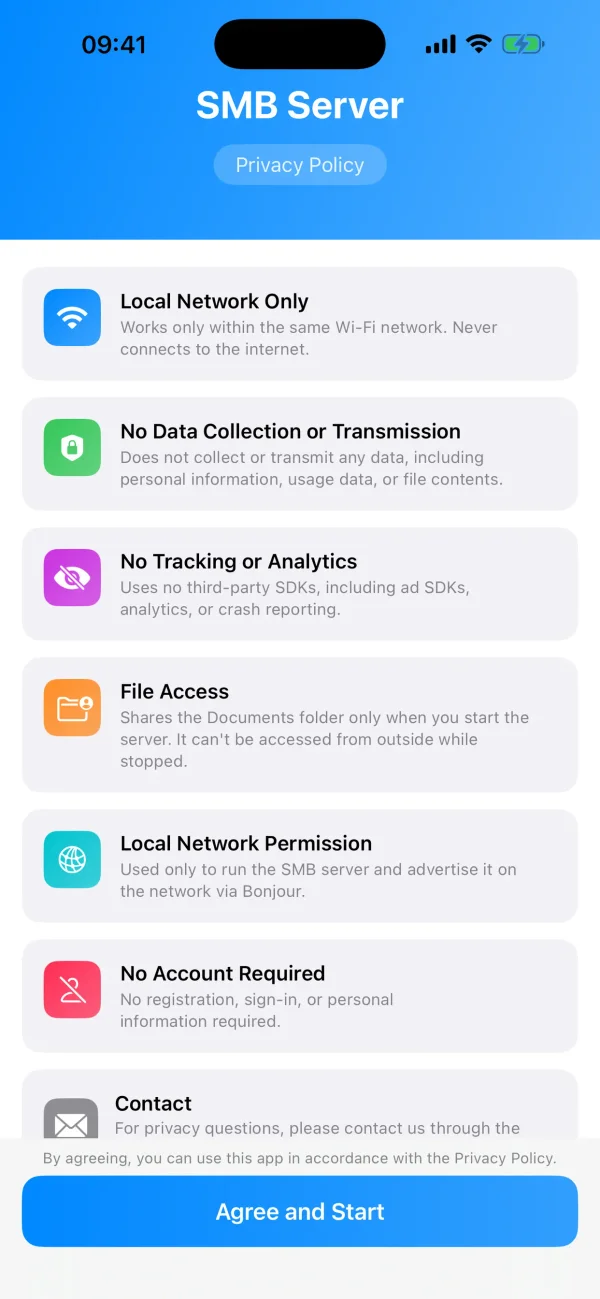
• Never connects to the internet. Works only within your local network (Wi-Fi)
• Does not collect or transmit personal information, usage data, or file contents
• Uses no third-party SDKs of any kind, including ads, analytics, or crash reporting
• No account registration or sign-in required
• Your Documents folder is shared only while the server is running. When stopped, it cannot be accessed from outside
[Notes]
• The server runs only while the app's screen is open. Closing the app disconnects all connections
• The SMB port number is 4455 (the standard port 445 is not available due to iOS restrictions). You need to specify the port when connecting
• With guest access, anyone on the same network can connect. Use it on a trusted network, or set a password
Có gì mới
Phiên bản 1.4 · 22/09/2026
Improved SMB compatibility and stability.
- Fixed files and folders not being deleted from some SMB clients (e.g. Linux smbclient / cifs).
- Fixed the share list not appearing in some clients.
- Fixed folder contents not displaying correctly in some clients.
- Minor internal fixes.
Quyền riêng tư của ứng dụng
Những gì Maiji Saito khai báo trên App Store về cách ứng dụng này xử lý dữ liệu.
-
Dữ liệu không được thu thập
Nhà phát triển không thu thập bất kỳ dữ liệu nào từ ứng dụng này.
Phương thức đảm bảo quyền riêng tư có thể khác nhau, chẳng hạn như tuỳ theo các tính năng bạn sử dụng hoặc độ tuổi của bạn.
Thông tin
- Người bán
- Maiji Saito
- Danh mục
- Tiện Ích
- Phiên bản
- 1.4
- Cập nhật
- 22/09/2026
- Phát hành
- 25/02/2026
- Kích thước
- 703,0 KB
- Yêu cầu
- iOS 15.6 trở lên
- Độ tuổi
- 4+
- Giá
- Miễn phí
- Ngôn ngữ
- Tiếng Nhật
- Bản quyền
- © premium_maiji
Có thể bạn cũng thích
-
 Easy FTP&SMB ClientTiện Ích
-
 Everdisk: Chuyển Tệp NhanhẢnh, clip và nhạc gửi tới PC
-
 PocketServer: Folder SharingTiện Ích
-
 SmbDAVTiện Ích
-
 Zwind - Máy chủ WebDAVSMB/NAS,RSS,WebMedia / WebDAV
-
 GoFTP ServerTiện Ích
-
 FTPManager Ứng dụng FTP & SFTPQuản lý, truyền và phát tệp
-
 FTP Client - FTP Server FilesTiện Ích
-
 NextinTiện Ích
-
 KaringTiện Ích