
SnapPlan
Credit event by AI
Được thiết kế cho iPhone, iPad
Miễn phí · Mua hàng trong ứng dụng
- Độ tuổi4+
- Danh mụcTiện Ích
- Nhà phát triển舟 方
- Ngôn ngữTiếng Anh+ 7 ngôn ngữ khác
- Kích thước2,6 MB
Liên kết đến trang App Store chính thức
Download.org không lưu trữ tệp nào của SnapPlan. Nút này mở trang ứng dụng trên App Store, nơi 舟 方 phát hành ứng dụng. Trang được kiểm tra lần cuối: 20/11/2026.
Ảnh chụp màn hình

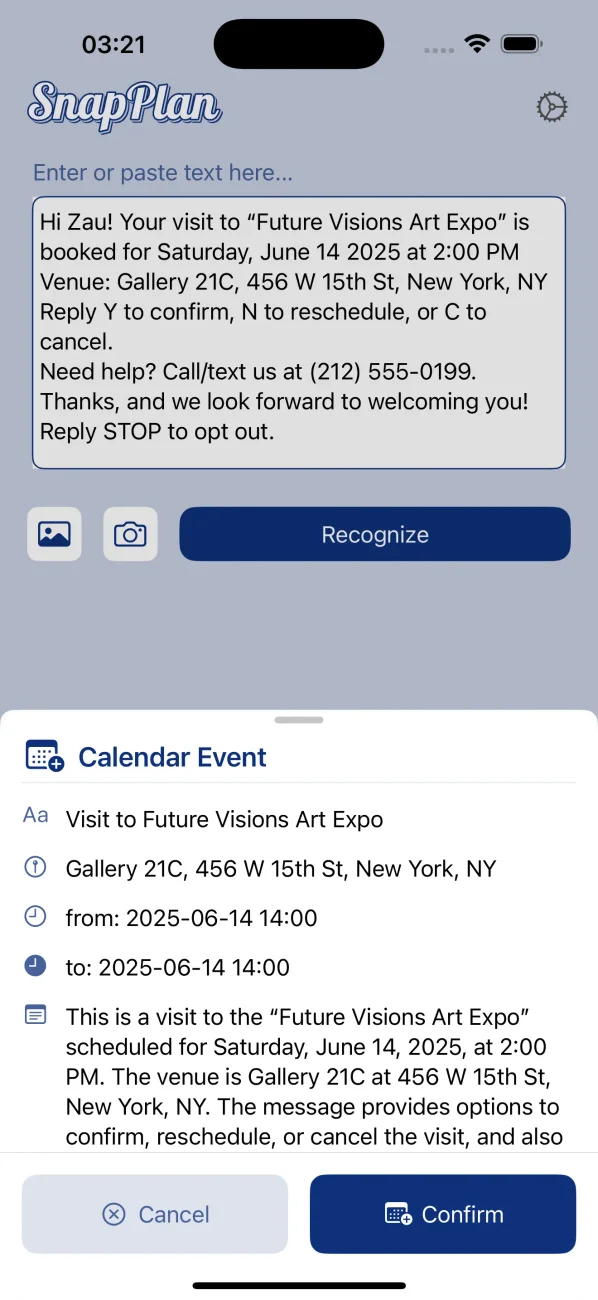

Giới thiệu
Nhà phát triển chưa cung cấp nội dung này bằng ngôn ngữ của bạn.
SnapPlan turns every photo and text snippet into a ready-to-go plan—so you never miss a date, deadline, or big idea again.
How it works
1. Snap a picture of an event poster, classroom whiteboard, conference badge, or any flyer.
2. Paste text you’ve copied from an email or SMS.
3. Import a screenshot of a chat invitation.
SnapPlan’s on-device AI instantly recognizes times, dates, and actionable words, then suggests a calendar event or a to-do in one tap. No typing, no copy-and-paste, no clutter.
Why you’ll love SnapPlan
* Photo-to-Plan Magic – Advanced image & text recognition converts posters, tickets, receipts, and slides into precise events or reminders.
* Natural-Language Parsing – Paste or type any sentence (“Lunch with Alex next Friday at 1 pm”) and watch it auto-populate your calendar.
* Smart Suggestions – Location autofill, time-zone awareness, and duplicate-event detection keep your schedule clean.
* Focus-Friendly Design – Minimalist interface, dark mode, Dynamic Island, and interactive notifications help you stay on track without distraction.
Whether you’re a student juggling classes, a professional capturing meeting notes, or a parent organizing family activities, SnapPlan is the fastest way to turn life’s snapshots—photos, emails, or chat screenshots—into actionable plans. Snap it. Plan it. Live it.
Terms of Use (EULA):
https://www.apple.com/legal/internet-services/itunes/dev/stdeula/
Có gì mới
Phiên bản 1.6 · 21/09/2025
We found that some users don’t like using Reminders to manage their to-dos. If you feel the same way, we now provide an “Event Preference” option. You can choose to add all events to the Calendar app, or let AI automatically decide whether to add them to Calendar or Reminders.
Quyền riêng tư của ứng dụng
Những gì 舟 方 khai báo trên App Store về cách ứng dụng này xử lý dữ liệu.
-
Dữ liệu không liên kết với bạn
Có thể được thu thập nhưng không liên kết với danh tính của bạn.
- Mã định danh
- Dữ liệu sử dụng
- Chẩn đoán
Phương thức đảm bảo quyền riêng tư có thể khác nhau, chẳng hạn như tuỳ theo các tính năng bạn sử dụng hoặc độ tuổi của bạn.
Thông tin
- Người bán
- 舟 方
- Danh mục
- Tiện Ích
- Phiên bản
- 1.6
- Cập nhật
- 21/09/2025
- Phát hành
- 10/05/2025
- Kích thước
- 2,6 MB
- Yêu cầu
- iOS 18.4 trở lên
- Độ tuổi
- 4+
- Giá
- Miễn phí
- Mua hàng trong ứng dụng
- Có
- Ngôn ngữ
- Tiếng Anh, Tiếng Pháp, Tiếng Đức, Tiếng Ý, Tiếng Nhật, Tiếng Trung Giản thể, Tiếng Tây Ban Nha, Tiếng Trung Phồn thể
- Bản quyền
- © 2025 neoros.ai. All rights reserved.
Có thể bạn cũng thích
-
 Screenshot CalendarTiện Ích
-
 Tellkey: Voice KeyboardTiện Ích
-
 Real-Time TranslationTiện Ích
-
 Voice Diary - Audio TranscribeTiện Ích
-
 PropNex Project SuiteTiện Ích
-
 Podcast Khử Tiếng Ồn ReducerAI Làm Sạch Âm Thanh & Video
-
 Podcast Cleaner AI Âm Thanh RõKhử Tiếng Ồn, Giọng Trong Trẻo
-
 viaim - Listen・Think・ActTiện Ích
-
 AudioPen: AI Voice to TextTiện Ích
-
 Sao chép và dán bàn phímTự động dán & Bảng tạm dễ dàng