
- Age rating4+
- CategoryUtilities
- Developer舟 方
- LanguagesEnglish+ 7 more
- Size2.6 MB
Links to the official App Store page
Download.org hosts no file of SnapPlan. The button opens its official App Store page, published by 舟 方. Listing last checked on Nov 20, 2026.
Screenshots


About
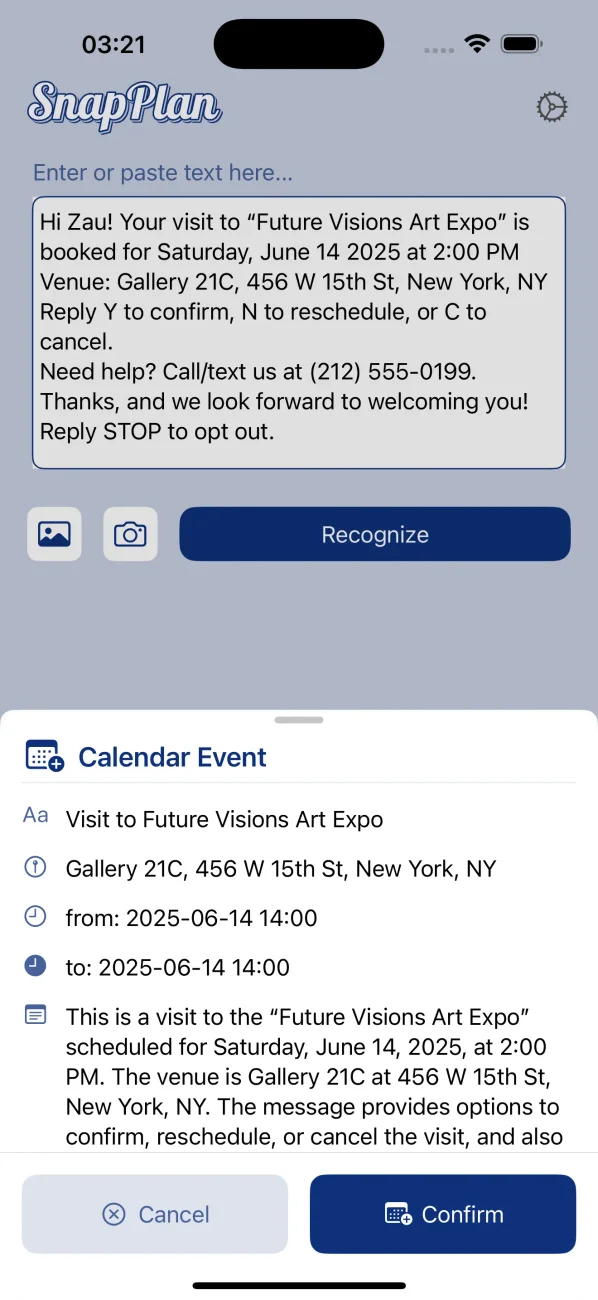
SnapPlan turns every photo and text snippet into a ready-to-go plan—so you never miss a date, deadline, or big idea again.
How it works
1. Snap a picture of an event poster, classroom whiteboard, conference badge, or any flyer.
2. Paste text you’ve copied from an email or SMS.
3. Import a screenshot of a chat invitation.
SnapPlan’s on-device AI instantly recognizes times, dates, and actionable words, then suggests a calendar event or a to-do in one tap. No typing, no copy-and-paste, no clutter.
Why you’ll love SnapPlan
* Photo-to-Plan Magic – Advanced image & text recognition converts posters, tickets, receipts, and slides into precise events or reminders.
* Natural-Language Parsing – Paste or type any sentence (“Lunch with Alex next Friday at 1 pm”) and watch it auto-populate your calendar.
* Smart Suggestions – Location autofill, time-zone awareness, and duplicate-event detection keep your schedule clean.
* Focus-Friendly Design – Minimalist interface, dark mode, Dynamic Island, and interactive notifications help you stay on track without distraction.
Whether you’re a student juggling classes, a professional capturing meeting notes, or a parent organizing family activities, SnapPlan is the fastest way to turn life’s snapshots—photos, emails, or chat screenshots—into actionable plans. Snap it. Plan it. Live it.
Terms of Use (EULA):
https://www.apple.com/legal/internet-services/itunes/dev/stdeula/
What’s new
Version 1.6 · Sep 21, 2025
We found that some users don’t like using Reminders to manage their to-dos. If you feel the same way, we now provide an “Event Preference” option. You can choose to add all events to the Calendar app, or let AI automatically decide whether to add them to Calendar or Reminders.
App privacy
What 舟 方 declares on the App Store about how this app handles data.
-
Data not linked to you
May be collected but is not linked to your identity.
- Identifiers
- Usage data
- Diagnostics
Privacy practices may vary, for example with the features you use or your age.
Information
- Seller
- 舟 方
- Category
- Utilities
- Version
- 1.6
- Updated
- Sep 21, 2025
- Released
- May 10, 2025
- Size
- 2.6 MB
- Requires
- iOS 18.4 or later
- Age rating
- 4+
- Price
- Free
- In-app purchases
- Yes
- Languages
- English, French, German, Italian, Japanese, Simplified Chinese, Spanish, Traditional Chinese
- Copyright
- © 2025 neoros.ai. All rights reserved.
You might also like
-
 Screenshot CalendarScreenshot to calendar event
-
 Tellkey: Voice KeyboardVoice typing in any app
-
 Real-Time TranslationReal-time voice translation
-
 Voice Diary - Audio TranscribeRecord moments. Keep memories.
-
 PropNex Project SuiteUtilities
-
 Audio Cleaner: Podcast DenoiseAI Noise Reducer & Voice Fix
-
 Podcast Cleaner: Noise ReducerDenoise Audio & Voice Enhancer
-
 viaim - Listen・Think・ActAI Agent Earbuds
-
 AudioPen: AI Voice to TextDictation Keyboard & Notes
-
 Copy And Paste Keyboard +Auto Pasting & Easy Clipboard