- Độ tuổi4+
- Danh mụcTài Chính
- Nhà phát triểnThe Software Experience
- Ngôn ngữTiếng Anh
- Kích thước1,5 MB
Liên kết đến trang App Store chính thức
Download.org không lưu trữ tệp nào của SplitCheck Bill Split. Nút này mở trang ứng dụng trên App Store, nơi The Software Experience phát hành ứng dụng. Trang được kiểm tra lần cuối: 15/11/2026.
Ảnh chụp màn hình


Giới thiệu
Nhà phát triển chưa cung cấp nội dung này bằng ngôn ngữ của bạn.
SplitCheck – Check Splitter / Tip Calculator
There may be other apps that allow you to split a check among different parties, but this app was designed to allow you to quickly enter your check and get the results fast and accurately. It does one thing and does it well. You don’t want your bother-in-law leaving the table before he knows what he owes. No more wondering why we’re still $5.00 short.
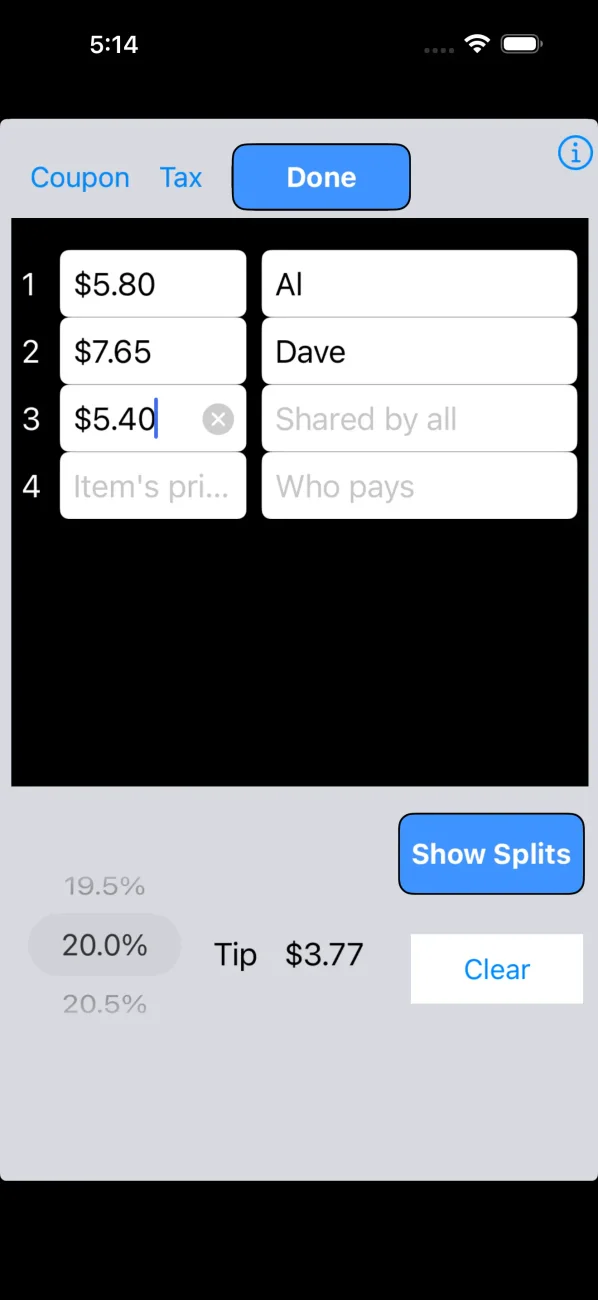
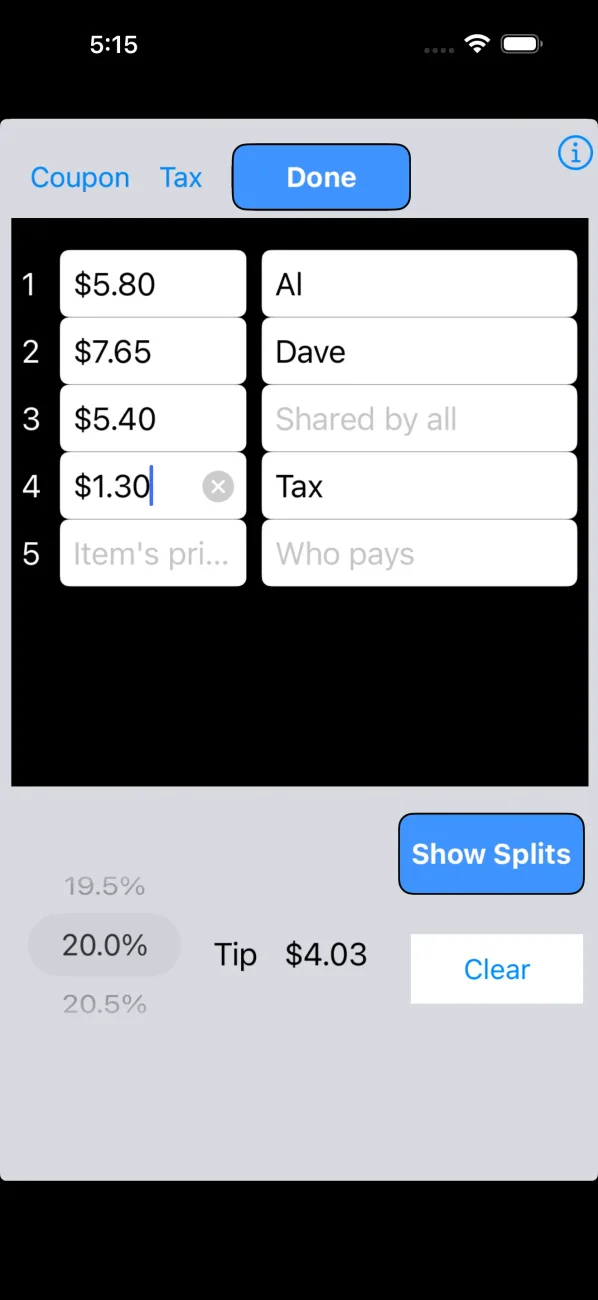
Enter items from your restaurant check into SplitCheck. As you enter an item’s price, another line is automatically entered below, ready for you to touch and enter that next item. The goal of the data entry method was to minimize ‘touches’ so data can be entered fast and easily. Enter who purchased the item next to the price of the item, either as you go or after all the items have been entered. Use initials, names, or numbers to make the entry easy. (It is case insensitive to make it even easier.) If an item was split, enter the same names or initials separated by a space. Depending on how many shared items are entered 50 or more payees can be entered! If an item is split among all parties, you can leave the payee’s box blank and the program assumes that the item is to be split among all uniquely entered payees.
Touch the ‘Tax’ button to enter the tax amount. The tax is proportionately calculated and applied based on the amounts each person spent.
Use the spinner to select a tip amount. The tip for each person is shown separately.
You can even apply a coupon value to one person or split among two or more people. Enter the value of the coupon and press ‘Coupon’. As with other entries, the value of the coupon can be assigned to one or more payees. (The tip will be calculated based on the bill without the coupon value subtracted.)
At any time touch ‘Show Splits’ to display how much each payee owes. The results are sorted by name with the bill, tip and total displayed for each. Touching ‘Details’ displays the breakdown for each payee.
1.5
Initial Release
Có gì mới
Phiên bản 1.7 · 23/12/2025
Updates for latest IOS versions.
Quyền riêng tư của ứng dụng
Những gì The Software Experience khai báo trên App Store về cách ứng dụng này xử lý dữ liệu.
-
Dữ liệu không được thu thập
Nhà phát triển không thu thập bất kỳ dữ liệu nào từ ứng dụng này.
Phương thức đảm bảo quyền riêng tư có thể khác nhau, chẳng hạn như tuỳ theo các tính năng bạn sử dụng hoặc độ tuổi của bạn.
Thông tin
- Người bán
- Alan Floeter
- Danh mục
- Tài Chính
- Phiên bản
- 1.7
- Cập nhật
- 23/12/2025
- Phát hành
- 11/02/2012
- Kích thước
- 1,5 MB
- Yêu cầu
- iOS 15.6 trở lên
- Độ tuổi
- 4+
- Giá
- 29.000đ
- Ngôn ngữ
- Tiếng Anh
- Bản quyền
- © 2022 The Software Experience, ltd
Có thể bạn cũng thích
-
 PocketDinerTài Chính
-
 U-SplitTài Chính
-
 KoTab: Scan. Claim. Settle.Tài Chính
-
 Famzam: Split Bills & ExpensesTài Chính
-
 Split Check - bills & receiptsTài Chính
-
 Check Mate – Split billsTài Chính
-
 Treasury: AI Budgeting & BillsTài Chính
-
 IOU: Tách Hóa Đơn & Chi PhíChia và thanh toán
-
 Tip Calculator - TipCalcTài Chính
-
 Chipp: Split Bills & ExpensesTài Chính