
AntiFreeze 1.01 for Windows
Ctrl-Alt-Win-Start when frozen to kill the problem process and regain control
Screenshots
Description
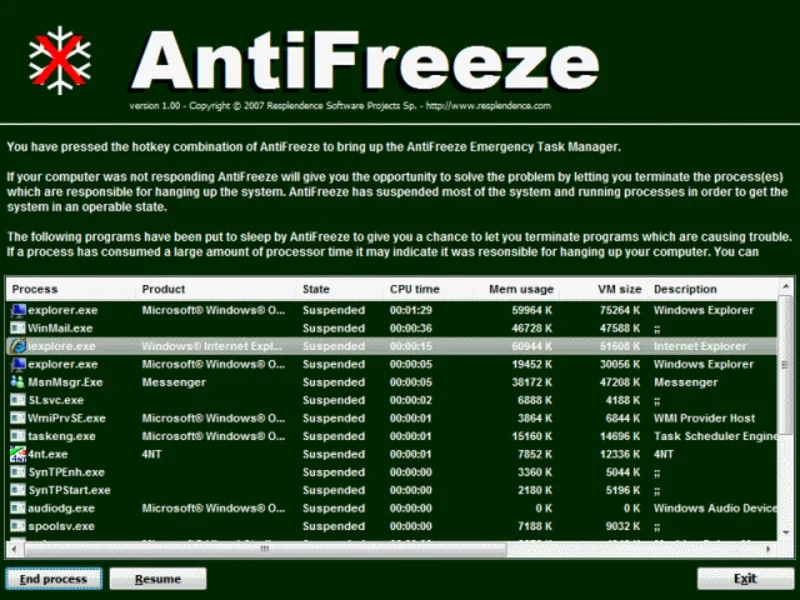
AntiFreeze gives you a way back into Windows when the system has frozen because too many resources are being used at once. While the computer is stuck, you hold down Ctrl-Alt-Win-Start. That brings up a window that works like Task Manager. From there you remove the programs or processes causing the problem, and AntiFreeze terminates the offending process and restores control of the system. It's a free application for Windows.
The window that appears is close in layout and behavior to the familiar Task Manager, so you can scan what's running and pick out the process that's hogging resources. Ending it is the whole job.
AntiFreeze comes from Resplendence Software.
Download files
28f3d4d2098a87579268669974071f5050efa48dc1e7aa505e758999d5f713ee
No digital signatured6c854f885159da685d2195d98aa6949f341560bb628081b8ffa5fef6b5bd9c6
System requirements
Available on:
Minimum OS:
Windows Windows Vista or later
Additional information
Developer
Latest release
Size
Category
File type
SHA-256
28f3d4d2098a87579268669974071f5050efa48dc1e7aa505e758999d5f713ee