

Apple Devices 1.1792.39682.0 for Windows
Connect an Apple device to a Windows PC to back up, restore and manage it
You are on macOS — this is the Windows version. See the macOS version
Screenshots
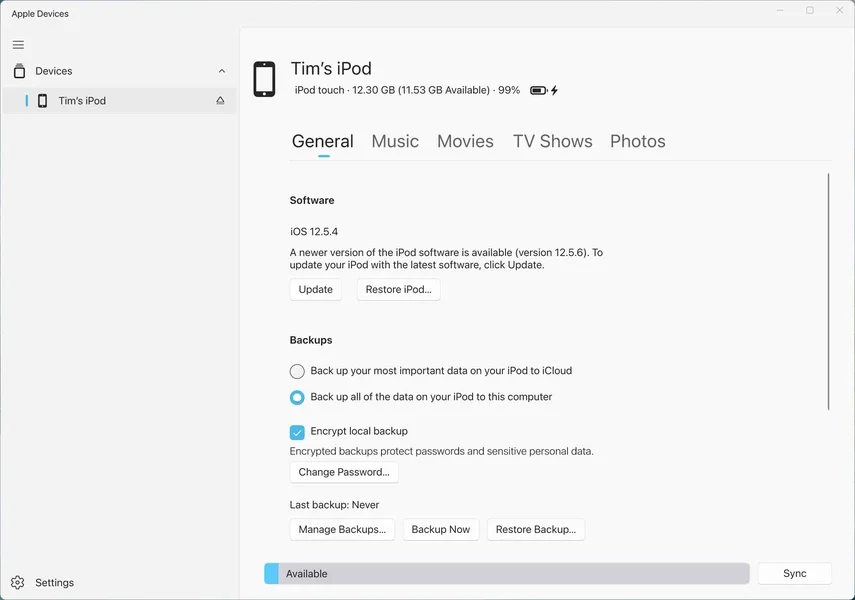
Description
Plug an Apple device into a Windows PC with a USB cable, and Apple Devices recognizes it. From there you can back up the phone's information, content and files to the PC, so photos and notes stay put. Backups can be protected with a password, and they often take a while, especially when the device has a lot of memory.
It is Apple's official Windows program, and it lets you use Apple devices on Windows without iTunes. You can manage the device's content and functions from the PC, restore it to factory settings, and see device information such as the running version and available updates.
The interface is simple and minimalistic.
Download files
bc748bdaf349501d6790046c97d351b8f09d2ad6d2e368691fd79761313abad0
Signed by 5BD5593D-A41B-4F89-884E-B4F3E0FBAA75 · valid until Oct 25, 2026fbfac18d66c304ab3fcf2ecc5b8178764e1ecf40c95104ba5045476ff43a4602
Signed by 5BD5593D-A41B-4F89-884E-B4F3E0FBAA75 · valid until Sep 9, 20262baa01f99334f74c324a368f19781ed41a57fbb652633213709bdda9b271b32b
Signed by 5BD5593D-A41B-4F89-884E-B4F3E0FBAA75 · valid until Mar 29, 2026c82eb0104fab7f710e0092ee5443bc4a879eeff84b6921c0daedecab081c4050
Signed by 5BD5593D-A41B-4F89-884E-B4F3E0FBAA75 · valid until Mar 1, 2026bd9c9d4f003f09d38b0e0be3fa2c0c9f9e9441549497e0cc4107a4e6741bbcde
Signed by 5BD5593D-A41B-4F89-884E-B4F3E0FBAA75 · valid until Jan 13, 2026System requirements
Available on:
Architecture:
ARM64
Additional information
Developer
Latest release
Size
Category
File type
SHA-256
bc748bdaf349501d6790046c97d351b8f09d2ad6d2e368691fd79761313abad0