
CoolRinger 1.0 for Windows
SHA-256 listed
Cuts a section of an MP3 into a ringtone from the right-click menu
All ages
Age rating
Screenshots
Description
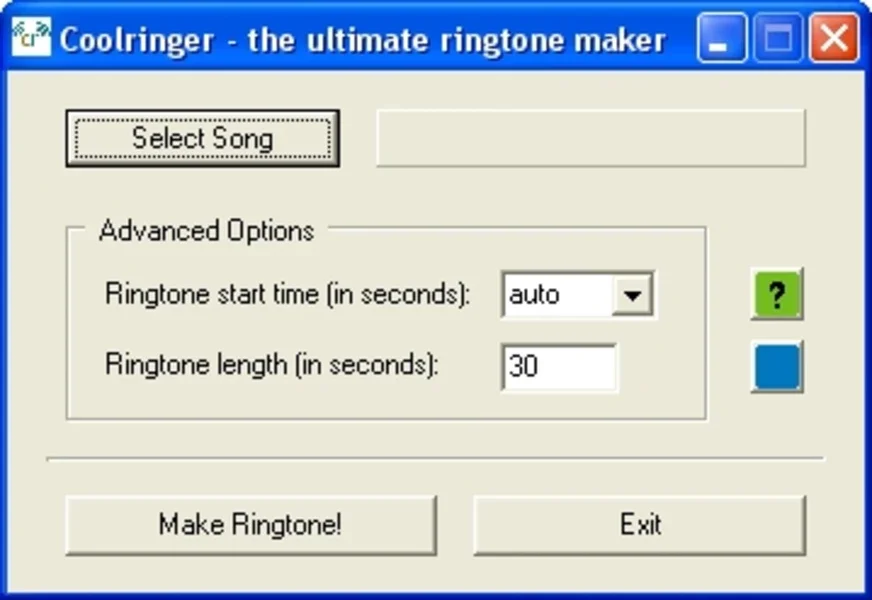
CoolRinger cuts a section out of an MP3 and saves it as a ringtone for a mobile device. Select the file, right-click, and choose 'Make a mobile ringtone'. The program adds this entry to the Windows shell, so the job starts from the context menu.
You enter two values: where the melody starts and how long the ringtone lasts. The value 'auto' takes the beginning of the song as the start position. The duration defaults to 30 seconds and can be set higher or lower. CoolRinger extracts the part of the track you specified, and the ringtone lands in the same folder as the source file.
The ringtones also work as Skype ringtones.
Download files
File1.0EXE
Version1.0
ReleasedOct 25, 2006
Size3.6 MB
SHA-256
Get
0c7d36d17ad8443939af72f7d0311f8aea1f13025ae194265afbb41a76bb5dc4
System requirements
Available on:
Additional information
Developer
Latest release
1.0 · Oct 25, 2006
Size
3.6 MB
Category
File type
EXE
SHA-256
0c7d36d17ad8443939af72f7d0311f8aea1f13025ae194265afbb41a76bb5dc4