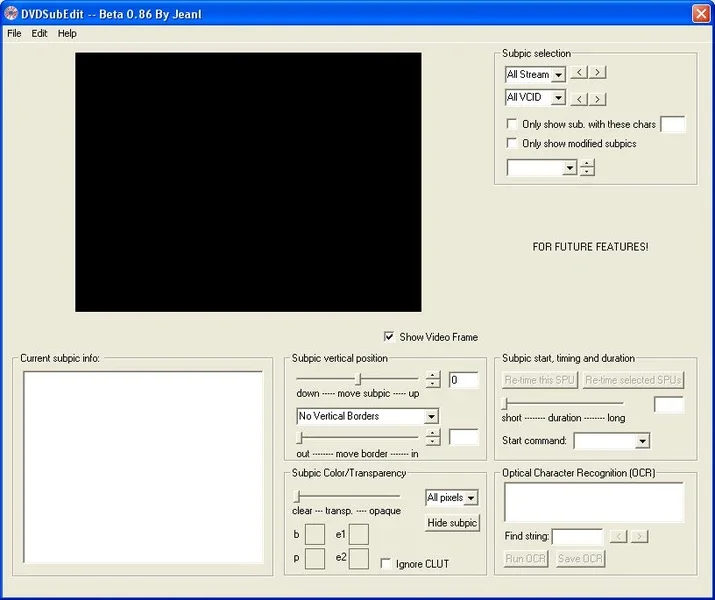

Screenshots
Description
Point DVDSubEdit at a VOB file and it pulls out everything inside, showing the elements and their configuration settings. Subtitles can be changed in place, without preparing or converting them beforehand. Once the data is out, background color, timing and format are all editable.
It helps when a subtitle file taken from a DVD does not fit its VOB file, or when you simply want to adjust it. Changes go back without a separate reauthoring step.
Download files
Filedvdsubedit-1-5-1.zipZIP
Version1.5.1
ReleasedJul 30, 2026
Size809.4 KB
SHA-256
Get
d350c8aadcea1e1ac538af562363b3c4987fb10251b60494e6e23d9afcbe94d0
File1.52ZIP
Version1.52
ReleasedMay 23, 2023
Size809.4 KB
SHA-256
Get
d350c8aadcea1e1ac538af562363b3c4987fb10251b60494e6e23d9afcbe94d0
Filedvdsubedit-1.34.zipZIP
Version1.34
ReleasedOct 6, 2006
Size513.8 KB
SHA-256
Get
91c8fb4ecec84cc2e1e6560a4251ce2c0af5c1968e57c75f061723e64c8cc58b
Filedvdsubedit-1.5.zipZIP
Version1.5
ReleasedUnknown
Size594.5 KB
SHA-256
Get
672c660280036221d624c5efc99fbe1291996cf73b543d31e1e51da0312729cd
System requirements
Available on:
Minimum OS:
Windows XP or later
Additional information
Developer
Latest release
1.5.1 · Jul 30, 2026
Size
809.4 KB
File type
ZIP
SHA-256
d350c8aadcea1e1ac538af562363b3c4987fb10251b60494e6e23d9afcbe94d0