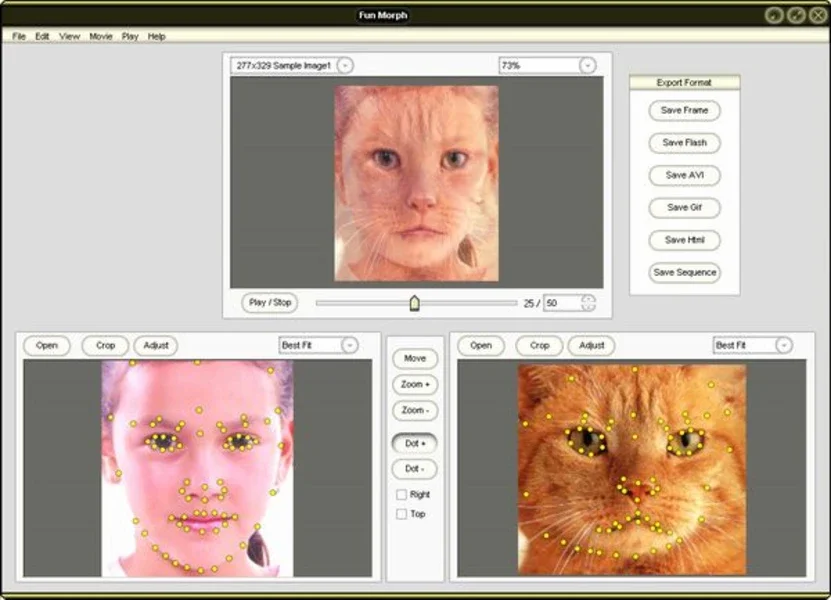

Screenshots
Description
Load two photographs, mark keypoints on each one, and Fun Morph works out the frames in between. The keypoints are usually the eyes, mouth and nose, and once they are placed the program handles the rest of the morph. Morphing itself is just a transformation effect between two pictures. It often gets used to show how time has affected a person. The finished animation comes out in AVI, GIF or SWF format.
Fun Morph includes several options for resizing photographs that arrive in different file formats.
It runs on Windows.
Download files
Filefun-morph-3.0.exeEXE
Version3.0
ReleasedMar 9, 2017
Size2.5 MB
SHA-256
Get
ab77716a424908ddb057fb1e5a9300f5a7c3f34e3e0e350d3028bd462e63dec8
No digital signatureFile5.62EXE
Version5.62
ReleasedJun 12, 2007
Size2.5 MB
SHA-256
Get
3d8eb3e09058c28ea806a6744502329f9343c55574d564480d3f91789c72d6bd
No digital signatureSystem requirements
Available on:
Minimum OS:
Windows Windows 2000 or later
Additional information
Developer
Latest release
3.0 · Mar 9, 2017
Size
2.5 MB
Category
File type
EXE
SHA-256
ab77716a424908ddb057fb1e5a9300f5a7c3f34e3e0e350d3028bd462e63dec8
Digital signature
No digital signature