
Funny Voice 1.6 for Windows
SHA-256 listed
Real-time voice changer with a recording option
All ages
Age rating
Screenshots
Description
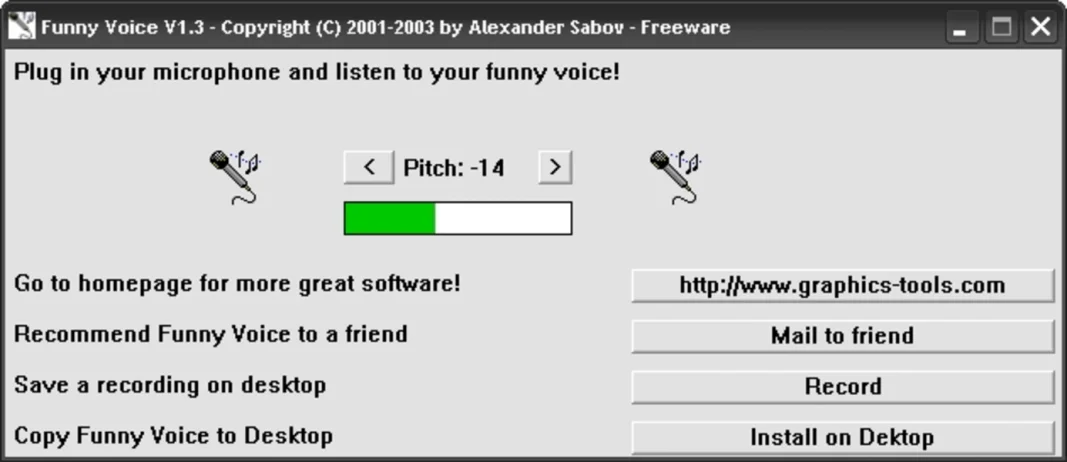
Plug in a microphone, turn on the speakers, and Funny Voice changes your voice as you speak. The scroll button does the work: moving the bar right pushes the voice toward a cartoon sound, and moving it left makes it scarier, in the direction of a horror movie.
The change happens in real time, so you hear the result while you talk rather than after. A recording option saves performances for later. The application is lightweight, and both the horror and cartoon ends of the bar are available from the same control.
It runs on Windows.
Download files
FileFunny_Voice_V1.6.exeEXE
Version1.6
ReleasedJul 23, 2024
Size950.0 KB
SHA-256
Get
20e554a8694f89f56cb0058b4883deddf003b7a95892c5dcf11dd1ce33ee06d8
No digital signatureFile1.4EXE
Version1.4
ReleasedAug 12, 2016
Size513.8 KB
SHA-256
Get
a8264a09fd6db2e5bcf5ac9182710e3c9ef16ec9131d290fb42a4295d9ea1c29
No digital signatureFilefunny-voice-1.3.exeEXE
Version1.3
ReleasedJul 22, 2005
Size41.5 KB
SHA-256
Get
012b40924ce3b9867c6b84d696d35ab4f810ee15d6c387fcd3e8845f4848a3d1
Filefunny-voice-1.3.exeEXE
Version1.3
ReleasedUnknown
Size41.5 KB
SHA-256
Get
590e5f5ad8e5c4ac964cf73ddb997cab99ce7b1aa32e59b8d83e7ff71027de5e
No digital signatureSystem requirements
Available on:
Minimum OS:
Windows Windows 98 SE or later
Additional information
Developer
Latest release
1.6 · Jul 23, 2024
Size
950.0 KB
Category
File type
EXE
SHA-256
20e554a8694f89f56cb0058b4883deddf003b7a95892c5dcf11dd1ce33ee06d8
Digital signature
No digital signature