
InSSIDer 5.6.1 for Windows
Scans nearby Wi-Fi networks live and shows signal, channel and security
You are on macOS — this is the Windows version. See the macOS version
Screenshots
Description
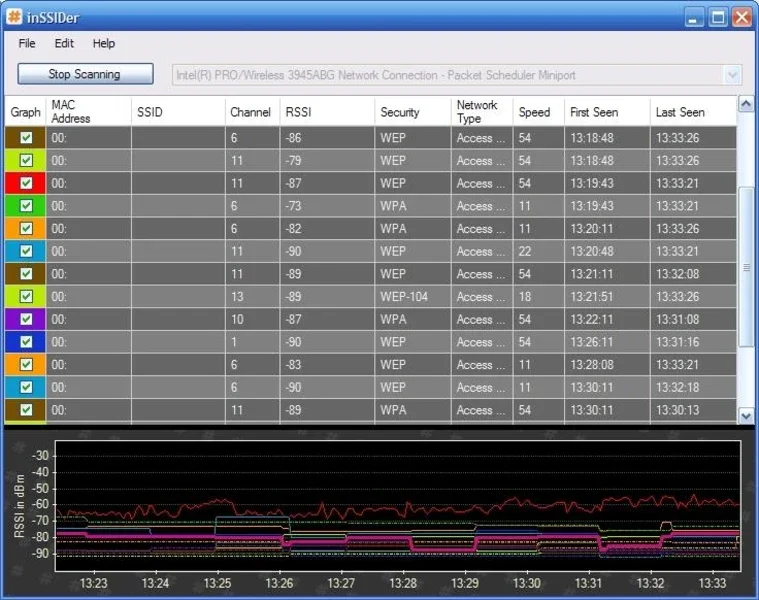
InSSIDer scans the wireless networks around you and shows what it finds. Once it is running, the data updates in real time, so you can watch a connection as conditions change.
Each network it finds on the accessible channels of your network card gets a bar graph of signal strength and location. The same entry lists the MAC address, ESSID, channel and security type, WEP or WAP among them. That is enough to see which channel is crowded and which access point is where. It can help troubleshoot a Wi-Fi connection, and it can help get the most out of a wireless network. There is no configuration to do first; start it and the scan begins. It does need Microsoft .NET Framework 2.0 or a later version installed.
The program is free and runs on Windows. The current version is 5.6.1.
Download files
948a2cde91190214a83a3d6e91d77c45315f390b88390b1f43446a4b4eb5277f
Signed by Oscium LLC · valid until Apr 1, 2028a26e831e26807644bae1b84f0a2bf28dcd5c96c076f0e87700892dc4fd1efc0b
7697202d06072a5a41d5a839146cd18e784635e50958cad85c39a7685e531eb4
2a311e8cf834e008c58cb1dc3f54e217e03948ee738bd8ca9740e7ede103b682
No digital signature8cf5b87b1a8ec5a2a94267b147619ab83697556775d07a1d9b104750a420d573
Signed by MetaGeek, LLC · valid until Jun 11, 2021System requirements
Available on:
Minimum OS:
Windows XP or later
Additional information
Developer
Latest release
Size
Category
File type
SHA-256
948a2cde91190214a83a3d6e91d77c45315f390b88390b1f43446a4b4eb5277f