
Monitorian 4.16.14 for Windows
SHA-256 listed
Controls brightness on every connected monitor, separately or together
All ages
Age rating
Screenshots
Description
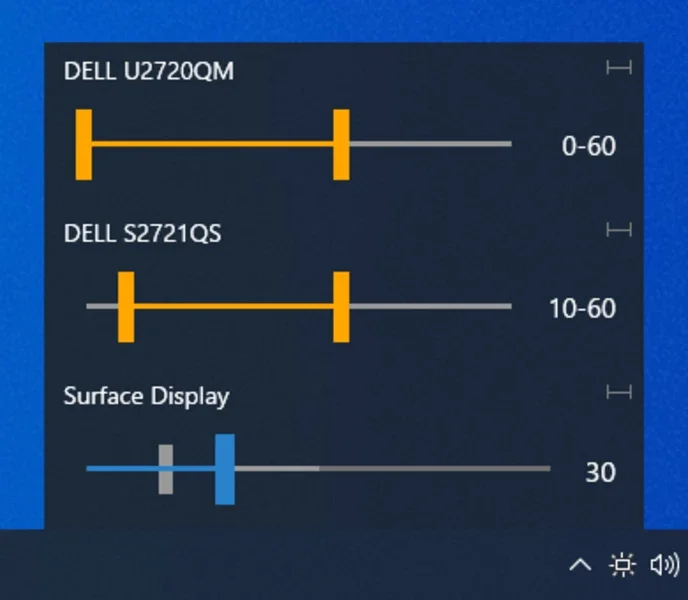
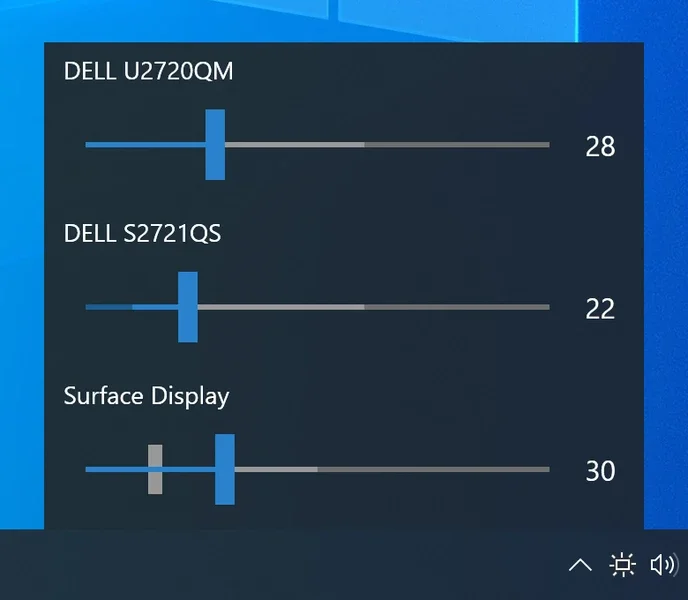
Monitorian adjusts the brightness of all screens connected to a PC, so you don't have to change each monitor's settings manually one by one. It gives a detailed view of each external monitor, and if the machine is a laptop it also shows the PC's screen. Several adjustment bars sit on the screen, one per display. You can change one monitor's brightness while keeping the others as they are, or move them all together. Changes appear in real time as you drag a bar. The interface adapts to the computer's environment. It is a Windows program.
Download files
Filemonitorian-4-16-14.zipZIP
Version4.16.14
ReleasedNov 19, 2026
Size560.5 KB
SHA-256
Get
0a84fddaa0eee1f5a88a37981b0dcd59d4fc263256430e7d8862c70a2f8bef4a
Filemonitorian-4-16-11.zipZIP
Version4.16.11
ReleasedNov 8, 2026
Size634.1 KB
SHA-256
Get
ff02e95a955d6aa2e83b20b11434b21f3c8659cb78caf06b719351e5ae8e2855
Filemonitorian-4-16-9.zipZIP
Version4.16.9
ReleasedNov 2, 2026
Size635.3 KB
SHA-256
Get
a01bee830a14935d9e862b673af6e28ce30f96d141c2d2699141a3412dfa69b0
Filemonitorian-4-16-8.zipZIP
Version4.16.8
ReleasedOct 31, 2026
Size634.8 KB
SHA-256
Get
6f00297ce4493cf777894304b304eb526d969e46c594854edb31520d3970292e
Filemonitorian-4-16-2.zipZIP
Version4.16.2
ReleasedOct 12, 2026
Size633.4 KB
SHA-256
Get
b1fa6ad0698c075ba0026bcceeb3c90f53debf73054d1a69baa0bd38352ae4f2
System requirements
Available on:
Additional information
Developer
Latest release
4.16.14 · Nov 19, 2026
Size
560.5 KB
Category
File type
ZIP
SHA-256
0a84fddaa0eee1f5a88a37981b0dcd59d4fc263256430e7d8862c70a2f8bef4a