
Nero InfoTool 5 for Windows
Checks what an optical drive can read and write, and which discs it takes
Screenshots
Description
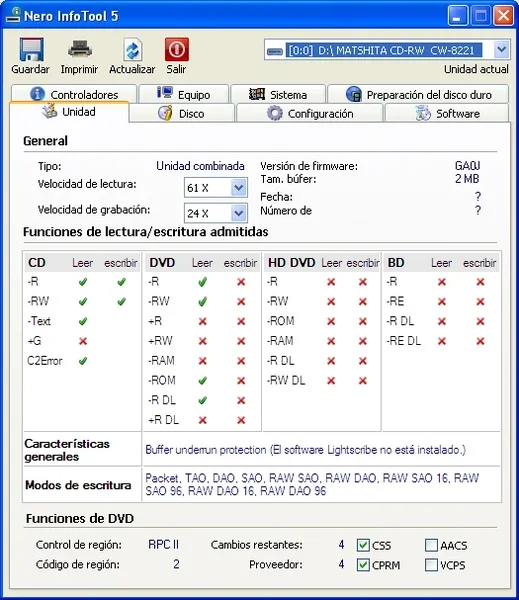
Nero InfoTool tells you what an optical drive can actually do. It shows which disc types a CD, DVD, HD-DVD or Blu-Ray player accepts, and it lists the read and write functions supported on each system. Writing modes get their own rundown, so you can see which ones the unit is compatible with. The tool also reports the type of firmware the drive uses and its buffer size, along with reading and recording speed.
The format support is spelled out in detail. For DVDs that means DVD-R, DVD-RW, DVD+R, DVD+RW, DVD-RAM and ROM, plus the dual-layer variants DVD-R DL and DVD+R DL. Blu-Ray coverage runs from BD-R and BD-RE to BD-R DL and BD-RE DL. On the HD DVD side the list covers HD DVD-R, HD DVD-RW, HD DVD-ROM and HD DVD-RAM, along with HD DVD-R DL and HD DVD-RW DL. CD functions are listed too, among them CD-R, CD-RW, CD-TEXT, CD+G and C2Error.
Features beyond the disc types are shown as well, such as underrun protection and Lightscribe support. It runs on Windows.
Download files
47d1a795060a23d683a80484c4e2401a79d1f21e39bb29f8294e3a38ca805e3d
System requirements
Available on:
Additional information
Developer
Latest release
Size
File type
SHA-256
47d1a795060a23d683a80484c4e2401a79d1f21e39bb29f8294e3a38ca805e3d