RAMExpert 1.23.0.47 for Windows
Shows RAM installed, bay usage and motherboard limits, with export
Screenshots
Description
RAMExpert is a Windows utility for checking what memory is installed in a PC. It reports the basic details of the RAM and tracks how much of it is in use.
Slots and memory codes
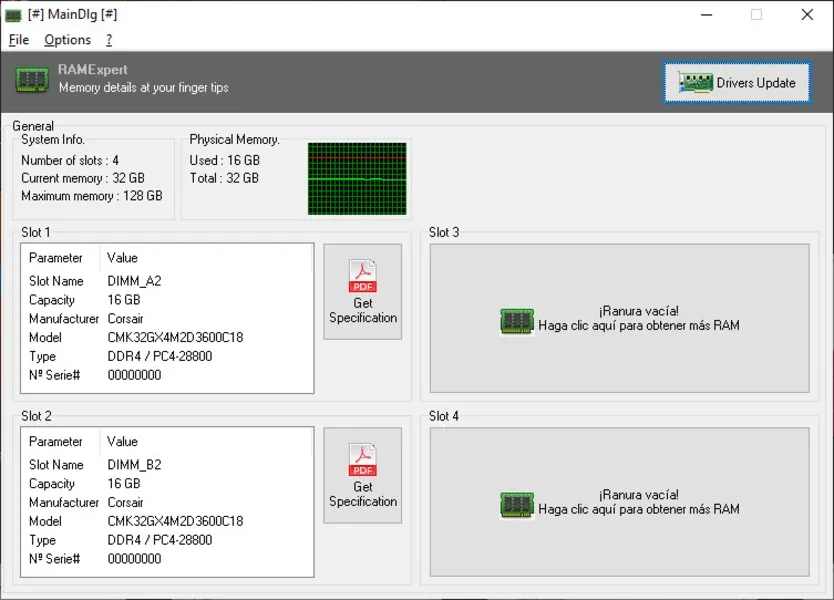
The program shows how many memory bays the motherboard has and which of them hold modules, leaving the empty ones marked. Each occupied bay is listed under its designation (A1, B1, A2, B2) with capacity, manufacturer, model, module type and frequency.
Frequency appears as a code such as PC4-28800, meaning a DDR4 module running at 3,600 MHz. The number after the dash is the frequency times 8; divide it by 8 to get the actual clock. The digit before the dash marks the memory type, with 4 for DDR4 and 5 for DDR5.
Capacity and export
Installed and currently used memory are both shown, along with the maximum amount the motherboard can take. Everything can be saved to a text file or a PDF.
Download files
4938a057fefe6a7e57edad3bf130112839ffc5d33828d3a7336fd78dafde006c
Signed by KC SOFTWARES SASU · valid until Apr 5, 2024df0044f73eba236976c1c39d04df2161646dd2b51d63725fcdfac395a9586a3b
Signed by KC SOFTWARES · valid until Apr 18, 2021051e4cd52fe06d124ee2dd47a49e3768e2f4deb90527b27fca6a89fa127980b8
2e65636d4895bf754c54ae28d44c6c41b9893dc64ca32179a307ed9f68d97aa1
78a7960d7fb4555528d48414be45a349cecc91f13248cd61a6147ee9cadd60a7
System requirements
Available on:
Minimum OS:
Windows XP or later
Additional information
Developer
Latest release
Size
Category
File type
SHA-256
4938a057fefe6a7e57edad3bf130112839ffc5d33828d3a7336fd78dafde006c





