RAMMon 3.4.1000 for Windows
SHA-256 listed
Shows what RAM is installed and how it is being used
All ages
Age rating
Screenshots
Description
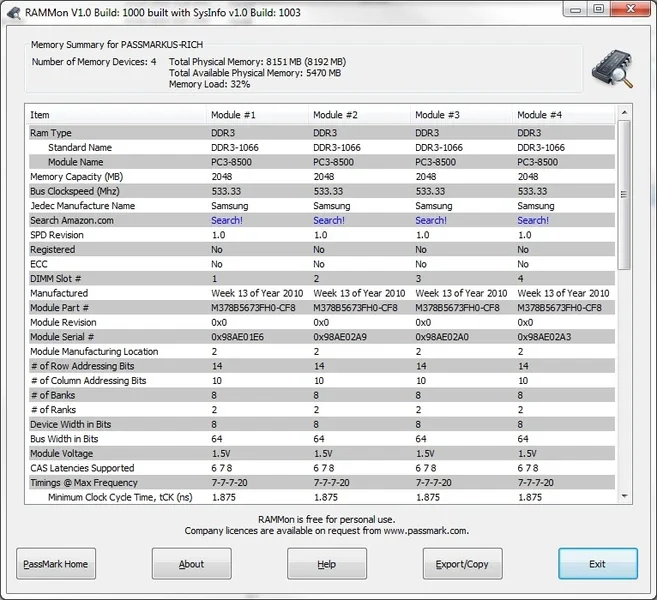
RAMMon displays information about the RAM installed in a computer. The main window shows the RAM type, the quantity, the manufacturer and the clock speed, along with current usage. It runs without any setup steps. Anyone worried about their hardware can read the details straight from that window, and anyone planning to buy more RAM but unsure which modules to get can match the existing ones first. A link to Amazon is included for checking prices or buying more modules.
Download files
Filerammon-3-4-1000.exeEXE
Version3.4.1000
ReleasedJun 18, 2026
Size4.3 MB
SHA-256
Get
da949086b3aa88d17cdc08bb6d5db72b094ced7b36fcd5e91f4c6b5ba099be5f
Signed by PassMark Software Pty Ltd · valid until Sep 7, 2025Filerammon-3.3.exeEXE
Version3.3
ReleasedJul 23, 2024
Size4.1 MB
SHA-256
Get
281990d7add3dac1e2118a672f558b94516cd3e50a71058edd6860729a412a5f
Filerammon-3.2.exeEXE
Version3.2
ReleasedMay 6, 2024
Size4.1 MB
SHA-256
Get
17b8a884f9223d1bb7d6a8407d266258c9996d7d6acf5525038133f9b7737822
Filerammon-3.1-Build-1000.exeEXE
Version3.1 (Build 1000)
ReleasedFeb 8, 2024
Size4.0 MB
SHA-256
Get
7fd341e1125502e36ed053a32b54814770e3c6fc3f1c9202c93c6d949f512fb1
Filerammon-3.0-Build-1000.exeEXE
Version3.0 (Build 1000)
ReleasedDec 21, 2023
Size4.0 MB
SHA-256
Get
fca01201e0678c953913015a70c72d3d80da08e61f5ff0c4f2e2cf5a71164ba8
System requirements
Available on:
Minimum OS:
Windows Windows 11 or later
Additional information
Developer
Latest release
3.4.1000 · Jun 18, 2026
Size
4.3 MB
Category
File type
EXE
SHA-256
da949086b3aa88d17cdc08bb6d5db72b094ced7b36fcd5e91f4c6b5ba099be5f
Digital signature
Signed by PassMark Software Pty Ltd · valid until Sep 7, 2025