
UninstallView 1.52 for Windows
SHA-256 listed
Removes installed Windows programs, including stubborn ones, in bulk
All ages
Age rating
Screenshots
Description
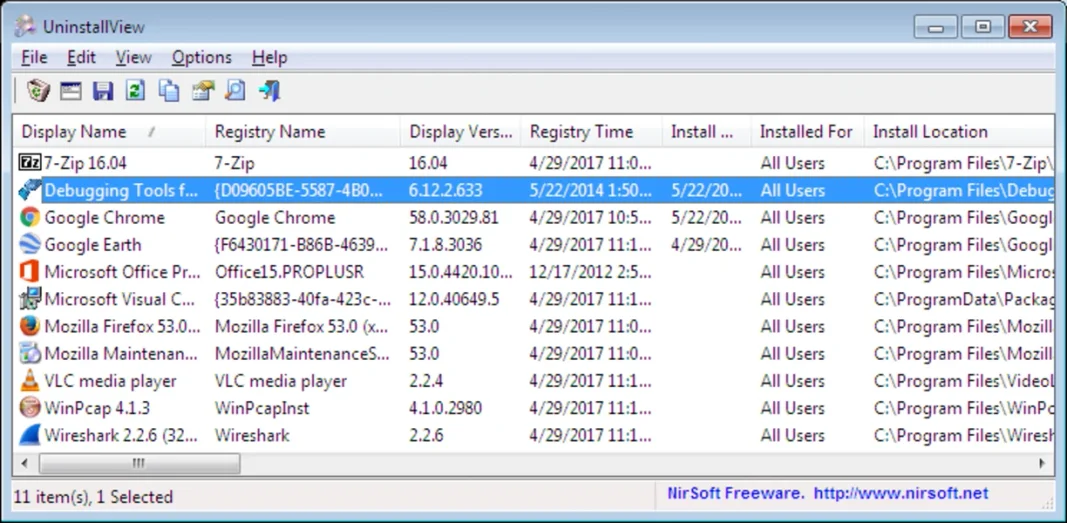
UninstallView is used much like the Windows Control Panel uninstall feature: you pick a program from the list and remove it. The interface is simple, with its functions in a toolbar. It adds functions that help remove programs the built-in tool has trouble with. Each installed program is shown with numerous details, so you can see what you are about to act on. You can also uninstall several programs at the same time.
Download files
Fileuninstallview-1-52.zipZIP
Version1.52
ReleasedJun 25, 2026
Size110.3 KB
SHA-256
Get
9d6835be4d7afccafd7a7ce945b057537dfe3e638f4f52f0fe359b1bd7aa8836
FileUninstallView_V1.51.zipZIP
Version1.51
ReleasedMar 17, 2026
Size89.3 KB
SHA-256
Get
b5ea1be8f2a76aa52825ecbc85b69501a9dd64cd91f7134b9053d731305a57de
Fileuninstallview-1.51.zipZIP
Version1.51
ReleasedOct 15, 2024
Size110.2 KB
SHA-256
Get
1fd9553ef6b9434f26583c22cb1f5810353ff252abe2055b96a828facb64fd5a
Fileuninstallview-1.50.zipZIP
Version1.50
ReleasedMay 8, 2023
Size115.5 KB
SHA-256
Get
b015a958f8e5047c8f13908ead921bcb805ba823208fddfbd509352ed238031b
Fileuninstallview-1.46.zipZIP
Version1.46
ReleasedMay 6, 2022
Size114.8 KB
SHA-256
Get
26ef654d52f32a634bcfb19c831e813699e8cc7d9f196d71b3e41d0597d88086
System requirements
Available on:
Minimum OS:
Windows XP or later
Additional information
Developer
Latest release
1.52 · Jun 25, 2026
Size
110.3 KB
Category
File type
ZIP
SHA-256
9d6835be4d7afccafd7a7ce945b057537dfe3e638f4f52f0fe359b1bd7aa8836