BreakFinder Comic Surf Face
Philipp Winkler- EveryoneAge rating
- PersonalizationCategory
- Nov 9, 2026Updated
- FreePrice
Links to the official Google Play listing of com.breakfinder.watchface.comic. Last checked on Nov 23, 2026.
About this app
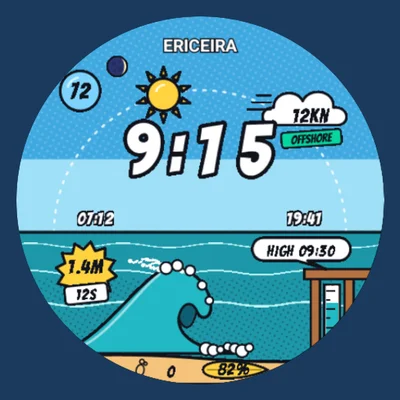
Your home spot as a comic line-up: score, swell, wind, tide and light.
Your home spot as a comic panel, next to the time. Look at the sea on your wrist and you know what the sea out there is doing.
The face is free. The surf scene needs the free BreakFinder Wear OS app. Your home spot is free with a BreakFinder account, more spots with Premium (breakfinder.surf). Without the app the face shows the clock over a sky that follows the time of day and the hint OPEN BREAKFINDER. Without an account it shows tide, light and wind of the nearest public spot (approximate location, not stored).
⌚ ON YOUR WEAR OS WATCH
A watch face, nothing else: no app screens, no tile, no complications of its own. Its six slots read five complications from the free BreakFinder Wear OS app (Breakfinder Face Score, Face Sea, Face Wind, Face Tide, Face Daylight); you cannot swap them, so the face has no edit screen. The clock, steps and battery come from the watch itself.
WHAT THE SCENE SHOWS
• The surf score as a sticker in the sky, coloured by how good it is
• The swell as a starburst with its height, and the period on a tag
• A breaking wave that gets bigger with the swell
• A wind cloud with the speed in knots and GLASSY, OFFSHORE, SIDE or ONSHORE
• A tide gauge on the pier with the next high or low and its time
• The sun on a dashed arc from first light to last light, and at night the moon in its current phase
• A sky that changes from night to dawn, day and dusk
• A big comic clock, your steps on the sand, and the battery as a surfboard
HONEST WHEN IT HAS NOTHING NEW
An old report turns the score sticker grey instead of passing it off as live. A tide turn that has passed is never shown as the next one. Without data the face says so instead of drawing a made-up sea.
BUILT FOR THE WATCH
Watch Face Format, no code running in the face, so it is light on the battery. The Always-On display shows a calm outline clock. Steps are read on the watch and never leave it.
SET UP
1. Install the BreakFinder app on your Wear OS watch and sign in
2. Set your home spot at breakfinder.surf (free)
3. Pick BreakFinder Comic as your watch face
Wear OS 4 or newer.
Setup guide: https://breakfinder.surf/watch
Support: support@breakfinder.surf
Privacy: https://breakfinder.surf/en/datenschutz
Data safety
What Philipp Winkler declares on Google Play about the data this app collects and shares.
- No data shared with third partiesLearn more about how developers declare sharing
- No data collectedLearn more about how developers declare collection
What’s new
Version 1.0.2 · Nov 9, 2026
Fixes empty BreakFinder fields: after the update they reconnect to their data sources.
Developer contact
- Websitebreakfinder.surf
- Emailsupport@breakfinder.surf
- Privacy policybreakfinder.surf
- AddressBurghof 1 24939 Flensburg Germany
Information
- Offered by
- Philipp Winkler
- Category
- Personalization
- Version
- 1.0.2
- Updated
- Nov 9, 2026
- Released
- Oct 14, 2026
- Age rating
- Everyone
- Price
- Free
- Package name
- com.breakfinder.watchface.comic