BreakFinder Comic Surf Face
Philipp Winkler- PEGI 3Clasificación por edad
- PersonalizaciónCategoría
- 9/11/2026Actualizado
- GratisPrecio
Enlaza a la ficha oficial de com.breakfinder.watchface.comic en Google Play. Última comprobación el 23/11/2026.
Acerca de esta aplicación
Traducción automática de Google. Idioma original: Inglés (Estados Unidos).
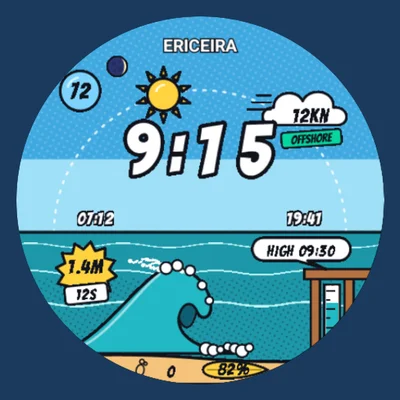
Tu lugar de origen como cartelera cómica: puntuación, oleaje, viento, marea y luz.
Tu lugar habitual como una viñeta cómica, junto a la hora. Mira el mar en tu muñeca y sabrás qué está haciendo el mar.
La esfera es gratuita. Para acceder a la escena del surf, necesitas la app gratuita BreakFinder Wear OS. Tu lugar habitual es gratuito con una cuenta de BreakFinder; con Premium (breakfinder.surf) tendrás acceso a más lugares. Sin la app, la esfera muestra el reloj sobre un cielo que sigue la hora del día y la sugerencia «ABRIR BREAKFINDER». Sin cuenta, muestra la marea, la luz y el viento del spot público más cercano (ubicación aproximada, no guardada).
⌚ EN TU RELOJ WEAR OS
Una esfera, nada más: sin pantallas de apps, sin mosaicos, sin complicaciones propias. Sus seis ranuras leen cinco complicaciones de la app gratuita BreakFinder Wear OS (Breakfinder Face Score, Face Sea, Face Wind, Face Tide, Face Daylight); no se pueden intercambiar, por lo que la esfera no tiene pantalla de edición. El reloj, los pasos y la batería provienen del propio reloj.
LO QUE MUESTRA LA ESCENA
• La puntuación de las olas como una pegatina en el cielo, coloreada según su calidad.
• El oleaje como una explosión estelar con su altura y el periodo en una etiqueta.
• Una ola rompiendo que crece con el oleaje.
• Una nube de viento con la velocidad en nudos y si es FRESCA, DE MAR, LATERAL o DE MAR.
• Un mareógrafo en el muelle con la próxima pleamar o bajamar y su hora.
• El sol en un arco punteado desde el amanecer hasta el anochecer, y por la noche la luna en su fase actual.
• Un cielo que cambia de noche a amanecer, día y atardecer.
• Un gran reloj cómico, tus pasos en la arena y la batería como una tabla de surf.
HONESTO CUANDO NO TIENE NADA NUEVO
Un informe antiguo vuelve gris la pegatina de la puntuación en lugar de mostrarla en tiempo real. Una marea pasada nunca se muestra como la siguiente. Sin datos, la pantalla lo indica en lugar de dibujar un mar ficticio.
DISEÑADO PARA EL RELOJ
Esfera de reloj con formato sin código, por lo que consume poca batería. La pantalla siempre activa muestra un reloj con contornos discretos. Los pasos se registran en el reloj y se mantienen siempre visibles.
CONFIGURACIÓN
1. Instala la app BreakFinder en tu reloj Wear OS e inicia sesión.
2. Configura tu punto de partida en breakfinder.surf (gratis).
3. Selecciona BreakFinder Comic como esfera del reloj.
Requiere Wear OS 4 o posterior.
Guía de configuración: https://breakfinder.surf/watch
Soporte: support@breakfinder.surf
Privacidad: https://breakfinder.surf/en/datenschutz
Mostrar el texto original
Your home spot as a comic panel, next to the time. Look at the sea on your wrist and you know what the sea out there is doing.
The face is free. The surf scene needs the free BreakFinder Wear OS app. Your home spot is free with a BreakFinder account, more spots with Premium (breakfinder.surf). Without the app the face shows the clock over a sky that follows the time of day and the hint OPEN BREAKFINDER. Without an account it shows tide, light and wind of the nearest public spot (approximate location, not stored).
⌚ ON YOUR WEAR OS WATCH
A watch face, nothing else: no app screens, no tile, no complications of its own. Its six slots read five complications from the free BreakFinder Wear OS app (Breakfinder Face Score, Face Sea, Face Wind, Face Tide, Face Daylight); you cannot swap them, so the face has no edit screen. The clock, steps and battery come from the watch itself.
WHAT THE SCENE SHOWS
• The surf score as a sticker in the sky, coloured by how good it is
• The swell as a starburst with its height, and the period on a tag
• A breaking wave that gets bigger with the swell
• A wind cloud with the speed in knots and GLASSY, OFFSHORE, SIDE or ONSHORE
• A tide gauge on the pier with the next high or low and its time
• The sun on a dashed arc from first light to last light, and at night the moon in its current phase
• A sky that changes from night to dawn, day and dusk
• A big comic clock, your steps on the sand, and the battery as a surfboard
HONEST WHEN IT HAS NOTHING NEW
An old report turns the score sticker grey instead of passing it off as live. A tide turn that has passed is never shown as the next one. Without data the face says so instead of drawing a made-up sea.
BUILT FOR THE WATCH
Watch Face Format, no code running in the face, so it is light on the battery. The Always-On display shows a calm outline clock. Steps are read on the watch and never leave it.
SET UP
1. Install the BreakFinder app on your Wear OS watch and sign in
2. Set your home spot at breakfinder.surf (free)
3. Pick BreakFinder Comic as your watch face
Wear OS 4 or newer.
Setup guide: https://breakfinder.surf/watch
Support: support@breakfinder.surf
Privacy: https://breakfinder.surf/en/datenschutz
Seguridad de los datos
Lo que Philipp Winkler declara en Google Play sobre los datos que esta aplicación recopila y comparte.
- No se comparten datos con tercerosMás información sobre cómo los desarrolladores declaran lo que comparten
- No se recogen datosMás información sobre cómo los desarrolladores declaran lo que recogen
Novedades
Versión 1.0.2 · 9/11/2026
Fixes empty BreakFinder fields: after the update they reconnect to their data sources.
Contacto del desarrollador
- Sitio webbreakfinder.surf
- Correo electrónicosupport@breakfinder.surf
- Política de privacidadbreakfinder.surf
- DirecciónBurghof 1 24939 Flensburg Germany
Información
- Ofrecida por
- Philipp Winkler
- Categoría
- Personalización
- Versión
- 1.0.2
- Actualizado
- 9/11/2026
- Publicado
- 14/10/2026
- Clasificación por edad
- PEGI 3
- Precio
- Gratis
- Nombre del paquete
- com.breakfinder.watchface.comic