BreakFinder Comic Surf Face
Philipp Winkler- 3 歳以上対象年齢
- カスタマイズカテゴリ
- 2026/11/9更新日
- 無料価格
com.breakfinder.watchface.comicのGoogle Play公式ページにリンクしています。最終確認:2026/11/23。
このアプリについて
Googleによる英語 (アメリカ合衆国)からの自動翻訳です。
コメディアンのラインナップとしてのあなたのホームスポット:スコア、うねり、風、潮、そして光。
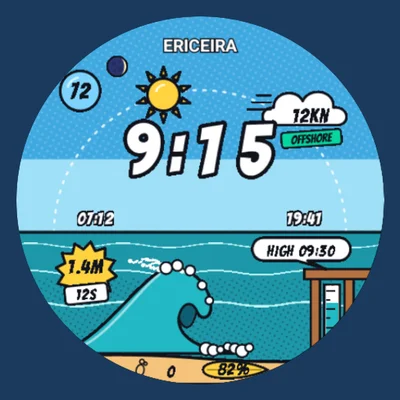
時刻の横に、あなたのホームスポットがコミックパネルのように表示されます。手首の海を見れば、外の海の様子が一目でわかります。
この文字盤は無料です。サーフィンシーンを表示するには、無料のBreakFinder Wear OSアプリが必要です。ホームスポットはBreakFinderアカウントをお持ちの方なら無料でご利用いただけます。プレミアムアカウント(breakfinder.surf)では、さらに多くのスポットが表示されます。アプリがない場合、文字盤には時刻に合わせて変化する空模様の上に時計が表示され、「BreakFinderを開いてください」というヒントが表示されます。アカウントをお持ちでない場合は、最寄りの公共スポットの潮汐、光、風速が表示されます(おおよその位置情報であり、保存されません)。
⌚ Wear OSウォッチで
文字盤のみ。アプリ画面もタイルも、独自のコンプリケーションもありません。6つのスロットには、無料のBreakFinder Wear OSアプリから5つのコンプリケーション(BreakFinder Face Score、Face Sea、Face Wind、Face Tide、Face Daylight)が表示されます。これらのコンプリケーションは入れ替えることができないため、文字盤の編集画面はありません。時計、歩数、バッテリー残量はウォッチ本体から取得されます。
シーンの内容
• サーフィンスコアは、波の良し悪しに応じて色分けされたステッカーとして空に表示
• うねりは、高さと周期を示す星形のグラフで表示
• うねりが大きくなるにつれて砕ける波
• 風速(ノット)と風向(GLASSY、OFFSHORE、SIDE、ONSHORE)を示す風雲
• 桟橋に設置された潮位計には、次の満潮または干潮時刻が表示され
• 日の出から日没まで点線の弧で描かれた太陽、そして夜には現在の月の満ち欠けが表示
• 夜から夜明け、昼、夕暮れへと変化する空
• 大きなコミカルな時計、砂浜に残る足跡、そしてサーフボードに見立てたバッテリー
新しい情報がない場合の正直さ
古いレポートでは、スコアステッカーがリアルタイムではなく灰色に変わります。すでに過ぎた潮の変わり目は、次の潮の変わり目として表示されません。データがない場合は、架空の海を描くのではなく、文字盤にその旨が表示されます。
スマートウォッチ専用設計
ウォッチフェイス形式を採用し、文字盤上でコードが動作しないため、バッテリー消費を抑えます。常時表示ディスプレイには、落ち着いたアウトラインの時計が表示されます。歩数はスマートウォッチ上で計測され、常に表示されます。
セットアップ
1. Wear OS搭載スマートウォッチにBreakFinderアプリをインストールし、サインインします。
2. breakfinder.surf(無料)でホームスポットを設定します。
3. ウォッチフェイスとしてBreakFinder Comicを選択します。
Wear OS 4以降に対応。
セットアップガイド:https://breakfinder.surf/watch
サポート:support@breakfinder.surf
プライバシーポリシー:https://breakfinder.surf/en/datenschutz
原文を表示
Your home spot as a comic panel, next to the time. Look at the sea on your wrist and you know what the sea out there is doing.
The face is free. The surf scene needs the free BreakFinder Wear OS app. Your home spot is free with a BreakFinder account, more spots with Premium (breakfinder.surf). Without the app the face shows the clock over a sky that follows the time of day and the hint OPEN BREAKFINDER. Without an account it shows tide, light and wind of the nearest public spot (approximate location, not stored).
⌚ ON YOUR WEAR OS WATCH
A watch face, nothing else: no app screens, no tile, no complications of its own. Its six slots read five complications from the free BreakFinder Wear OS app (Breakfinder Face Score, Face Sea, Face Wind, Face Tide, Face Daylight); you cannot swap them, so the face has no edit screen. The clock, steps and battery come from the watch itself.
WHAT THE SCENE SHOWS
• The surf score as a sticker in the sky, coloured by how good it is
• The swell as a starburst with its height, and the period on a tag
• A breaking wave that gets bigger with the swell
• A wind cloud with the speed in knots and GLASSY, OFFSHORE, SIDE or ONSHORE
• A tide gauge on the pier with the next high or low and its time
• The sun on a dashed arc from first light to last light, and at night the moon in its current phase
• A sky that changes from night to dawn, day and dusk
• A big comic clock, your steps on the sand, and the battery as a surfboard
HONEST WHEN IT HAS NOTHING NEW
An old report turns the score sticker grey instead of passing it off as live. A tide turn that has passed is never shown as the next one. Without data the face says so instead of drawing a made-up sea.
BUILT FOR THE WATCH
Watch Face Format, no code running in the face, so it is light on the battery. The Always-On display shows a calm outline clock. Steps are read on the watch and never leave it.
SET UP
1. Install the BreakFinder app on your Wear OS watch and sign in
2. Set your home spot at breakfinder.surf (free)
3. Pick BreakFinder Comic as your watch face
Wear OS 4 or newer.
Setup guide: https://breakfinder.surf/watch
Support: support@breakfinder.surf
Privacy: https://breakfinder.surf/en/datenschutz
データ セーフティ
このアプリが収集・共有するデータについて、Philipp WinklerがGoogle Playで申告している内容です。
- 第三者と共有されるデータはありません詳しくは、デベロッパーが共有を申告する方法についての説明をご覧ください
- データは収集されません詳しくは、デベロッパーが収集を申告する方法についての説明をご覧ください
新機能
バージョン 1.0.2 · 2026/11/9
Fixes empty BreakFinder fields: after the update they reconnect to their data sources.
開発元の連絡先
- ウェブサイトbreakfinder.surf
- メールsupport@breakfinder.surf
- プライバシーポリシーbreakfinder.surf
- 住所Burghof 1 24939 Flensburg Germany
情報
- 提供元
- Philipp Winkler
- カテゴリ
- カスタマイズ
- バージョン
- 1.0.2
- 更新日
- 2026/11/9
- リリース
- 2026/10/14
- 対象年齢
- 3 歳以上
- 価格
- 無料
- パッケージ名
- com.breakfinder.watchface.comic