Ember Egg Watch Face
Tempus Arcanum- EveryoneAge rating
- PersonalizationCategory
- Oct 20, 2026Updated
- $0.99Price
Links to the official Google Play listing of com.tempusarcanum.hatch. Last checked on Nov 28, 2026.
About this app
Animated fantasy dragon egg: your steps crack it, and at your goal it hatches
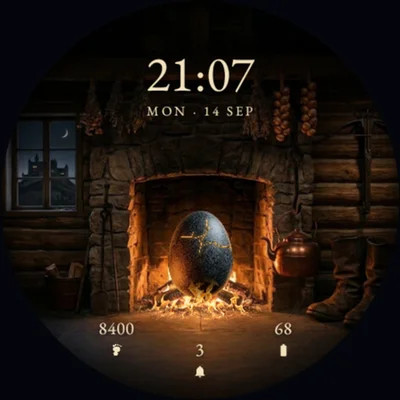
An animated fantasy watch face for Wear OS that turns your daily steps into a dragon egg hatching in a hearth fire, with the digital time above the hearth. The egg lies in the fire of a stone hearth inside a giant's timber hut at night, with a copper kettle, a giant's boots, a crossbow and a castle far off through the window. As your steps near your goal the egg cracks in five stages, and at the goal it hatches.
KEY FEATURES
• A step-goal egg: it cracks in five stages as you walk and hatches when you reach your goal.
• The hatchling stays until midnight, when the steps start over and a new egg lies in the fire.
• At each new minute the fire flares and the egg shivers, harder as it nears hatching.
• Tap the egg for a burst of sparks.
• Once hatched, the hatchling blinks and puffs smoke each minute. Tap it and it rears back and breathes fire.
• The time is set in firelit ivory above the hearth, with the day and date beneath it.
• Three complications on the hearth floor show your steps, unread notifications and battery.
MAKE IT YOURS
• Dragon color: Ember, Frost, Moss or Gold, for the egg and the hatchling.
• Steps to hatch: your watch's goal (10,000 if it has none), or 5,000, 8,000, 10,000 or 12,000.
• Time format: 12- or 24-hour.
• Three complications: steps, unread notifications and battery by default; choose other data for any of them in the watch face editor.
ALWAYS-ON DISPLAY
In always-on mode the hut dims, and the egg or hatchling, the time, the date, your steps and battery stay faintly lit, to save power.
COMPATIBILITY
Works on Wear OS 6 or later, such as Galaxy Watch models updated to One UI 8 Watch and Pixel Watch. Made in Watch Face Format: no permissions, no data collected.
HOW TO INSTALL
1. Install it from Google Play on your watch, or tap Install on my watch in the phone app.
2. Touch and hold your watch face, swipe to The Ember Egg and tap it. To customize, touch and hold it, then tap Customize.
More watch faces: this face is part of Tempus Arcanum, an app with 200+ animated watch faces for Wear OS, free to download. Search for "Tempus Arcanum" on Google Play, browse the whole collection on your phone and send any face to your watch with one tap.
Data safety
What Tempus Arcanum declares on Google Play about the data this app collects and shares.
- No data shared with third partiesLearn more about how developers declare sharing
- No data collectedLearn more about how developers declare collection
What’s new
Oct 20, 2026
Refreshed with the new Tempus Arcanum icon. Small fixes and improvements.
Developer contact
- Emailbicher09@gmail.com
- Privacy policytelegra.ph
- Addressвулиця Будівельників, будинок 7 30 Помічна Кіровоградська область Ukraine 27030
Information
- Offered by
- Tempus Arcanum
- Category
- Personalization
- Updated
- Oct 20, 2026
- Released
- Sep 19, 2026
- Age rating
- Everyone
- Price
- $0.99
- Package name
- com.tempusarcanum.hatch