Ember Egg Watch Face
Tempus Arcanum- Classificação LivreClassificação etária
- PersonalizaçãoCategoria
- 20/10/2026Atualizado
- R$ 4,99Preço
Leva à página oficial de com.tempusarcanum.hatch na Google Play. Última verificação em 28/11/2026.
Sobre este app
Tradução automática do Google. Idioma original: Inglês (Estados Unidos).
Ovo de dragão animado de fantasia: seus passos o quebram e, ao chegar ao seu destino, ele choca.
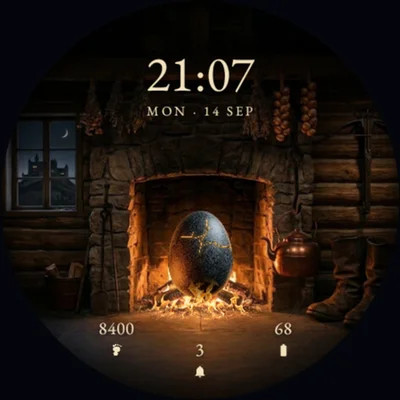
Um mostrador de relógio animado e fantástico para Wear OS que transforma seus passos diários em um ovo de dragão chocando na lareira, com a hora digital acima da lareira. O ovo está no fogo de uma lareira de pedra dentro da cabana de madeira de um gigante à noite, com uma chaleira de cobre, botas de gigante, uma besta e um castelo ao longe através da janela. À medida que seus passos se aproximam do seu objetivo, o ovo racha em cinco estágios e, ao atingir o objetivo, choca.
PRINCIPAIS RECURSOS
• Um ovo que representa um objetivo a cada passo: ele racha em cinco estágios enquanto você caminha e choca quando você atinge seu objetivo.
• O filhote permanece até a meia-noite, quando os passos recomeçam e um novo ovo é colocado no fogo.
• A cada minuto, o fogo se intensifica e o ovo treme, com mais força à medida que se aproxima da eclosão.
• Toque no ovo para ver uma rajada de faíscas.
• Depois de chocado, o filhote pisca e solta fumaça a cada minuto. Toque nele e ele se ergue e cospe fogo.
• O horário é exibido em marfim iluminado pela lareira, com o dia e a data abaixo.
• Três indicadores no chão da lareira mostram seus passos, notificações não lidas e a bateria.
PERSONALIZE
• Cor do dragão: Brasa, Gelo, Musgo ou Ouro, para o ovo e o filhote.
• Passos para chocar: a meta do seu relógio (10.000 se não houver nenhuma), ou 5.000, 8.000, 10.000 ou 12.000.
• Formato da hora: 12 ou 24 horas.
• Três indicadores: passos, notificações não lidas e bateria por padrão; escolha outros dados para qualquer um deles no editor de mostradores.
VISOR SEMPRE LIGADO
No modo sempre ligado, a cabana escurece e o ovo ou filhote, a hora, a data, seus passos e a bateria permanecem levemente iluminados para economizar energia.
COMPATIBILIDADE
Funciona no Wear OS 6 ou posterior, como os modelos Galaxy Watch atualizados para One UI 8 Watch e Pixel Watch. Criado no formato de mostrador de relógio: sem permissões, sem coleta de dados.
COMO INSTALAR
1. Instale-o na Google Play no seu relógio ou toque em "Instalar no meu relógio" no aplicativo do telefone.
2. Toque e segure o mostrador do relógio, deslize até "O Ovo de Brasa" e toque nele. Para personalizar, toque e segure e, em seguida, toque em "Personalizar".
Mais mostradores de relógio: este mostrador faz parte do Tempus Arcanum, um aplicativo com mais de 200 mostradores de relógio animados para Wear OS, disponível para download gratuito. Pesquise "Tempus Arcanum" na Google Play, navegue por toda a coleção no seu telefone e envie qualquer mostrador para o seu relógio com um toque.
Mostrar o texto original
An animated fantasy watch face for Wear OS that turns your daily steps into a dragon egg hatching in a hearth fire, with the digital time above the hearth. The egg lies in the fire of a stone hearth inside a giant's timber hut at night, with a copper kettle, a giant's boots, a crossbow and a castle far off through the window. As your steps near your goal the egg cracks in five stages, and at the goal it hatches.
KEY FEATURES
• A step-goal egg: it cracks in five stages as you walk and hatches when you reach your goal.
• The hatchling stays until midnight, when the steps start over and a new egg lies in the fire.
• At each new minute the fire flares and the egg shivers, harder as it nears hatching.
• Tap the egg for a burst of sparks.
• Once hatched, the hatchling blinks and puffs smoke each minute. Tap it and it rears back and breathes fire.
• The time is set in firelit ivory above the hearth, with the day and date beneath it.
• Three complications on the hearth floor show your steps, unread notifications and battery.
MAKE IT YOURS
• Dragon color: Ember, Frost, Moss or Gold, for the egg and the hatchling.
• Steps to hatch: your watch's goal (10,000 if it has none), or 5,000, 8,000, 10,000 or 12,000.
• Time format: 12- or 24-hour.
• Three complications: steps, unread notifications and battery by default; choose other data for any of them in the watch face editor.
ALWAYS-ON DISPLAY
In always-on mode the hut dims, and the egg or hatchling, the time, the date, your steps and battery stay faintly lit, to save power.
COMPATIBILITY
Works on Wear OS 6 or later, such as Galaxy Watch models updated to One UI 8 Watch and Pixel Watch. Made in Watch Face Format: no permissions, no data collected.
HOW TO INSTALL
1. Install it from Google Play on your watch, or tap Install on my watch in the phone app.
2. Touch and hold your watch face, swipe to The Ember Egg and tap it. To customize, touch and hold it, then tap Customize.
More watch faces: this face is part of Tempus Arcanum, an app with 200+ animated watch faces for Wear OS, free to download. Search for "Tempus Arcanum" on Google Play, browse the whole collection on your phone and send any face to your watch with one tap.
Segurança dos dados
O que Tempus Arcanum declara na Google Play sobre os dados que este app coleta e compartilha.
- Os dados não são compartilhados com terceirosSaiba mais sobre como os desenvolvedores declaram o compartilhamento
- Nenhum dado foi coletadoSaiba mais sobre como os desenvolvedores declaram a coleta
Novidades
20/10/2026
Refreshed with the new Tempus Arcanum icon. Small fixes and improvements.
Contato do desenvolvedor
- E-mailbicher09@gmail.com
- Política de privacidadetelegra.ph
- Endereçoвулиця Будівельників, будинок 7 30 Помічна Кіровоградська область Ukraine 27030
Informações
- Oferecido por
- Tempus Arcanum
- Categoria
- Personalização
- Atualizado
- 20/10/2026
- Lançamento
- 19/09/2026
- Classificação etária
- Classificação Livre
- Preço
- R$ 4,99
- Nome do pacote
- com.tempusarcanum.hatch