Ember Egg Watch Face
Tempus Arcanum- 3 歳以上対象年齢
- カスタマイズカテゴリ
- 2026/10/20更新日
- ¥170価格
com.tempusarcanum.hatchのGoogle Play公式ページにリンクしています。最終確認:2026/11/28。
このアプリについて
Googleによる英語 (アメリカ合衆国)からの自動翻訳です。
アニメーション化されたファンタジードラゴンの卵:あなたの足が卵を割り、ゴールで孵化する
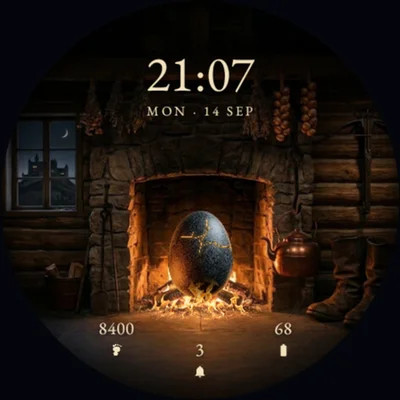
Wear OS向けのアニメーション付きファンタジーウォッチフェイス。毎日の歩数を、暖炉の火の中で孵化するドラゴンの卵に変身させます。デジタル時刻は暖炉の上に表示されます。夜、巨人の木造小屋の石造りの暖炉に卵が置かれ、窓の外には銅製のやかん、巨人のブーツ、クロスボウ、そして遠くに城が見えます。目標に近づくにつれて卵は5段階に割れ、目標に到達すると孵化します。
主な機能
• 目標歩数に応じた卵:歩くにつれて卵は5段階に割れ、目標に到達すると孵化します。
• 孵化したばかりの赤ちゃんは真夜中までそこにいます。真夜中になると歩数がリセットされ、新しい卵が暖炉に置かれます。
• 毎分ごとに炎が燃え上がり、卵は孵化が近づくにつれて激しく震えます。
• 卵をタップすると火花が散ります。
• 孵化した赤ちゃんは毎分まばたきをして煙を吐きます。赤ちゃんをタップすると後ろにのけぞり、火を噴きます。 • 暖炉の上には、炎に照らされた象牙色の文字盤に時刻が表示され、その下に曜日と日付が表示されます。
• 暖炉の床には、歩数、未読通知、バッテリー残量を示す3つのコンプリケーションが表示されます。
カスタマイズ
• ドラゴンの色:卵と雛の色は、エンバー、フロスト、モス、ゴールドから選択できます。
• 孵化に必要な歩数:時計に設定されている目標歩数(設定がない場合は10,000歩)、または5,000歩、8,000歩、10,000歩、12,000歩から選択できます。
• 時刻表示形式:12時間表示または24時間表示。
• デフォルトでは、歩数、未読通知、バッテリー残量の3つのコンプリケーションが表示されます。ウォッチフェイスエディターで、それぞれの表示項目を変更できます。
常時表示
常時表示モードでは、暖炉の文字盤が暗くなり、卵または雛、時刻、日付、歩数、バッテリー残量は、電力消費を抑えるためにかすかに点灯します。
互換性
Wear OS 6以降に対応しています。Galaxy Watch(One UI 8にアップデート済み)やPixel Watchなど、様々なモデルでご利用いただけます。ウォッチフェイス形式:権限不要、データ収集なし。
インストール方法
1. ウォッチのGoogle Playからインストールするか、スマートフォンアプリで「ウォッチにインストール」をタップしてください。
2. ウォッチフェイスを長押しし、「The Ember Egg」までスワイプしてタップします。カスタマイズするには、長押しして「カスタマイズ」をタップしてください。
その他のウォッチフェイス:このウォッチフェイスは、Wear OS向けの200種類以上のアニメーションウォッチフェイスを収録したアプリ「Tempus Arcanum」の一部です。無料でダウンロードできます。Google Playで「Tempus Arcanum」を検索し、スマートフォンでコレクション全体を閲覧して、ワンタップでウォッチフェイスを送信できます。
原文を表示
An animated fantasy watch face for Wear OS that turns your daily steps into a dragon egg hatching in a hearth fire, with the digital time above the hearth. The egg lies in the fire of a stone hearth inside a giant's timber hut at night, with a copper kettle, a giant's boots, a crossbow and a castle far off through the window. As your steps near your goal the egg cracks in five stages, and at the goal it hatches.
KEY FEATURES
• A step-goal egg: it cracks in five stages as you walk and hatches when you reach your goal.
• The hatchling stays until midnight, when the steps start over and a new egg lies in the fire.
• At each new minute the fire flares and the egg shivers, harder as it nears hatching.
• Tap the egg for a burst of sparks.
• Once hatched, the hatchling blinks and puffs smoke each minute. Tap it and it rears back and breathes fire.
• The time is set in firelit ivory above the hearth, with the day and date beneath it.
• Three complications on the hearth floor show your steps, unread notifications and battery.
MAKE IT YOURS
• Dragon color: Ember, Frost, Moss or Gold, for the egg and the hatchling.
• Steps to hatch: your watch's goal (10,000 if it has none), or 5,000, 8,000, 10,000 or 12,000.
• Time format: 12- or 24-hour.
• Three complications: steps, unread notifications and battery by default; choose other data for any of them in the watch face editor.
ALWAYS-ON DISPLAY
In always-on mode the hut dims, and the egg or hatchling, the time, the date, your steps and battery stay faintly lit, to save power.
COMPATIBILITY
Works on Wear OS 6 or later, such as Galaxy Watch models updated to One UI 8 Watch and Pixel Watch. Made in Watch Face Format: no permissions, no data collected.
HOW TO INSTALL
1. Install it from Google Play on your watch, or tap Install on my watch in the phone app.
2. Touch and hold your watch face, swipe to The Ember Egg and tap it. To customize, touch and hold it, then tap Customize.
More watch faces: this face is part of Tempus Arcanum, an app with 200+ animated watch faces for Wear OS, free to download. Search for "Tempus Arcanum" on Google Play, browse the whole collection on your phone and send any face to your watch with one tap.
データ セーフティ
このアプリが収集・共有するデータについて、Tempus ArcanumがGoogle Playで申告している内容です。
- 第三者と共有されるデータはありません詳しくは、デベロッパーが共有を申告する方法についての説明をご覧ください
- データは収集されません詳しくは、デベロッパーが収集を申告する方法についての説明をご覧ください
新機能
2026/10/20
Refreshed with the new Tempus Arcanum icon. Small fixes and improvements.
開発元の連絡先
- メールbicher09@gmail.com
- プライバシーポリシーtelegra.ph
- 住所вулиця Будівельників, будинок 7 30 Помічна Кіровоградська область Ukraine 27030
情報
- 提供元
- Tempus Arcanum
- カテゴリ
- カスタマイズ
- 更新日
- 2026/10/20
- リリース
- 2026/9/19
- 対象年齢
- 3 歳以上
- 価格
- ¥170
- パッケージ名
- com.tempusarcanum.hatch