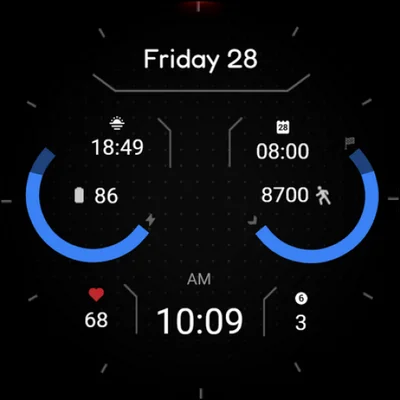
Falcon - Digital Watch Face
Regarder Watch Faces- EveryoneAge rating
- PersonalizationCategory
- Oct 21, 2026Updated
- $0.99Price
Links to the official Google Play listing of com.watchfacestudio.regarder.falcon. Last checked on Nov 13, 2026.
About this app
Minimalist watch face app for Wear OS devices. Perfect for a sleek look.
Minimalist watch face app for Wear OS devices. Clean design, customizable colors, and complications. Perfect for a sleek look.
Installing Regarder Minimal Falcon is easy:
Just open the Mobile Companion app and follow the instructions there.
In case this does not work. You can use a PC and install it from there
If this option still does not work you can install the watch face from your wear os Device, here are the instructions:
1. On your Wear OS smartwatch, open the Google Play Store.
2. Search for "Regarder Minimal 2" and select the app from the search results.
3. Tap "Install" to begin the installation process.
4. Once the installation is complete, you can find the watch face in the "Watch Faces" section of your smartwatch's settings.
5. Select Regarder Minimal 2 as your active watch face.
Note on Heart Rate:
The watch face doesn't automatically measure and display HR.
To view, manually tap the heart rate display area (see images) for the watch to take a measurement and show the current result.
After the first manual measurement, the watch can automatically measure HR every 10 minutes, with manual measurement still available.
Please note that certain features may not be available on all watches.
Data safety
What Regarder Watch Faces declares on Google Play about the data this app collects and shares.
- No data shared with third partiesLearn more about how developers declare sharing
- This app may collect these data typesDevice or other IDs
- Data is encrypted in transit
- You can request that data be deleted
What’s new
Oct 21, 2026
Updated for the latest Wear OS versions.
Developer contact
- Websiteregarderwatchfaces.com
- Emailwatches.regarder@gmail.com
- Privacy policyregarderwatchfaces.framer.website
- Addressstr. trandafirilor nr.8 bl.9 sc.b et.3 ap.38 331155 Hunedoara România
Information
- Offered by
- Regarder Watch Faces
- Category
- Personalization
- Updated
- Oct 21, 2026
- Released
- Apr 23, 2023
- Age rating
- Everyone
- Price
- $0.99
- Package name
- com.watchfacestudio.regarder.falcon