Falcon - Digital Watch Face
Regarder Watch Faces- 3 歳以上対象年齢
- カスタマイズカテゴリ
- 2026/10/21更新日
- ¥130価格
com.watchfacestudio.regarder.falconのGoogle Play公式ページにリンクしています。最終確認:2026/11/13。
このアプリについて
Googleによる英語 (アメリカ合衆国)からの自動翻訳です。
Wear OS デバイス用のシンプルなウォッチフェイス アプリ。洗練された外観に最適です。
Wear OS デバイス用のシンプルなウォッチフェイス アプリ。すっきりとしたデザイン、カスタマイズ可能なカラー、コンプリケーション。洗練された外観に最適です。
Regarder Minimal Falcon のインストールは簡単です。
モバイル コンパニオン アプリを開いて、そこにある指示に従ってください。
これが機能しない場合に備えて。 PCを使用してそこからインストールできます
このオプションがまだ機能しない場合は、Wear OS デバイスからウォッチフェイスをインストールできます。手順は次のとおりです。
1. Wear OS スマートウォッチで、Google Play ストアを開きます。
2.「Regarder Minimal 2」を検索し、検索結果からアプリを選択します。
3. 「インストール」をタップして、インストールプロセスを開始します。
4. インストールが完了すると、スマートウォッチの設定の「ウォッチフェイス」セクションにウォッチフェイスが表示されます。
5. アクティブなウォッチフェイスとして「Regarder Minimal 2」を選択します。
心拍数に関する注意:
ウォッチフェイスは心拍数を自動的に測定して表示しません。
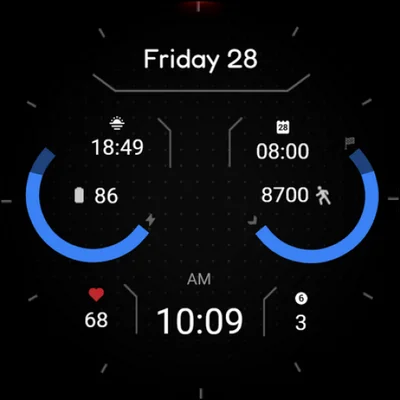
表示するには、時計の心拍数表示領域 (画像を参照) を手動でタップして測定し、現在の結果を表示します。
最初の手動測定の後、時計は 10 分ごとに HR を自動的に測定し、手動測定も引き続き利用できます。
特定の機能がすべての時計で利用できるわけではないことに注意してください。
原文を表示
Minimalist watch face app for Wear OS devices. Clean design, customizable colors, and complications. Perfect for a sleek look.
Installing Regarder Minimal Falcon is easy:
Just open the Mobile Companion app and follow the instructions there.
In case this does not work. You can use a PC and install it from there
If this option still does not work you can install the watch face from your wear os Device, here are the instructions:
1. On your Wear OS smartwatch, open the Google Play Store.
2. Search for "Regarder Minimal 2" and select the app from the search results.
3. Tap "Install" to begin the installation process.
4. Once the installation is complete, you can find the watch face in the "Watch Faces" section of your smartwatch's settings.
5. Select Regarder Minimal 2 as your active watch face.
Note on Heart Rate:
The watch face doesn't automatically measure and display HR.
To view, manually tap the heart rate display area (see images) for the watch to take a measurement and show the current result.
After the first manual measurement, the watch can automatically measure HR every 10 minutes, with manual measurement still available.
Please note that certain features may not be available on all watches.
データ セーフティ
このアプリが収集・共有するデータについて、Regarder Watch FacesがGoogle Playで申告している内容です。
- 第三者と共有されるデータはありません詳しくは、デベロッパーが共有を申告する方法についての説明をご覧ください
- このアプリは以下の種類のデータを収集することがありますファイル、ドキュメント
- データは送信中に暗号化されます
- データを削除するようリクエストできます
新機能
2026/10/21
Updated for the latest Wear OS versions.
開発元の連絡先
- ウェブサイトregarderwatchfaces.com
- メールwatches.regarder@gmail.com
- プライバシーポリシーregarderwatchfaces.framer.website
- 住所str. trandafirilor nr.8 bl.9 sc.b et.3 ap.38 331155 Hunedoara România
情報
- 提供元
- Regarder Watch Faces
- カテゴリ
- カスタマイズ
- 更新日
- 2026/10/21
- リリース
- 2023/4/23
- 対象年齢
- 3 歳以上
- 価格
- ¥130
- パッケージ名
- com.watchfacestudio.regarder.falcon