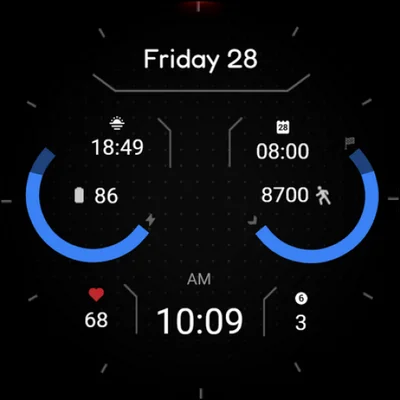
Falcon - Digital Watch Face
Regarder Watch Faces- USK ab 0 JahrenAltersfreigabe
- PersonalisierungKategorie
- 21.10.2026Aktualisiert
- 0,89 €Preis
Verlinkt auf den offiziellen Google Play-Eintrag von com.watchfacestudio.regarder.falcon. Zuletzt geprüft am 13.11.2026.
Über diese App
Automatische Übersetzung von Google. Originalsprache: Englisch (Vereinigte Staaten).
Minimalistische Watchface-App für Wear OS-Geräte. Perfekt für einen eleganten Look.
Minimalistische Zifferblatt-App für Wear OS-Geräte. Klares Design, anpassbare Farben und Komplikationen. Perfekt für einen eleganten Look.
Die Installation von Regarder Minimal Falcon ist einfach:
Öffnen Sie einfach die Mobile Companion-App und befolgen Sie die dortigen Anweisungen.
Falls dies nicht funktioniert. Sie können einen PC verwenden und es von dort aus installieren
Wenn diese Option immer noch nicht funktioniert, können Sie das Zifferblatt von Ihrem Wear OS-Gerät installieren. Hier finden Sie die Anweisungen:
1. Öffnen Sie auf Ihrer Wear OS-Smartwatch den Google Play Store.
2. Suchen Sie nach „Regarder Minimal 2“ und wählen Sie die App aus den Suchergebnissen aus.
3. Tippen Sie auf „Installieren“, um den Installationsvorgang zu starten.
4. Sobald die Installation abgeschlossen ist, finden Sie das Zifferblatt im Abschnitt „Zifferblätter“ in den Einstellungen Ihrer Smartwatch.
5. Wählen Sie Regarder Minimal 2 als Ihr aktives Zifferblatt.
Hinweis zur Herzfrequenz:
Das Zifferblatt misst und zeigt die Herzfrequenz nicht automatisch an.
Tippen Sie zum Anzeigen manuell auf den Herzfrequenz-Anzeigebereich (siehe Bilder), damit die Uhr eine Messung durchführt und das aktuelle Ergebnis anzeigt.
Nach der ersten manuellen Messung kann die Uhr automatisch alle 10 Minuten die Herzfrequenz messen, wobei die manuelle Messung weiterhin möglich ist.
Bitte beachten Sie, dass bestimmte Funktionen möglicherweise nicht auf allen Uhren verfügbar sind.
Originaltext anzeigen
Minimalist watch face app for Wear OS devices. Clean design, customizable colors, and complications. Perfect for a sleek look.
Installing Regarder Minimal Falcon is easy:
Just open the Mobile Companion app and follow the instructions there.
In case this does not work. You can use a PC and install it from there
If this option still does not work you can install the watch face from your wear os Device, here are the instructions:
1. On your Wear OS smartwatch, open the Google Play Store.
2. Search for "Regarder Minimal 2" and select the app from the search results.
3. Tap "Install" to begin the installation process.
4. Once the installation is complete, you can find the watch face in the "Watch Faces" section of your smartwatch's settings.
5. Select Regarder Minimal 2 as your active watch face.
Note on Heart Rate:
The watch face doesn't automatically measure and display HR.
To view, manually tap the heart rate display area (see images) for the watch to take a measurement and show the current result.
After the first manual measurement, the watch can automatically measure HR every 10 minutes, with manual measurement still available.
Please note that certain features may not be available on all watches.
Datensicherheit
Was Regarder Watch Faces bei Google Play zu den Daten angibt, die diese App erfasst und weitergibt.
- Keine Daten werden mit Drittunternehmen oder -organisationen geteiltWeitere Informationen dazu, wie Entwickler Angaben zur Weitergabe von Daten machen
- Diese App kann die folgenden Datentypen erhebenInstallierte Apps
- Daten werden bei der Übertragung verschlüsselt
- Du kannst das Löschen der Daten beantragen
Neue Funktionen
21.10.2026
Updated for the latest Wear OS versions.
Kontakt zum Entwickler
- Websiteregarderwatchfaces.com
- E-Mailwatches.regarder@gmail.com
- Datenschutzerklärungregarderwatchfaces.framer.website
- Adressestr. trandafirilor nr.8 bl.9 sc.b et.3 ap.38 331155 Hunedoara România
Informationen
- Angeboten von
- Regarder Watch Faces
- Kategorie
- Personalisierung
- Aktualisiert
- 21.10.2026
- Veröffentlicht
- 23.04.2023
- Altersfreigabe
- USK ab 0 Jahren
- Preis
- 0,89 €
- Paketname
- com.watchfacestudio.regarder.falcon