SG-116
SGWatchDesign- EveryoneAge rating
- PersonalizationCategory
- Aug 13, 2026Updated
- $0.99Price
Links to the official Google Play listing of com.watchfacestudio.sg_116. Last checked on Nov 28, 2026.
About this app
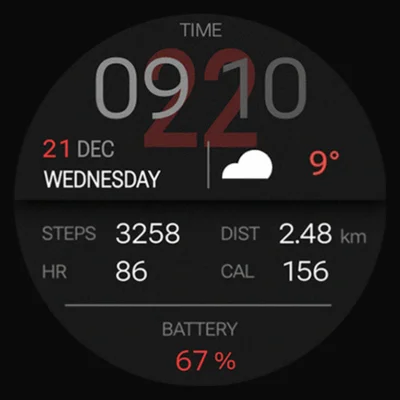
The SG-116 is a digital watch face from SGWatchDesign.
The SG-116 is a digital dial from SGWatchDesign.
Buy one get one! OFFER
Only for Wear OS device API 30+
Functions
• 12/24 hour time (adapts to the connected phone)
• 20 collor styles
• high resolution
• Energy -efficient
For the full range of functions, please activate the authorization "sensors" and "complications data" manually!
The telephone app only serves as a placeholder to simplify the installation and finding the dial on your Wear OS watch. You have to select your watch device from the dropdown menu
Please send all problem reports or help inquiries to our support address
sgwatchdesign@gmail.com
To view your current heart rate data you’ll need to take a manual measurement. To do this, tap on the heart rate display area (see images). Wait a few seconds. The watch face will take a measurement and display the current result.
After the first manual measurement, the watch face can automatically measure your heart rate every 10 minutes. Manual measurement will also be possible.
**Distance KM/MI:
The watch face uses an arithmetic formula to calculate the distance and calories:
1 km = 1312 steps
1 mile = 2100 steps.
Miles will automatically show on devices with language set to UK and US English.
For other languages, the distance will be shown in KM.
***some features may not be available on some watches.
Google Playstore:
https://play.google.com/store/apps/dev?id=7367234512924305828
FACEBOOK:
https://www.facebook.com/SGWatchDesign/
INSTAGRAM:
https://www.instagram.com/sg_watchdesign
Data safety
What SGWatchDesign declares on Google Play about the data this app collects and shares.
- No data shared with third partiesLearn more about how developers declare sharing
- No data collectedLearn more about how developers declare collection
What’s new
Aug 13, 2026
V9.0.0 (Wear)
• add manual selection km/mi
V8.0.2 (Wear)
• rebuilt with WFS 1.6.10
• Update Target API 33
V8.0.0 (wear)
• rebuilt with WFS 1.4.20
• new Watch Face Format
• prepared for Wear OS 4
• more custom complication options!
Update 1.0.1: add white color for Hour and minute
(you can display the time in white or in the basic color grey)
Developer contact
- Emailsgwatchdesign@gmail.com
- Privacy policydocs.google.com
- AddressSchlossblick 14 56414 Wallmerod Germany
Information
- Offered by
- SGWatchDesign
- Category
- Personalization
- Updated
- Aug 13, 2026
- Released
- Dec 23, 2022
- Age rating
- Everyone
- Price
- $0.99
- Package name
- com.watchfacestudio.sg_116