SG-116
SGWatchDesign- 3 歳以上対象年齢
- カスタマイズカテゴリ
- 2026/8/13更新日
- ¥130価格
com.watchfacestudio.sg_116のGoogle Play公式ページにリンクしています。最終確認:2026/11/28。
このアプリについて
Googleによる英語 (アメリカ合衆国)からの自動翻訳です。
SG-116 は、SGWatchDesign のデジタル ウォッチ フェイスです。
SG-116は、SGWatchDesignのデジタルダイアルです。
1つ買うともう1つ無料!
Wear OSデバイスAPI 30+対応のみ
機能
• 12/24時間表示(接続されたスマートフォンに合わせて調整)
• 20種類のカラーバリエーション
• 高解像度
• 省エネ
すべての機能をご利用いただくには、「センサー」と「コンプリケーションデータ」の認証を手動で有効にしてください。
電話アプリは、Wear OSウォッチへのインストールとダイアルの検索を簡素化するための仮置きアプリです。ドロップダウンメニューからウォッチデバイスを選択してください。
問題報告やお問い合わせは、サポートアドレス(sgwatchdesign@gmail.com)までお送りください。
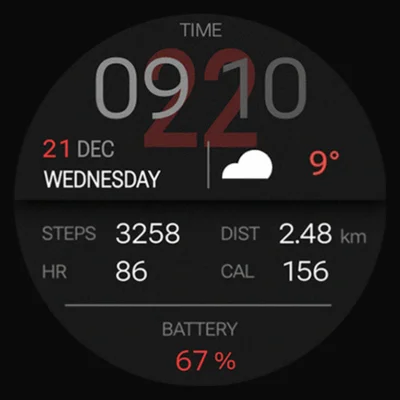
現在の心拍数データを確認するには、手動で測定する必要があります。心拍数表示エリア(画像参照)をタップしてください。数秒お待ちください。ウォッチフェイスが測定を行い、現在の結果を表示します。
最初の手動測定後、ウォッチフェイスは10分ごとに心拍数を自動的に測定します。手動での測定も可能です。
**距離(KM/MI):
ウォッチフェイスは、距離とカロリーを算術式で計算します。
1 km = 1312歩
1 マイル = 2100歩
デバイスで言語がイギリス英語とアメリカ英語に設定されている場合は、マイルが自動的に表示されます。
その他の言語では、距離はkm単位で表示されます。
***一部の機能は、一部のウォッチではご利用いただけない場合があります。
Google Playストア:
https://play.google.com/store/apps/dev?id=7367234512924305828
FACEBOOK:
https://www.facebook.com/SGWatchDesign/
Instagram:
https://www.instagram.com/sg_watchdesign
原文を表示
The SG-116 is a digital dial from SGWatchDesign.
Buy one get one! OFFER
Only for Wear OS device API 30+
Functions
• 12/24 hour time (adapts to the connected phone)
• 20 collor styles
• high resolution
• Energy -efficient
For the full range of functions, please activate the authorization "sensors" and "complications data" manually!
The telephone app only serves as a placeholder to simplify the installation and finding the dial on your Wear OS watch. You have to select your watch device from the dropdown menu
Please send all problem reports or help inquiries to our support address
sgwatchdesign@gmail.com
To view your current heart rate data you’ll need to take a manual measurement. To do this, tap on the heart rate display area (see images). Wait a few seconds. The watch face will take a measurement and display the current result.
After the first manual measurement, the watch face can automatically measure your heart rate every 10 minutes. Manual measurement will also be possible.
**Distance KM/MI:
The watch face uses an arithmetic formula to calculate the distance and calories:
1 km = 1312 steps
1 mile = 2100 steps.
Miles will automatically show on devices with language set to UK and US English.
For other languages, the distance will be shown in KM.
***some features may not be available on some watches.
Google Playstore:
https://play.google.com/store/apps/dev?id=7367234512924305828
FACEBOOK:
https://www.facebook.com/SGWatchDesign/
INSTAGRAM:
https://www.instagram.com/sg_watchdesign
データ セーフティ
このアプリが収集・共有するデータについて、SGWatchDesignがGoogle Playで申告している内容です。
- 第三者と共有されるデータはありません詳しくは、デベロッパーが共有を申告する方法についての説明をご覧ください
- データは収集されません詳しくは、デベロッパーが収集を申告する方法についての説明をご覧ください
新機能
2026/8/13
V9.0.0 (Wear)
• add manual selection km/mi
V8.0.2 (Wear)
• rebuilt with WFS 1.6.10
• Update Target API 33
V8.0.0 (wear)
• rebuilt with WFS 1.4.20
• new Watch Face Format
• prepared for Wear OS 4
• more custom complication options!
Update 1.0.1: add white color for Hour and minute
(you can display the time in white or in the basic color grey)
開発元の連絡先
- メールsgwatchdesign@gmail.com
- プライバシーポリシーdocs.google.com
- 住所Schlossblick 14 56414 Wallmerod Germany
情報
- 提供元
- SGWatchDesign
- カテゴリ
- カスタマイズ
- 更新日
- 2026/8/13
- リリース
- 2022/12/23
- 対象年齢
- 3 歳以上
- 価格
- ¥130
- パッケージ名
- com.watchfacestudio.sg_116