SG-116
SGWatchDesign- USK ab 0 JahrenAltersfreigabe
- PersonalisierungKategorie
- 13.08.2026Aktualisiert
- 1,09 €Preis
Verlinkt auf den offiziellen Google Play-Eintrag von com.watchfacestudio.sg_116. Zuletzt geprüft am 28.11.2026.
Über diese App
Automatische Übersetzung von Google. Originalsprache: Englisch (Vereinigte Staaten).
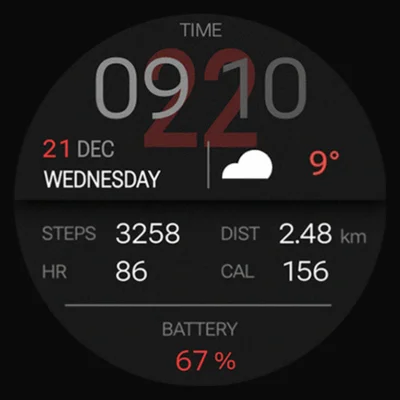
Das SG-116 ist ein digitales Zifferblatt von SGWatchDesign.
Die SG-116 ist ein digitales Zifferblatt von SGWatchDesign.
Kaufe eins, krieg eins gratis! ANGEBOT
Nur für Wear OS Geräte mit API 30+
Funktionen
• 12/24-Stunden-Anzeige (passt sich dem verbundenen Smartphone an)
• 20 Farbstile
• Hohe Auflösung
• Energiesparend
Für den vollen Funktionsumfang aktivieren Sie bitte die Berechtigungen „Sensoren“ und „Komplikationsdaten“ manuell!
Die Smartphone-App dient lediglich als Platzhalter, um die Installation und das Auffinden des Zifferblatts auf Ihrer Wear OS Uhr zu vereinfachen. Sie müssen Ihr Gerät aus dem Dropdown-Menü auswählen.
Bitte senden Sie alle Problemmeldungen oder Hilfeanfragen an unsere Support-Adresse:
sgwatchdesign@gmail.com
Um Ihre aktuellen Herzfrequenzdaten anzuzeigen, müssen Sie eine manuelle Messung durchführen. Tippen Sie dazu auf den Herzfrequenz-Anzeigebereich (siehe Bilder). Warten Sie einige Sekunden. Das Zifferblatt führt eine Messung durch und zeigt das aktuelle Ergebnis an.
Nach der ersten manuellen Messung misst das Zifferblatt automatisch alle 10 Minuten Ihre Herzfrequenz. Auch manuelle Messungen sind möglich.
**Distanz (km/mi):
Das Zifferblatt berechnet Distanz und Kalorien anhand einer arithmetischen Formel:
1 km = 1312 Schritte
1 Meile = 2100 Schritte.
Meilen werden automatisch auf Geräten mit der Spracheinstellung „UK“ und „US-Englisch“ angezeigt.
Für andere Sprachen wird die Distanz in km angezeigt.
***Einige Funktionen sind möglicherweise nicht auf allen Uhren verfügbar.
Google Playstore:
https://play.google.com/store/apps/dev?id=7367234512924305828
FACEBOOK:
https://www.facebook.com/SGWatchDesign/
INSTAGRAM:
https://www.instagram.com/sg_watchdesign
Originaltext anzeigen
The SG-116 is a digital dial from SGWatchDesign.
Buy one get one! OFFER
Only for Wear OS device API 30+
Functions
• 12/24 hour time (adapts to the connected phone)
• 20 collor styles
• high resolution
• Energy -efficient
For the full range of functions, please activate the authorization "sensors" and "complications data" manually!
The telephone app only serves as a placeholder to simplify the installation and finding the dial on your Wear OS watch. You have to select your watch device from the dropdown menu
Please send all problem reports or help inquiries to our support address
sgwatchdesign@gmail.com
To view your current heart rate data you’ll need to take a manual measurement. To do this, tap on the heart rate display area (see images). Wait a few seconds. The watch face will take a measurement and display the current result.
After the first manual measurement, the watch face can automatically measure your heart rate every 10 minutes. Manual measurement will also be possible.
**Distance KM/MI:
The watch face uses an arithmetic formula to calculate the distance and calories:
1 km = 1312 steps
1 mile = 2100 steps.
Miles will automatically show on devices with language set to UK and US English.
For other languages, the distance will be shown in KM.
***some features may not be available on some watches.
Google Playstore:
https://play.google.com/store/apps/dev?id=7367234512924305828
FACEBOOK:
https://www.facebook.com/SGWatchDesign/
INSTAGRAM:
https://www.instagram.com/sg_watchdesign
Datensicherheit
Was SGWatchDesign bei Google Play zu den Daten angibt, die diese App erfasst und weitergibt.
- Keine Daten werden mit Drittunternehmen oder -organisationen geteiltWeitere Informationen dazu, wie Entwickler Angaben zur Weitergabe von Daten machen
- Keine Daten erhobenWeitere Informationen dazu, wie Entwickler Angaben zur Datenerhebung machen
Neue Funktionen
13.08.2026
V9.0.0 (Wear)
• add manual selection km/mi
V8.0.2 (Wear)
• rebuilt with WFS 1.6.10
• Update Target API 33
V8.0.0 (wear)
• rebuilt with WFS 1.4.20
• new Watch Face Format
• prepared for Wear OS 4
• more custom complication options!
Update 1.0.1: add white color for Hour and minute
(you can display the time in white or in the basic color grey)
Kontakt zum Entwickler
- E-Mailsgwatchdesign@gmail.com
- Datenschutzerklärungdocs.google.com
- AdresseSchlossblick 14 56414 Wallmerod Germany
Informationen
- Angeboten von
- SGWatchDesign
- Kategorie
- Personalisierung
- Aktualisiert
- 13.08.2026
- Veröffentlicht
- 23.12.2022
- Altersfreigabe
- USK ab 0 Jahren
- Preis
- 1,09 €
- Paketname
- com.watchfacestudio.sg_116