Active 2: Watch face
amoledwatchfaces™- USK ab 0 JahrenAltersfreigabe
- EffizienzKategorie
- 04.08.2026Aktualisiert
- 1,49 €Preis
Verlinkt auf den offiziellen Google Play-Eintrag von com.amoledwatchfaces.active2. Zuletzt geprüft am 26.11.2026.
Über diese App
Automatische Übersetzung von Google. Originalsprache: Englisch (Vereinigte Staaten).
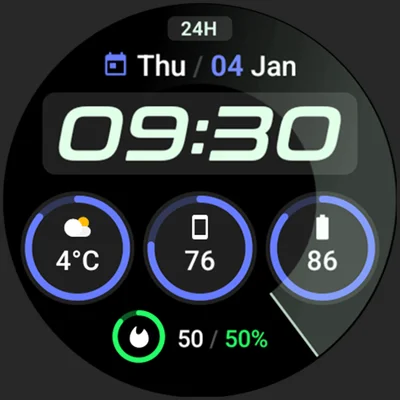
Fitnessorientiertes Design. Individuelle Komplikationen. Batteriefreundlich. Echte schwarze BG.
Nur für Wear OS 4+-Geräte
// Nicht für rechteckige Uhren geeignet
Unterstützt von Watch Face Format
amoledwatchfaces.com
KAUFEN SIE EINEN, ERHALTEN SIE EIN ANGEBOT!
amoledwatchfaces.com/bogo
BENUTZERDEFINIERTE KOMPLIKATIONS-APPS
amoledwatchfaces.com/apps
FUNKTIONEN
• Zifferblattformat 1
• drei Hauptkomplikationen mit vier Typen
• Datumsfeld, das in eine LONG_TEXT-Komplikation umgewandelt werden kann (Nächstes Ereignis)
• Einzigartiger Umgebungsmodus mit niedrigem OPR und adaptiven Farben
• Einbrennschutz
• PNGQuant-optimierte Ebenen > batteriefreundlich
• Echtschwarzer Hintergrund
• hohe Auflösung
• Vollständig kompatibel mit den neuesten Wear OS-Geräten
• einzigartige Farbthemen
• Machen Sie es zu Ihrem eigenen, passen Sie jeden Verlauf des Fortschrittsbalkens individuell an, wenn die Bereichswertkomplikation verwendet wird
• Tippen Sie auf das Datum, um den Kalender zu öffnen
• Tippen Sie auf „Digitaluhr“, um eine benutzerdefinierte App-Startaktion festzulegen
• Tippen Sie auf „am-pm“, um die Alarm-App zu öffnen
• Zentralsekundenanzeige
• Unterstützung bei Komplikationen bei Telefonbenachrichtigungen*
* erfordert die App „Phone Battery Complication“.
https://play.google.com/store/apps/details?id=com.weartools.phonebattcomp
BENUTZERKONFIGURATIONEN
• Thema (Standard + 29x)
• Balken 1, 2, 3 – Farbton 1, Farbton 2, Farbton 3 – übernimmt die Farbe vom Thema und gilt nur für Fortschrittsbalken in drei Hauptkomplikationen
• Sekundenanzeige (4x + Option zum Deaktivieren)
• AOD (Stil – 2x)
• Digitaluhr-Hintergrund (umschalten)
• Zusammenfassung des unteren Slots (umschalten)
• Benutzerdefinierte Komplikation (6x)
Anleitung zur Installation und Fehlerbehebung
amoledwatchfaces.com/guide
Bitte senden Sie alle Problemberichte oder Hilfeanfragen an unsere Support-Adresse
support@amoledwatchfaces.com
Treten Sie unserer Telegram-Gruppe für Live-Support und Diskussionen bei
t.me/amoledwatchfaces
amoledwatchfaces™ – Awf
Originaltext anzeigen
Only for Wear OS 4+ devices
// Not suitable for rectangular watches
Powered by Watch Face Format
amoledwatchfaces.com
BUY ONE GET ONE OFFER!
amoledwatchfaces.com/bogo
CUSTOM COMPLICATION APPS
amoledwatchfaces.com/apps
FEATURES
• Watch Face Format 1
• three main complications with four types
• date box which can be converted to LONG_TEXT complication (Next Event)
• unique ambient mode with low OPR & adaptive colors
• burn-in protection
• PNGQuant optimized layers > battery friendly
• true black background
• high resolution
• fully compatible latest Wear OS devices
• unique color themes
• make it your own, customize each progress bar gradient individually when ranged value complication is used
• tap date to open Calendar
• tap Digital Clock to set custom app launch action
• tap am-pm to open Alarm app
• sweep seconds indicator
• phone notifications complication support*
* requires Phone Battery Complication app
https://play.google.com/store/apps/details?id=com.weartools.phonebattcomp
USER CONFIGURATIONS
• Theme (Default + 29x)
• Bar1, 2, 3 - Tint 1, Tint 2, Tint 3 - takes color from Theme, applies only to Progress bars in three main complications
• Seconds Indicator (4x + option to disable)
• AOD (Style - 2x)
• Digital Clock Background (Toggle)
• Bottom Slot Summary (Toggle)
• Custom Complication (6x)
Installation and troubleshooting guide
amoledwatchfaces.com/guide
Please send any issues reports or help requests to our support address
support@amoledwatchfaces.com
Join our Telegram group for live support and discussion
t.me/amoledwatchfaces
amoledwatchfaces™ - Awf
Datensicherheit
Was amoledwatchfaces™ bei Google Play zu den Daten angibt, die diese App erfasst und weitergibt.
- Keine Daten werden mit Drittunternehmen oder -organisationen geteiltWeitere Informationen dazu, wie Entwickler Angaben zur Weitergabe von Daten machen
- Keine Daten erhobenWeitere Informationen dazu, wie Entwickler Angaben zur Datenerhebung machen
Neue Funktionen
04.08.2026
v1.1.0
• EMPTY (date) potential fix
v1.0.9
• watchface.xml optimizations
• reworked customization previews
• added watch face preview time
• added phone notifications complication support*
v1.0.8
• minified watchface.xml
v1.0.7
• added new orange theme
v1.0.5
• WFF XSD format fixes
• added an option to remove bottom complication slot summary (s%%)
...
* requires Phone Battery Complication app
https://play.google.com/store/apps/details?id=com.weartools.phonebattcomp
Kontakt zum Entwickler
- Websiteamoledwatchfaces.com
- E-Mailsupport@amoledwatchfaces.com
- Datenschutzerklärungamoledwatchfaces.com
- Adresse51 Nižný Kručov 09301 Nižný Kručov Slovakia
Informationen
- Angeboten von
- amoledwatchfaces™
- Kategorie
- Effizienz
- Aktualisiert
- 04.08.2026
- Veröffentlicht
- 04.01.2024
- Altersfreigabe
- USK ab 0 Jahren
- Preis
- 1,49 €
- Paketname
- com.amoledwatchfaces.active2
Ähnliche Apps
-
 SeptaWorks Watch Face
Personalisierung
-
 Gravity Watch Face
Personalisierung
-
 Fit ONE: Watch face
Personalisierung
-
 Pulse 2: Watch face
Personalisierung
-
 Summit Watch Face
Effizienz
-
 Key WF45 Digital Watch Face
Personalisierung
-
 QuanTick 04 - Digital Watch
Personalisierung
-
 SG-168
Personalisierung
-
 Pixel OLED: Watch face
Personalisierung
-
 Apex SE Watch Face
Personalisierung
-
 SG-172
Personalisierung
-
 Utility Watch Face
Effizienz