Crypt 53 Digital Watch Face
DigitX Watchfaces- USK ab 0 JahrenAltersfreigabe
- PersonalisierungKategorie
- 07.09.2026Aktualisiert
- 1,99 €Preis
Verlinkt auf den offiziellen Google Play-Eintrag von watch.digitx.crypt53. Zuletzt geprüft am 13.11.2026.
Über diese App
Automatische Übersetzung von Google. Originalsprache: Englisch (Vereinigte Staaten).
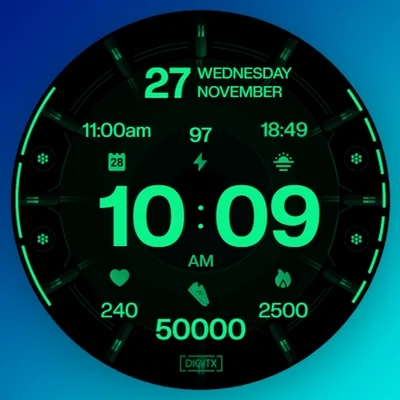
Minimalistisches digitales Zifferblatt für Wear OS, benutzerdefinierte Komplikationen und Farben.
⌚ Unterstützt durch das neue Zifferblattformat.
Zu den kompatiblen Geräten gehören Geräte mit API-Level 30 oder höher: Google Pixel, Galaxy Watch 4, 5, 6, 7, Ultra und andere Wear OS-Modelle.
Minimalistisches digitales Zifferblatt für Wear OS, benutzerdefinierte Komplikationen und Farben.
⌚ BOGO:
https://digitx.watch/home/buy-one-get-one-free/
🚨 Hinweis für Galaxy Watch-Nutzer:
Der Zifferblatt-Editor in der Samsung Wearable App kann komplizierte Zifferblätter wie dieses oft nicht laden.
Dies liegt nicht am Zifferblatt selbst.
Es wird empfohlen, das Zifferblatt direkt auf der Uhr anzupassen, bis Samsung dieses Problem behebt.
✅ Funktionsübersicht:
- Minimalistisches digitales Zifferblatt
- 12/24-Stunden-Digitalzeit
- Benutzerdefinierte Farben (über 30 Farben zur Auswahl)
- 2 benutzerdefinierte Komplikationen (für benutzerdefinierte Daten)
- 4 benutzerdefinierte Kurzbefehle für den Zugriff auf Ihre Lieblings-App
- 5 Standardkurzbefehle: Alarm, Kalender, Herzfrequenz, Batteriestatus
- 5 Helligkeitsstufen (erhöht die Batterielaufzeit)
- 4 minimalistische AOD-Stile
- Zifferblattanzeigen: Digitalzeit, AM/PM, Wochentag, Monatstag, Monat, Herzfrequenz, Schritte, ungefähr verbrannte Kalorien, Batteriestand + 2 benutzerdefinierte Komplikationen und 4 benutzerdefinierte Kurzbefehle
🎨 Verfügbare Anpassungsoptionen:
- Farbe: über 30 Designs
- Zifferblatthelligkeit: 5 Stufen
- AOD: 4 Stile
- Komplikationen: 2 benutzerdefinierte Komplikationen, 4 benutzerdefinierte Kurzbefehle
📱 Funktionen der Telefon-App (Begleit-App):
Die Telefon-App ist ein Tool, mit dem Sie ein Zifferblatt auf Ihrer Wear OS-Uhr installieren und finden können.
❤️ Herzfrequenzmessung:
Die Herzfrequenzmessung wurde geändert. (Vorher manuell, jetzt automatisch). Das Messintervall kann in den Uhrstatuseinstellungen (Uhreinstellungen > Gesundheit) eingestellt werden.
⌚ AOD:
Das Zifferblatt ist ständig aktiv. Die Farben sind mit der normalen Anzeige synchronisiert.* Sie können auch die minimalistische AOD-Option wählen.
*Beachten Sie, dass die Verwendung von AOD die Betriebszeit einer vollständig geladenen Smartwatch erheblich verkürzt.
🎨 Farbkonfiguration:
1. Halten Sie Ihren Finger in der Mitte des Uhrendisplays gedrückt.
2. Drücken Sie die Taste, um Anpassungen vorzunehmen.
3. Wischen Sie nach links oder rechts, um zwischen verschiedenen anpassbaren Elementen zu wechseln.
4. Wischen Sie nach oben oder unten, um die Optionen/Farbe der Elemente zu ändern.
🎨 App-Verknüpfungen und benutzerdefinierte Komplikationen einrichten:
Verknüpfungen = Widget-Links
Benutzerdefinierte Kompl. = Werte ändern
1. Halten Sie das Uhrendisplay gedrückt.
2. Drücke die Anpassen-Schaltfläche.
3. Wische von rechts nach links, bis du zu „Komplikationen“ gelangst.
4. Deine App-Verknüpfungen und/oder benutzerdefinierten Komplikationen werden hervorgehoben. Klicke darauf, um deine bevorzugte Einstellung auszuwählen.
🚨 Probleme bei der Installation, auch auf einer kompatiblen Smartwatch?**
Besuche: https://digitx.watch/home/about-digitx/help-faq/
oder kontaktiere mich: https://digitx.watch/home/about-digitx/contact-us/
** Zifferblätter werden nach der Installation nicht automatisch auf dem Display der Uhr installiert. Daher musst du diese Option auf dem Display der Uhr aktivieren.
✅ Verfügbar auf Wear OS-Geräten – API 30+
Galaxy Watch Ultra / Galaxy Watch 7
Galaxy Watch 6 / 6 Classic
Galaxy Watch 5/5 Pro
Galaxy Watch 4 / 4 Classic
FOSSIL: Gen 7, Gen 6, Gen 6 Wellness, Gen 6 Hybrid, Gen 5e, Wear, Sport, Michael Kors Gen 6
MOBVOI: TicWatch Pro 5, Pro 3 GPS, Pro 3 LTE, E3, Pro 4G, C2, E2/S2, Pro
GOOGLE: Pixel Watch 2, Pixel Watch
XIAOMI: Watch 2 Pro, Watch 2
OPPO: Watch 2, Watch X
MONTBLANC: Summit 3, 2, 2+, Lite, Summit
SUUNTO: Suunto 7
NEW BALANCE: RunIQ
POLAR: M600
TAG HEUER: Connected E4, Connected 2020
Und alle weiteren Wear OS-Geräte (API 30+)
ℹ️ Einzigartiges Zifferblatt zum Testen Ihrer Smartwatch!
Vielen Dank für Ihre Unterstützung. Folgen Sie mir für weitere neue Zifferblätter!
Bei Fragen oder Support kontaktieren Sie mich gerne. Ich helfe Ihnen gerne!
💌 https://digitx.watch/home/about-digitx/contact-us/
_____________________
➡️ Folgen Sie mir, um auf dem Laufenden zu bleiben:
🟢 Website: https://digitx.watch/
🔴 Instagram: https://www.instagram.com/digitxhwf/
🔵 Facebook: https://www.facebook.com/digitxxl
__________
DigitX Zifferblätter
Originaltext anzeigen
⌚Supported by the new Watch Face Format.
Compatible devices include API level 30 or later: Google Pixel, Galaxy Watch 4, 5, 6, 7, Ultra, and other Wear OS models.
Minimalistic digital watch face for Wear OS, custom complications, and colors.
⌚ BOGO:
https://digitx.watch/home/buy-one-get-one-free/
🚨 Note to Galaxy Watch users:
The watch face editor in the Samsung Wearable app often fails to load complicated watch faces like this one.
This is not a problem with the watch face itself.
It is recommended that you customize your watch face directly on the watch until Samsung fixes this issue.
✅ Features Overview:
- Minimalistic digital watch face
- 12/24 hours digital time
- Custom colors (30+ colors to choose from)
- 2 custom complications (for user-defined data)
- 4 custom shortcuts to access your favorite app
- 5 standard shortcuts: alarm, calendar, heart rate, battery status
- 5 levels of dial brightness (increases battery life)
- 4 minimalistic AOD styles
- Watch face displays: digital time, am/pm, day of the week, day of the month, month, heart rate, steps, approximate burned calories, battery level + 2 custom complications and 4 custom shortcuts
🎨 Available Customization Options:
- Color: 30+ themes
- Face brightness: 5 levels
- AOD: 4 styles
- Complications: 2 custom complications, 4 custom shortcuts
📱 Phone app features (companion app):
The phone app is simply a tool that helps you install and locate a watch face on your Wear OS watch.
❤️ Heart rate measurement:
Heart rate measurement has been changed. (Previously manual, now automatic). Set the measurement interval in the watch status settings (Watch settings > Health).
⌚ AOD:
The watch face has an always-on display. The colors are synchronized with the normal view.* You can also choose the minimalist AOD option.
*Keep in mind that using AOD will significantly reduce the operating time of a fully charged smartwatch.
🎨 Color Configuration:
1. Press and hold your finger in the middle of the watch display.
2. Press the button to make adjustments.
3. Swipe left or right to switch between different items that can be customized.
4. Swipe up or down to change the options/color of items.
🎨 Setting up app shortcuts and custom complications:
Shortcuts = widget links
Custom compl. = change values
1. Press and hold the watch display.
2. Press the customize button.
3. Swipe from right to left until you reach “complications.”
4. Your app shortcuts and/or custom complications are highlighted. Click them to choose your favorite setting.
🚨 Having trouble installing even on a compatible smartwatch?**
Visit: https://digitx.watch/home/about-digitx/help-faq/
or contact me: https://digitx.watch/home/about-digitx/contact-us/
** Watch faces are not automatically installed on the watch screen after installation. Therefore, you need to set this option on the watch screen.
✅ Available on Wear OS devices – API 30+
Galaxy Watch Ultra / Galaxy Watch 7
Galaxy Watch 6 / 6 Classic
Galaxy Watch 5/5 Pro
Galaxy Watch 4 / 4 Cassic
FOSSIL: Gen 7, Gen 6, Gen 6 Wellness, Gen 6 Hybrid, Gen 5e, Wear, Sport, Michael Kors Gen 6
MOBVOI: TicWatch Pro 5, Pro 3 GPS, Pro 3 LTE, E3, Pro 4G, C2, E2/S2, Pro
GOOGLE: Pixel Watch 2, Pixel Watch
XIAOMI: Watch 2 Pro, Watch 2
OPPO: Watch2, Watch X
MONTBLANC: Summit 3, 2, 2+, Lite, Summit
SUUNTO: Suunto 7
NEW BALANCE: RunIQ
POLAR: M600
TAG HEUER: Connected E4, Connected 2020
And every another Wear Os devices API 30+)
ℹ️ Unique style watch face ready to test your smartwatch!
Thanks for your support and don't forget to follow me for more upcoming watch faces!
If you have any additional questions or need support, please do not hesitate to contact me. I am here to help!
💌 https://digitx.watch/home/about-digitx/contact-us/
_____________________
➡️ Follow for being up to date:
🟢 Website: https://digitx.watch/
🔴 Instagram: https://www.instagram.com/digitxhwf/
🔵 Facebook: https://www.facebook.com/digitxxl
__________
DigitX Watch Faces
Datensicherheit
Was DigitX Watchfaces bei Google Play zu den Daten angibt, die diese App erfasst und weitergibt.
- Keine Daten werden mit Drittunternehmen oder -organisationen geteiltWeitere Informationen dazu, wie Entwickler Angaben zur Weitergabe von Daten machen
- Keine Daten erhobenWeitere Informationen dazu, wie Entwickler Angaben zur Datenerhebung machen
Kontakt zum Entwickler
- Websitedigitx.watch
- E-Mailsupport@digitx.watch
- Datenschutzerklärungdigitx.watch
- Adresse35 Ul. Nowa Wieś 42-160 Zajączki Drugie Poland
Informationen
- Angeboten von
- DigitX Watchfaces
- Kategorie
- Personalisierung
- Aktualisiert
- 07.09.2026
- Veröffentlicht
- 04.10.2025
- Altersfreigabe
- USK ab 0 Jahren
- Preis
- 1,99 €
- Paketname
- watch.digitx.crypt53