Crypt 53 Digital Watch Face
DigitX Watchfaces- Rating 3+Batasan usia
- PersonalisasiKategori
- 7/9/2026Diperbarui
- Rp 31.000Harga
Tertaut ke halaman resmi watch.digitx.crypt53 di Google Play. Terakhir diperiksa pada 13/11/2026.
Tentang aplikasi ini
Terjemahan otomatis oleh Google. Bahasa asli: Inggris (Amerika Serikat).
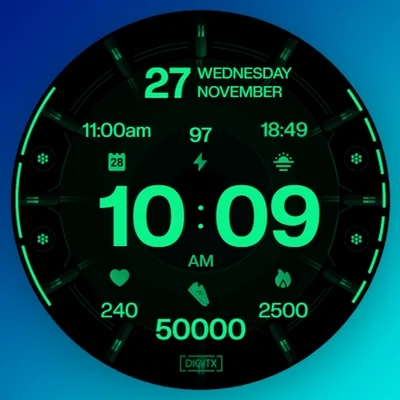
Tampilan jam digital minimalis untuk Wear OS, komplikasi khusus, dan warna.
⌚Didukung oleh Format Tampilan Jam yang baru.
Perangkat yang kompatibel mencakup API level 30 atau lebih baru: Google Pixel, Galaxy Watch 4, 5, 6, 7, Ultra, dan model Wear OS lainnya.
Tampilan jam digital minimalis untuk Wear OS, dengan komplikasi dan warna yang dapat disesuaikan.
⌚ BOGO:
https://digitx.watch/home/buy-one-get-one-free/
🚨 Catatan untuk pengguna Galaxy Watch:
Editor tampilan jam di aplikasi Samsung Wearable sering kali gagal memuat tampilan jam yang rumit seperti ini.
Ini bukan masalah pada tampilan jam itu sendiri.
Sebaiknya Anda menyesuaikan tampilan jam langsung di jam tangan hingga Samsung memperbaiki masalah ini.
✅ Ikhtisar Fitur:
- Tampilan jam digital minimalis
- Waktu digital 12/24 jam
- Warna kustom (lebih dari 30 warna untuk dipilih)
- 2 komplikasi kustom (untuk data yang ditentukan pengguna)
- 4 pintasan kustom untuk mengakses aplikasi favorit Anda
- 5 pintasan standar: alarm, kalender, detak jantung, status baterai
- 5 tingkat kecerahan dial (meningkatkan masa pakai baterai)
- 4 gaya AOD minimalis
- Tampilan tampilan jam: waktu digital, AM/PM, hari dalam seminggu, hari dalam sebulan, bulan, detak jantung, langkah, perkiraan kalori yang terbakar, tingkat baterai + 2 komplikasi kustom dan 4 pintasan kustom
🎨 Opsi Kustomisasi yang Tersedia:
- Warna: 30+ tema
- Kecerahan tampilan: 5 tingkat
- AOD: 4 gaya
- Komplikasi: 2 komplikasi kustom, 4 pintasan kustom
📱 Fitur aplikasi telepon (aplikasi pendamping):
Aplikasi telepon hanyalah alat yang membantu Anda memasang dan menemukan tampilan jam di jam tangan Wear OS Anda.
❤️ Pengukuran detak jantung:
Pengukuran detak jantung telah diubah. (Sebelumnya manual, sekarang otomatis). Atur interval pengukuran di pengaturan status jam tangan (Pengaturan jam tangan > Kesehatan).
⌚ AOD:
Tampilan jam tangan memiliki tampilan selalu aktif. Warnanya disinkronkan dengan tampilan normal.* Anda juga dapat memilih opsi AOD minimalis.
*Perlu diingat bahwa penggunaan AOD akan secara signifikan mengurangi waktu pengoperasian jam tangan pintar yang terisi penuh.
🎨 Konfigurasi Warna:
1. Tekan dan tahan jari Anda di tengah tampilan jam tangan.
2. Tekan tombol untuk melakukan penyesuaian.
3. Geser ke kiri atau kanan untuk beralih di antara berbagai item yang dapat disesuaikan.
4. Geser ke atas atau ke bawah untuk mengubah opsi/warna item.
🎨 Mengatur pintasan aplikasi dan komplikasi khusus:
Pintasan = tautan widget
Komplikasi khusus = mengubah nilai
1. Tekan dan tahan tampilan jam tangan.
2. Tekan tombol kustomisasi.
3. Geser dari kanan ke kiri hingga Anda mencapai "komplikasi".
4. Pintasan aplikasi dan/atau komplikasi khusus Anda akan disorot. Klik untuk memilih pengaturan favorit Anda.
🚨 Kesulitan menginstal bahkan di jam tangan pintar yang kompatibel?**
Kunjungi: https://digitx.watch/home/about-digitx/help-faq/
atau hubungi saya: https://digitx.watch/home/about-digitx/contact-us/
** Tampilan jam tidak otomatis terinstal di layar jam setelah instalasi. Oleh karena itu, Anda perlu mengatur opsi ini di layar jam.
✅ Tersedia di perangkat Wear OS – API 30+
Galaxy Watch Ultra / Galaxy Watch 7
Galaxy Watch 6 / 6 Classic
Galaxy Watch 5/5 Pro
Galaxy Watch 4 / 4 Cassic
FOSSIL: Gen 7, Gen 6, Gen 6 Wellness, Gen 6 Hybrid, Gen 5e, Wear, Sport, Michael Kors Gen 6
MOBVOI: TicWatch Pro 5, Pro 3 GPS, Pro 3 LTE, E3, Pro 4G, C2, E2/S2, Pro
GOOGLE: Pixel Watch 2, Pixel Watch
XIAOMI: Watch 2 Pro, Watch 2
OPPO: Watch2, Watch X
MONTBLANC: Summit 3, 2, 2+, Lite, Summit
SUUNTO: Suunto 7
NEW BALANCE: RunIQ
POLAR: M600
TAG HEUER: Connected E4, Connected 2020
Dan lainnya Perangkat Wear OS API 30+)
ℹ️ Tampilan jam tangan unik siap menguji jam tangan pintar Anda!
Terima kasih atas dukungan Anda dan jangan lupa ikuti saya untuk mendapatkan tampilan jam tangan terbaru!
Jika Anda memiliki pertanyaan tambahan atau membutuhkan dukungan, jangan ragu untuk menghubungi saya. Saya siap membantu!
💌 https://digitx.watch/home/about-digitx/contact-us/
_____________________
➡️ Ikuti untuk mendapatkan informasi terbaru:
🟢 Situs web: https://digitx.watch/
🔴 Instagram: https://www.instagram.com/digitxhwf/
🔵 Facebook: https://www.facebook.com/digitxxl
__________
Tampilan Jam Tangan DigitX
Tampilkan teks asli
⌚Supported by the new Watch Face Format.
Compatible devices include API level 30 or later: Google Pixel, Galaxy Watch 4, 5, 6, 7, Ultra, and other Wear OS models.
Minimalistic digital watch face for Wear OS, custom complications, and colors.
⌚ BOGO:
https://digitx.watch/home/buy-one-get-one-free/
🚨 Note to Galaxy Watch users:
The watch face editor in the Samsung Wearable app often fails to load complicated watch faces like this one.
This is not a problem with the watch face itself.
It is recommended that you customize your watch face directly on the watch until Samsung fixes this issue.
✅ Features Overview:
- Minimalistic digital watch face
- 12/24 hours digital time
- Custom colors (30+ colors to choose from)
- 2 custom complications (for user-defined data)
- 4 custom shortcuts to access your favorite app
- 5 standard shortcuts: alarm, calendar, heart rate, battery status
- 5 levels of dial brightness (increases battery life)
- 4 minimalistic AOD styles
- Watch face displays: digital time, am/pm, day of the week, day of the month, month, heart rate, steps, approximate burned calories, battery level + 2 custom complications and 4 custom shortcuts
🎨 Available Customization Options:
- Color: 30+ themes
- Face brightness: 5 levels
- AOD: 4 styles
- Complications: 2 custom complications, 4 custom shortcuts
📱 Phone app features (companion app):
The phone app is simply a tool that helps you install and locate a watch face on your Wear OS watch.
❤️ Heart rate measurement:
Heart rate measurement has been changed. (Previously manual, now automatic). Set the measurement interval in the watch status settings (Watch settings > Health).
⌚ AOD:
The watch face has an always-on display. The colors are synchronized with the normal view.* You can also choose the minimalist AOD option.
*Keep in mind that using AOD will significantly reduce the operating time of a fully charged smartwatch.
🎨 Color Configuration:
1. Press and hold your finger in the middle of the watch display.
2. Press the button to make adjustments.
3. Swipe left or right to switch between different items that can be customized.
4. Swipe up or down to change the options/color of items.
🎨 Setting up app shortcuts and custom complications:
Shortcuts = widget links
Custom compl. = change values
1. Press and hold the watch display.
2. Press the customize button.
3. Swipe from right to left until you reach “complications.”
4. Your app shortcuts and/or custom complications are highlighted. Click them to choose your favorite setting.
🚨 Having trouble installing even on a compatible smartwatch?**
Visit: https://digitx.watch/home/about-digitx/help-faq/
or contact me: https://digitx.watch/home/about-digitx/contact-us/
** Watch faces are not automatically installed on the watch screen after installation. Therefore, you need to set this option on the watch screen.
✅ Available on Wear OS devices – API 30+
Galaxy Watch Ultra / Galaxy Watch 7
Galaxy Watch 6 / 6 Classic
Galaxy Watch 5/5 Pro
Galaxy Watch 4 / 4 Cassic
FOSSIL: Gen 7, Gen 6, Gen 6 Wellness, Gen 6 Hybrid, Gen 5e, Wear, Sport, Michael Kors Gen 6
MOBVOI: TicWatch Pro 5, Pro 3 GPS, Pro 3 LTE, E3, Pro 4G, C2, E2/S2, Pro
GOOGLE: Pixel Watch 2, Pixel Watch
XIAOMI: Watch 2 Pro, Watch 2
OPPO: Watch2, Watch X
MONTBLANC: Summit 3, 2, 2+, Lite, Summit
SUUNTO: Suunto 7
NEW BALANCE: RunIQ
POLAR: M600
TAG HEUER: Connected E4, Connected 2020
And every another Wear Os devices API 30+)
ℹ️ Unique style watch face ready to test your smartwatch!
Thanks for your support and don't forget to follow me for more upcoming watch faces!
If you have any additional questions or need support, please do not hesitate to contact me. I am here to help!
💌 https://digitx.watch/home/about-digitx/contact-us/
_____________________
➡️ Follow for being up to date:
🟢 Website: https://digitx.watch/
🔴 Instagram: https://www.instagram.com/digitxhwf/
🔵 Facebook: https://www.facebook.com/digitxxl
__________
DigitX Watch Faces
Keamanan data
Yang dinyatakan DigitX Watchfaces di Google Play tentang data yang dikumpulkan dan dibagikan aplikasi ini.
- Tidak ada data yang dibagikan kepada pihak ketigaPelajari lebih lanjut cara developer menyatakan pembagian data
- Tidak ada data yang dikumpulkanPelajari lebih lanjut cara developer menyatakan pengumpulan data
Kontak pengembang
- Situs webdigitx.watch
- Emailsupport@digitx.watch
- Kebijakan Privasidigitx.watch
- Alamat35 Ul. Nowa Wieś 42-160 Zajączki Drugie Poland
Informasi
- Ditawarkan oleh
- DigitX Watchfaces
- Kategori
- Personalisasi
- Diperbarui
- 7/9/2026
- Dirilis
- 4/10/2025
- Batasan usia
- Rating 3+
- Harga
- Rp 31.000
- Nama paket
- watch.digitx.crypt53