Crypt 53 Digital Watch Face
DigitX Watchfaces- PEGI 3Clasificación por edad
- PersonalizaciónCategoría
- 7/9/2026Actualizado
- 1,99 €Precio
Enlaza a la ficha oficial de watch.digitx.crypt53 en Google Play. Última comprobación el 13/11/2026.
Acerca de esta aplicación
Traducción automática de Google. Idioma original: Inglés (Estados Unidos).
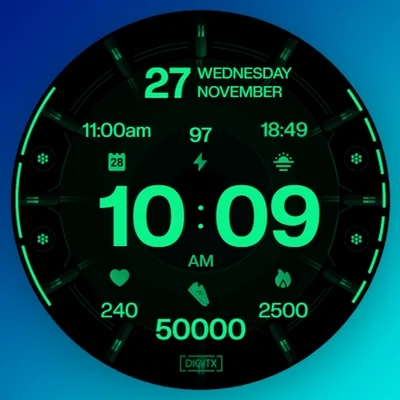
Esfera de reloj digital minimalista para Wear OS, complicaciones personalizadas y colores.
⌚Compatible con el nuevo formato de esfera de reloj.
Dispositivos compatibles con nivel de API 30 o posterior: Google Pixel, Galaxy Watch 4, 5, 6, 7, Ultra y otros modelos de Wear OS.
Esfera digital minimalista para Wear OS, con complicaciones y colores personalizados.
⌚ BOGO:
https://digitx.watch/home/buy-one-get-one-free/
🚨 Nota para usuarios de Galaxy Watch:
El editor de esferas de reloj de la app Samsung Wearable a menudo no carga esferas complejas como esta.
Esto no es un problema de la esfera en sí.
Se recomienda personalizar la esfera directamente en el reloj hasta que Samsung solucione este problema.
✅ Resumen de características:
- Esfera digital minimalista
- Hora digital de 12/24 horas
- Colores personalizados (más de 30 colores a elegir)
- 2 complicaciones personalizadas (para datos definidos por el usuario)
- 4 accesos directos personalizados para acceder a tu app favorita
- 5 accesos directos estándar: alarma, calendario, frecuencia cardíaca, estado de la batería
- 5 niveles de brillo de la esfera (aumenta la duración de la batería)
- 4 estilos minimalistas de AOD
- Visualización de la esfera: hora digital, am/pm, día de la semana, día del mes, mes, frecuencia cardíaca, pasos, calorías quemadas aproximadas, nivel de batería + 2 complicaciones personalizadas y 4 accesos directos personalizados
🎨 Opciones de personalización disponibles:
- Color: más de 30 temas
- Brillo de la esfera: 5 niveles
- AOD: 4 estilos
- Complicaciones: 2 complicaciones personalizadas, 4 accesos directos personalizados
📱 Funciones de la app de teléfono (app complementaria):
La app de teléfono es simplemente una herramienta que te ayuda a instalar y localizar una esfera en tu reloj Wear OS.
❤️ Medición de la frecuencia cardíaca:
La medición de la frecuencia cardíaca ha cambiado. (Antes era manual, ahora automática). Configura el intervalo de medición en los ajustes de estado del reloj (Ajustes del reloj > Salud).
⌚ AOD:
La pantalla del reloj siempre está activa. Los colores se sincronizan con la vista normal.* También puedes elegir la opción minimalista de AOD.
*Ten en cuenta que usar AOD reducirá significativamente el tiempo de funcionamiento de un smartwatch completamente cargado.
🎨 Configuración de color:
1. Mantén pulsado el dedo en el centro de la pantalla del reloj.
2. Pulsa el botón para realizar ajustes.
3. Desliza el dedo hacia la izquierda o la derecha para cambiar entre los diferentes elementos personalizables.
4. Desliza el dedo hacia arriba o hacia abajo para cambiar las opciones o el color de los elementos.
🎨 Configurar accesos directos de aplicaciones y complicaciones personalizadas:
Accesos directos = enlaces de widgets
Compleción personalizada = cambiar valores
1. Mantén pulsada la pantalla del reloj.
2. Pulsa el botón de personalización.
3. Desliza el dedo de derecha a izquierda hasta llegar a "Complicaciones".
4. Los accesos directos de tus apps y/o las complicaciones personalizadas aparecerán resaltados. Haz clic en ellos para elegir tu configuración favorita.
🚨 ¿Tienes problemas para instalar incluso en un smartwatch compatible?**
Visita: https://digitx.watch/home/about-digitx/help-faq/
o contáctame: https://digitx.watch/home/about-digitx/contact-us/
** Las esferas de reloj no se instalan automáticamente en la pantalla del reloj después de la instalación. Por lo tanto, debes configurar esta opción en la pantalla del reloj.
✅ Disponible en dispositivos Wear OS – API 30+
Galaxy Watch Ultra / Galaxy Watch 7
Galaxy Watch 6 / 6 Classic
Galaxy Watch 5/5 Pro
Galaxy Watch 4 / 4 Cassic
FOSSIL: Gen 7, Gen 6, Gen 6 Wellness, Gen 6 Hybrid, Gen 5e, Wear, Sport, Michael Kors Gen 6
MOBVOI: TicWatch Pro 5, Pro 3 GPS, Pro 3 LTE, E3, Pro 4G, C2, E2/S2, Pro
GOOGLE: Pixel Watch 2, Pixel Watch
XIAOMI: Watch 2 Pro, Watch 2
OPPO: Watch2, Watch X
MONTBLANC: Summit 3, 2, 2+, Lite, Summit
SUUNTO: Suunto 7
NEW BALANCE: RunIQ
POLAR: M600
TAG HEUER: Connected E4, Connected 2020
Y todos Otro dispositivo Wear OS (API 30+)
ℹ️ ¡Esfera de reloj con un estilo único, lista para probar tu smartwatch!
Gracias por tu apoyo y no olvides seguirme para estar al tanto de las próximas esferas de reloj.
Si tienes alguna pregunta o necesitas ayuda, no dudes en contactarme. ¡Estoy aquí para ayudarte!
💌 https://digitx.watch/home/about-digitx/contact-us/
_____________________
➡️ Sígueme para estar al día:
🟢 Sitio web: https://digitx.watch/
🔴 Instagram: https://www.instagram.com/digitxhwf/
🔵 Facebook: https://www.facebook.com/digitxxl
__________
Esferas de reloj DigitX
Mostrar el texto original
⌚Supported by the new Watch Face Format.
Compatible devices include API level 30 or later: Google Pixel, Galaxy Watch 4, 5, 6, 7, Ultra, and other Wear OS models.
Minimalistic digital watch face for Wear OS, custom complications, and colors.
⌚ BOGO:
https://digitx.watch/home/buy-one-get-one-free/
🚨 Note to Galaxy Watch users:
The watch face editor in the Samsung Wearable app often fails to load complicated watch faces like this one.
This is not a problem with the watch face itself.
It is recommended that you customize your watch face directly on the watch until Samsung fixes this issue.
✅ Features Overview:
- Minimalistic digital watch face
- 12/24 hours digital time
- Custom colors (30+ colors to choose from)
- 2 custom complications (for user-defined data)
- 4 custom shortcuts to access your favorite app
- 5 standard shortcuts: alarm, calendar, heart rate, battery status
- 5 levels of dial brightness (increases battery life)
- 4 minimalistic AOD styles
- Watch face displays: digital time, am/pm, day of the week, day of the month, month, heart rate, steps, approximate burned calories, battery level + 2 custom complications and 4 custom shortcuts
🎨 Available Customization Options:
- Color: 30+ themes
- Face brightness: 5 levels
- AOD: 4 styles
- Complications: 2 custom complications, 4 custom shortcuts
📱 Phone app features (companion app):
The phone app is simply a tool that helps you install and locate a watch face on your Wear OS watch.
❤️ Heart rate measurement:
Heart rate measurement has been changed. (Previously manual, now automatic). Set the measurement interval in the watch status settings (Watch settings > Health).
⌚ AOD:
The watch face has an always-on display. The colors are synchronized with the normal view.* You can also choose the minimalist AOD option.
*Keep in mind that using AOD will significantly reduce the operating time of a fully charged smartwatch.
🎨 Color Configuration:
1. Press and hold your finger in the middle of the watch display.
2. Press the button to make adjustments.
3. Swipe left or right to switch between different items that can be customized.
4. Swipe up or down to change the options/color of items.
🎨 Setting up app shortcuts and custom complications:
Shortcuts = widget links
Custom compl. = change values
1. Press and hold the watch display.
2. Press the customize button.
3. Swipe from right to left until you reach “complications.”
4. Your app shortcuts and/or custom complications are highlighted. Click them to choose your favorite setting.
🚨 Having trouble installing even on a compatible smartwatch?**
Visit: https://digitx.watch/home/about-digitx/help-faq/
or contact me: https://digitx.watch/home/about-digitx/contact-us/
** Watch faces are not automatically installed on the watch screen after installation. Therefore, you need to set this option on the watch screen.
✅ Available on Wear OS devices – API 30+
Galaxy Watch Ultra / Galaxy Watch 7
Galaxy Watch 6 / 6 Classic
Galaxy Watch 5/5 Pro
Galaxy Watch 4 / 4 Cassic
FOSSIL: Gen 7, Gen 6, Gen 6 Wellness, Gen 6 Hybrid, Gen 5e, Wear, Sport, Michael Kors Gen 6
MOBVOI: TicWatch Pro 5, Pro 3 GPS, Pro 3 LTE, E3, Pro 4G, C2, E2/S2, Pro
GOOGLE: Pixel Watch 2, Pixel Watch
XIAOMI: Watch 2 Pro, Watch 2
OPPO: Watch2, Watch X
MONTBLANC: Summit 3, 2, 2+, Lite, Summit
SUUNTO: Suunto 7
NEW BALANCE: RunIQ
POLAR: M600
TAG HEUER: Connected E4, Connected 2020
And every another Wear Os devices API 30+)
ℹ️ Unique style watch face ready to test your smartwatch!
Thanks for your support and don't forget to follow me for more upcoming watch faces!
If you have any additional questions or need support, please do not hesitate to contact me. I am here to help!
💌 https://digitx.watch/home/about-digitx/contact-us/
_____________________
➡️ Follow for being up to date:
🟢 Website: https://digitx.watch/
🔴 Instagram: https://www.instagram.com/digitxhwf/
🔵 Facebook: https://www.facebook.com/digitxxl
__________
DigitX Watch Faces
Seguridad de los datos
Lo que DigitX Watchfaces declara en Google Play sobre los datos que esta aplicación recopila y comparte.
- No se comparten datos con tercerosMás información sobre cómo los desarrolladores declaran lo que comparten
- No se recogen datosMás información sobre cómo los desarrolladores declaran lo que recogen
Contacto del desarrollador
- Sitio webdigitx.watch
- Correo electrónicosupport@digitx.watch
- Política de privacidaddigitx.watch
- Dirección35 Ul. Nowa Wieś 42-160 Zajączki Drugie Poland
Información
- Ofrecida por
- DigitX Watchfaces
- Categoría
- Personalización
- Actualizado
- 7/9/2026
- Publicado
- 4/10/2025
- Clasificación por edad
- PEGI 3
- Precio
- 1,99 €
- Nombre del paquete
- watch.digitx.crypt53