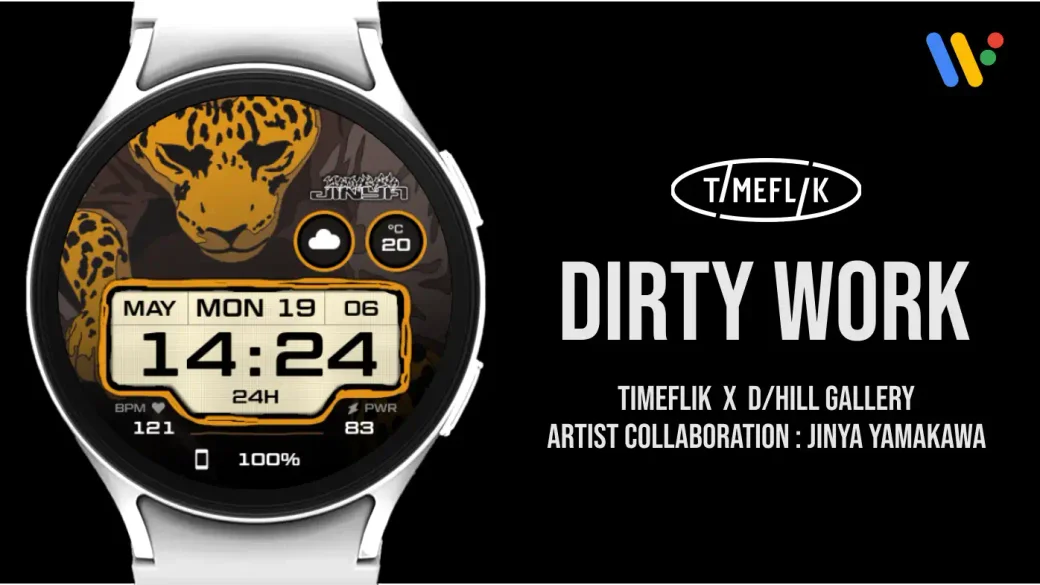
Jinya: Dirty Work
TIMEFLIK- USK ab 0 JahrenAltersfreigabe
- PersonalisierungKategorie
- 19.05.2025Aktualisiert
- 1,59 €Preis
Verlinkt auf den offiziellen Google Play-Eintrag von com.apposter.jinya_dirtywork. Zuletzt geprüft am 15.11.2026.

Screenshots


Über diese App
Automatische Übersetzung von Google. Originalsprache: Englisch (Vereinigte Staaten).
Dies ist ein exklusives Dirty Work-Zifferblatt, das von TIMEFLIK erstellt wurde
TIMEFLIK X D/HILL GALERIE
***Diese App ist eine Google Play App.
Sie kann nur auf Ihrer Smartwatch installiert und verwendet werden.
Die Kompatibilitätswarnung von Google Play weist darauf hin, dass es sich um eine reine Uhren-App handelt.
Die Nutzung ist problemlos, bitte seien Sie daher nicht verwirrt.
[Bedienung]
Ändern Sie nach dem Download das Zifferblatt, indem Sie den Bildschirm kurz berühren.
Bei Galaxy-Uhren können Sie es auch unter [Galaxy Wearable] > [Zifferblätter] ändern.
_______________________________
[Hauptfunktionen]
- Digitale Uhrzeit
- 12/24-Stunden-Format
- Tag des Monats
- Datum
- Batteriestatus
- Herzfrequenz
- 1 bearbeitbare Komplikation
- 4 voreingestellte Tastenkombinationen
- 10 Designfarben
- Always-On-Display
[Fehlerbehebung]
Bitte teilen Sie uns die folgenden Informationen an help@apposter.com mit.
Unser Entwicklungsteam wird versuchen, das Problem zu reproduzieren und zu beheben.
*Dieses Zifferblatt unterstützt Wear OS-Geräte.
_______________________________
**So stellen Sie den Akkustand Ihres Smartphones ein**
https://play.google.com/store/apps/details?id=com.weartools.phonebattcomp
1. Installieren Sie die App „Akkustand“ auf Ihrem Smartphone und Ihrer Uhr.
2. Wählen Sie unter „Komplikationen“ die Option „Akkustand Ihres Smartphones“ aus.
Originaltext anzeigen
TIMEFLIK X D/HILL GALLERY
***This app is a Goolle Play app.
It can be installed and operated in your smartwatch only.
The compatibility warning message from Google Play indicates that it is a watch-only app.
There is no problem with the use, so please don’t be confused.
[How to use]
After downloading, change the watch face by touching the screen for a while.
If your watch is a Galaxy watch, you can also change it from [Galaxy Wearable] > [Watch faces].
_______________________________
[Key Features]
- Digital Time
- 12/24H Format
- Day of Month
- Date
- Battery Status
- Heart Rate
- 1 Editable Complication
- 4 Preset Shortcut
- 10 Theme Colors
- Always On Display
[Troubleshooting]
Please let us know the information below to help@apposter.com.
Our development team will try to reproduce and solve it.
*This watch face supports wear OS devices.
_______________________________
**How to set a Phone Battery Level**
https://play.google.com/store/apps/details?id=com.weartools.phonebattcomp
1. Install the Phone Battery Level app on both the phone and the watch.
2. Select Phone Battery Level in Complications.
Datensicherheit
Was TIMEFLIK bei Google Play zu den Daten angibt, die diese App erfasst und weitergibt.
- Keine Daten werden mit Drittunternehmen oder -organisationen geteiltWeitere Informationen dazu, wie Entwickler Angaben zur Weitergabe von Daten machen
- Keine Daten erhobenWeitere Informationen dazu, wie Entwickler Angaben zur Datenerhebung machen
Kontakt zum Entwickler
- E-Mailhelp@apposter.com
- Datenschutzerklärungweb.timeflik.com
- Adresse대한민국 서울특별시 마포구 마포구 성암로 189, 7층 705호 (상암동,중소기업 DMC 타워) 03929
Informationen
- Angeboten von
- TIMEFLIK
- Kategorie
- Personalisierung
- Aktualisiert
- 19.05.2025
- Veröffentlicht
- 19.05.2025
- Altersfreigabe
- USK ab 0 Jahren
- Preis
- 1,59 €
- Paketname
- com.apposter.jinya_dirtywork