Offset O-24 - Digital Face
RECREATIVE Watch FacesEnthält Werbung
- USK ab 0 JahrenAltersfreigabe
- PersonalisierungKategorie
- 09.11.2026Aktualisiert
- 1,99 €Preis
Verlinkt auf den offiziellen Google Play-Eintrag von aaa.a.offset_digital_tactical_dashboard_orange_watchface. Zuletzt geprüft am 13.11.2026.
Über diese App
Automatische Übersetzung von Google. Originalsprache: Englisch (Vereinigtes Königreich).
Robustes, industrielles digitales Zifferblatt für Wear OS, orange auf dunklem Carbon
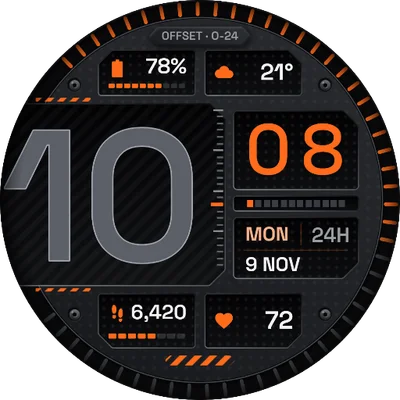
Offset O-24 ist ein robustes Zifferblatt im Industriestil mit einer übergroßen Stundenziffer, die über den linken Rand hinausragt. Daneben befindet sich eine markante orangefarbene Minutenanzeige. Das Ganze ist auf dunklen, carbonstrukturierten Flächen mit Warnstreifen und einer orangefarbenen Lünette mit Strichmuster angeordnet. Vier anpassbare Komplikationen rahmen das Zifferblatt ein, und über 65 Farben in 5 unabhängigen Designs ermöglichen es Ihnen, den Look ganz nach Ihrem Geschmack zu gestalten.
Powered by Watch Face Format
⚙️ Funktionen der Smartphone-App
Die Smartphone-App dient lediglich der Installation und dem Auffinden des Zifferblatts auf Ihrer Wear OS-Smartwatch. Nur die mobile App enthält Werbung.
⚙️ Zifferblattfunktionen
• 4 benutzerdefinierte Komplikationen
• Über 65 Farben in 5 unabhängigen Designs
• Stundenstil: 3 Optionen
• Schriftart der Uhr: 4 Optionen
• 3 Always-On-Modi
• 12 Always-On-Farben
• Nachtmodus (Rot/Gelb)
• 12-/24-Stunden-Anzeige, synchronisiert mit Ihren Geräteeinstellungen
• 3 Tipp-Schnellzugriffe: Wecker, Kalender
🎨 Anpassen
1. Display berühren und gedrückt halten
2. Auf Anpassen tippen
🎨 Komplikationen
Display berühren und gedrückt halten, um den Anpassungsmodus zu öffnen. Sie können das Feld mit beliebigen Daten anpassen.
🔋 Akku
Für eine bessere Akkulaufzeit empfehlen wir, den Always-On-Display-Modus zu deaktivieren.
✅ Kompatible Geräte: Google Pixel, Galaxy Watch 4, 5, 6, 7, 8, 9 und andere Wear OS-Modelle
Installation und Fehlerbehebung
Folgen Sie diesem Link: https://www.recreative-watch.com/help/#installation-methodes
Zifferblätter werden nach der Installation nicht automatisch auf dem Display Ihrer Uhr angezeigt. Sie müssen sie daher manuell auswählen.
💌 Schreiben Sie an support@recreative-watch.com, wenn Sie Hilfe benötigen.
Originaltext anzeigen
Offset O-24 is a rugged, industrial-style watch face with an oversized hour numeral that bleeds off the left edge. It sits beside a bold orange minute readout, all set on dark carbon-textured panels with hazard stripes and a ticked orange bezel. Four customisable complications frame the dial, and 65+ colours across 5 independent themes let you retune the look to your taste.
Powered by Watch Face Format
⚙️ Phone App Features
The phone app is simply a tool to facilitate installation and locating the watch face on your Wear OS watch. Only the mobile app contains ads.
⚙️ Watch Face Features
• 4 custom complications
• 65+ colours in 5 independent themes
• Hour style: 3 options
• Clock font: 4 options
• 3 always-on modes
• 12 always-on colours
• Night mode (red / amber)
• 12/24h synced with your device settings
• 3 tap shortcuts: Alarm, Calendar
🎨 Customization
1 - Touch and hold display
2 - Tap on Customize option
🎨 Complications
Touch and hold display to open customization mode. You can customize the field with any data you want.
🔋 Battery
For better battery performance of the watch, we recommend disabling the "Always On Display" mode.
✅ Compatible devices include Google Pixel, Galaxy Watch 4, 5, 6, 7, 8, 9 and other Wear OS models
Installation and troubleshooting
Follow this link: https://www.recreative-watch.com/help/#installation-methodes
Watch faces don't automatically apply on your watch screen after the installation. That's why you must set it on your watch's screen.
💌 Write to support@recreative-watch.com for assistance.
Datensicherheit
Was RECREATIVE Watch Faces bei Google Play zu den Daten angibt, die diese App erfasst und weitergibt.
- Keine Daten werden mit Drittunternehmen oder -organisationen geteiltWeitere Informationen dazu, wie Entwickler Angaben zur Weitergabe von Daten machen
- Diese App kann die folgenden Datentypen erhebenStandort, Personenbezogene Daten und 3 weitere
- Daten werden bei der Übertragung verschlüsselt
- Du kannst das Löschen der Daten beantragen
Kontakt zum Entwickler
- Websiterecreative-watch.com
- E-Mailsupport@recreative-watch.com
- Datenschutzerklärungrecreative-watch.com
- AdresseSTR. MIHAIL EMINESCU BL.18 SC.A AP.2 545100 Iernut Romania
Informationen
- Angeboten von
- RECREATIVE Watch Faces
- Kategorie
- Personalisierung
- Aktualisiert
- 09.11.2026
- Veröffentlicht
- 09.11.2026
- Altersfreigabe
- USK ab 0 Jahren
- Preis
- 1,99 €
- Paketname
- aaa.a.offset_digital_tactical_dashboard_orange_watchface