Offset O-24 - Digital Face
RECREATIVE Watch FacesContient des annonces
- PEGI 3Classification d’âge
- PersonnalisationCatégorie
- 09/11/2026Mis à jour
- 1,99 €Prix
Renvoie vers la fiche Google Play officielle de aaa.a.offset_digital_tactical_dashboard_orange_watchface. Dernière vérification le 13/11/2026.
À propos de cette application
Traduction automatique par Google. Langue d’origine : Anglais (Royaume-Uni).
Cadran de montre numérique industriel robuste pour Wear OS, orange sur fond carbone foncé
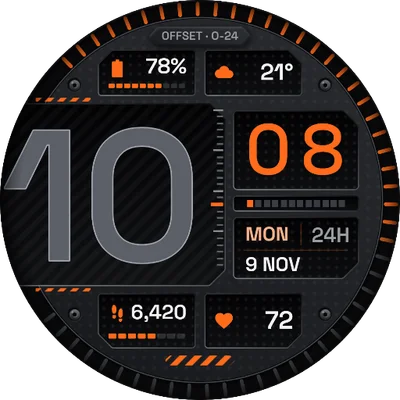
Offset O-24 est un cadran de montre robuste au style industriel, avec un chiffre des heures surdimensionné qui déborde sur le bord gauche. Il côtoie un affichage des minutes orange vif, le tout sur des panneaux foncés texturés carbone avec des bandes de signalisation et une lunette orange à motif. Quatre complications personnalisables encadrent le cadran, et plus de 65 couleurs réparties sur 5 thèmes indépendants vous permettent de le personnaliser à votre goût.
Powered by Watch Face Format
⚙️ Phone App Features
L'application mobile est un outil simple permettant d'installer et de localiser le cadran sur votre montre Wear OS. Seule l'application mobile contient des publicités.
⚙️ Fonctionnalités du cadran
• 4 complications personnalisées
• Plus de 65 couleurs réparties en 5 thèmes indépendants
• Style de l'heure : 3 options
• Police de l'horloge : 4 options
• 3 modes d'affichage permanent
• 12 couleurs d'affichage permanent
• Mode nuit (rouge/ambre)
• Synchronisation 12/24 h avec les paramètres de votre appareil
• 3 raccourcis : Alarme, Calendrier
🎨 Personnalisation
1 - Appuyez longuement sur l'écran
2 - Appuyez sur Personnaliser
🎨 Complications
Appuyez longuement sur l'écran pour ouvrir le mode de personnalisation. Vous pouvez personnaliser le champ avec les données de votre choix.
🔋 Batterie
Pour une meilleure autonomie de la batterie de votre montre, nous vous recommandons de désactiver le mode « Always On Display ».
✅ Appareils compatibles : Google Pixel, Galaxy Watch 4, 5, 6, 7, 8, 9 et autres modèles Wear OS
Installation et dépannage
Suivez ce lien : https://www.recreative-watch.com/help/#installation-methodes
Les cadrans ne s’appliquent pas automatiquement à l’écran de votre montre après l’installation. Vous devez donc les configurer manuellement.
💌 Contactez-nous à l’adresse support@recreative-watch.com pour obtenir de l’aide.
Afficher le texte d’origine
Offset O-24 is a rugged, industrial-style watch face with an oversized hour numeral that bleeds off the left edge. It sits beside a bold orange minute readout, all set on dark carbon-textured panels with hazard stripes and a ticked orange bezel. Four customisable complications frame the dial, and 65+ colours across 5 independent themes let you retune the look to your taste.
Powered by Watch Face Format
⚙️ Phone App Features
The phone app is simply a tool to facilitate installation and locating the watch face on your Wear OS watch. Only the mobile app contains ads.
⚙️ Watch Face Features
• 4 custom complications
• 65+ colours in 5 independent themes
• Hour style: 3 options
• Clock font: 4 options
• 3 always-on modes
• 12 always-on colours
• Night mode (red / amber)
• 12/24h synced with your device settings
• 3 tap shortcuts: Alarm, Calendar
🎨 Customization
1 - Touch and hold display
2 - Tap on Customize option
🎨 Complications
Touch and hold display to open customization mode. You can customize the field with any data you want.
🔋 Battery
For better battery performance of the watch, we recommend disabling the "Always On Display" mode.
✅ Compatible devices include Google Pixel, Galaxy Watch 4, 5, 6, 7, 8, 9 and other Wear OS models
Installation and troubleshooting
Follow this link: https://www.recreative-watch.com/help/#installation-methodes
Watch faces don't automatically apply on your watch screen after the installation. That's why you must set it on your watch's screen.
💌 Write to support@recreative-watch.com for assistance.
Sécurité des données
Ce que RECREATIVE Watch Faces déclare sur Google Play au sujet des données que cette application collecte et partage.
- Aucune donnée partagée avec des tiersEn savoir plus sur la manière dont les développeurs déclarent le partage
- Cette appli peut recueillir ces types de donnéesPosition, Informations personnelles et 3 autres
- Les données sont chiffrées lors de leur transfert
- Vous pouvez demander la suppression des données
Coordonnées du développeur
- Site webrecreative-watch.com
- E-mailsupport@recreative-watch.com
- Politique de confidentialitérecreative-watch.com
- AdresseSTR. MIHAIL EMINESCU BL.18 SC.A AP.2 545100 Iernut Romania
Informations
- Proposée par
- RECREATIVE Watch Faces
- Catégorie
- Personnalisation
- Mis à jour
- 09/11/2026
- Publié
- 09/11/2026
- Classification d’âge
- PEGI 3
- Prix
- 1,99 €
- Nom du package
- aaa.a.offset_digital_tactical_dashboard_orange_watchface