Offset O-24 - Digital Face
RECREATIVE Watch Faces広告を含む
- 3 歳以上対象年齢
- カスタマイズカテゴリ
- 2026/11/9更新日
- ¥330価格
aaa.a.offset_digital_tactical_dashboard_orange_watchfaceのGoogle Play公式ページにリンクしています。最終確認:2026/11/13。
このアプリについて
Googleによる英語 (イギリス)からの自動翻訳です。
Wear OS対応の頑丈な工業用デジタルウォッチフェイス、ダークカーボン地にオレンジ
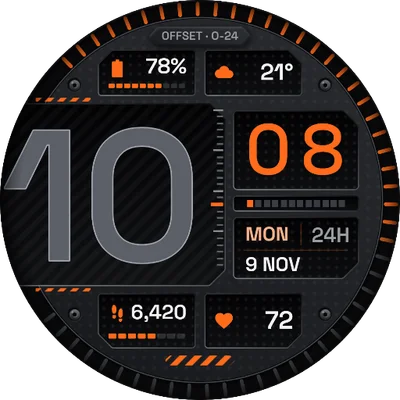
Offset O-24は、左端まで伸びる特大の時針が特徴的な、堅牢でインダストリアルなデザインの文字盤です。鮮やかなオレンジ色の分針が隣り合い、ダークカーボン調のパネルに危険表示ストライプとオレンジ色のベゼルが配されています。文字盤を囲むように4つのカスタマイズ可能なコンプリケーションが配置され、5つのテーマから65色以上のカラーバリエーションで好みに合わせてカスタマイズできます。
Powered by Watch Face Format
⚙️ スマートフォンアプリの機能
スマートフォンアプリは、Wear OSウォッチへの文字盤のインストールと位置特定を容易にするためのツールです。広告が表示されるのはモバイルアプリのみです。
⚙️ ウォッチフェイスの機能
• 4つのカスタムコンプリケーション
• 5つの独立したテーマで65色以上のカラー
• 時刻表示スタイル:3種類
• 時計のフォント:4種類
• 3つの常時表示モード
• 12色の常時表示カラー
• ナイトモード(赤/オレンジ)
• デバイス設定と同期した12時間表示/24時間表示
• 3つのタップショートカット:アラーム、カレンダー
🎨 カスタマイズ
1 - ディスプレイを長押し
2 - カスタマイズオプションをタップ
🎨 コンプリケーション
ディスプレイを長押ししてカスタマイズモードを開きます。各フィールドに任意のデータを追加できます。
🔋 バッテリー
時計のバッテリー性能を向上させるため、「常時表示」モードを無効にすることをお勧めします。
✅ 対応デバイス:Google Pixel、Galaxy Watch 4、5、6、7、8、9、その他Wear OS搭載モデル
インストールとトラブルシューティング
こちらのリンクをご覧ください:https://www.recreative-watch.com/help/#installation-methodes
ウォッチフェイスはインストール後、自動的に時計画面に反映されません。そのため、時計画面上で設定する必要があります。
💌 サポートが必要な場合は、support@recreative-watch.comまでお問い合わせください。
原文を表示
Offset O-24 is a rugged, industrial-style watch face with an oversized hour numeral that bleeds off the left edge. It sits beside a bold orange minute readout, all set on dark carbon-textured panels with hazard stripes and a ticked orange bezel. Four customisable complications frame the dial, and 65+ colours across 5 independent themes let you retune the look to your taste.
Powered by Watch Face Format
⚙️ Phone App Features
The phone app is simply a tool to facilitate installation and locating the watch face on your Wear OS watch. Only the mobile app contains ads.
⚙️ Watch Face Features
• 4 custom complications
• 65+ colours in 5 independent themes
• Hour style: 3 options
• Clock font: 4 options
• 3 always-on modes
• 12 always-on colours
• Night mode (red / amber)
• 12/24h synced with your device settings
• 3 tap shortcuts: Alarm, Calendar
🎨 Customization
1 - Touch and hold display
2 - Tap on Customize option
🎨 Complications
Touch and hold display to open customization mode. You can customize the field with any data you want.
🔋 Battery
For better battery performance of the watch, we recommend disabling the "Always On Display" mode.
✅ Compatible devices include Google Pixel, Galaxy Watch 4, 5, 6, 7, 8, 9 and other Wear OS models
Installation and troubleshooting
Follow this link: https://www.recreative-watch.com/help/#installation-methodes
Watch faces don't automatically apply on your watch screen after the installation. That's why you must set it on your watch's screen.
💌 Write to support@recreative-watch.com for assistance.
データ セーフティ
このアプリが収集・共有するデータについて、RECREATIVE Watch FacesがGoogle Playで申告している内容です。
- 第三者と共有されるデータはありません詳しくは、デベロッパーが共有を申告する方法についての説明をご覧ください
- このアプリは以下の種類のデータを収集することがあります位置情報、個人情報、他 3 件
- データは送信中に暗号化されます
- データを削除するようリクエストできます
開発元の連絡先
- ウェブサイトrecreative-watch.com
- メールsupport@recreative-watch.com
- プライバシーポリシーrecreative-watch.com
- 住所STR. MIHAIL EMINESCU BL.18 SC.A AP.2 545100 Iernut Romania
情報
- 提供元
- RECREATIVE Watch Faces
- カテゴリ
- カスタマイズ
- 更新日
- 2026/11/9
- リリース
- 2026/11/9
- 対象年齢
- 3 歳以上
- 価格
- ¥330
- パッケージ名
- aaa.a.offset_digital_tactical_dashboard_orange_watchface